🎈Winter Savings Special Sale 🎁
00
DAYS
00
HRS
00
MINS
00
SECS



Build Powerful Workflows Just by Speaking
Imagine building a complete automation without typing a single word.
No clicking through triggers.
No searching for actions.
No manual configuration.
Just speak your idea out loud — and watch your workflow appear.
That’s exactly what Voice Dictation in AI Builder and AI Assistant allows you to do. This new feature transforms the way workflows are created by turning natural speech into structured automation in seconds.
Whether you are an agency owner, marketer, or automation specialist, voice-to-workflow creation removes friction between idea and execution.
Let’s break down exactly how it works and how to use it effectively.
Voice Dictation allows users to create workflows inside the Workflow Builder using spoken instructions instead of typing.
When you click the microphone icon inside the AI Builder prompt box, the system listens to your voice, transcribes your speech, and generates a structured workflow based on your instructions.
This includes:
Instead of building step by step manually, you describe what you want — and the system builds it for you.
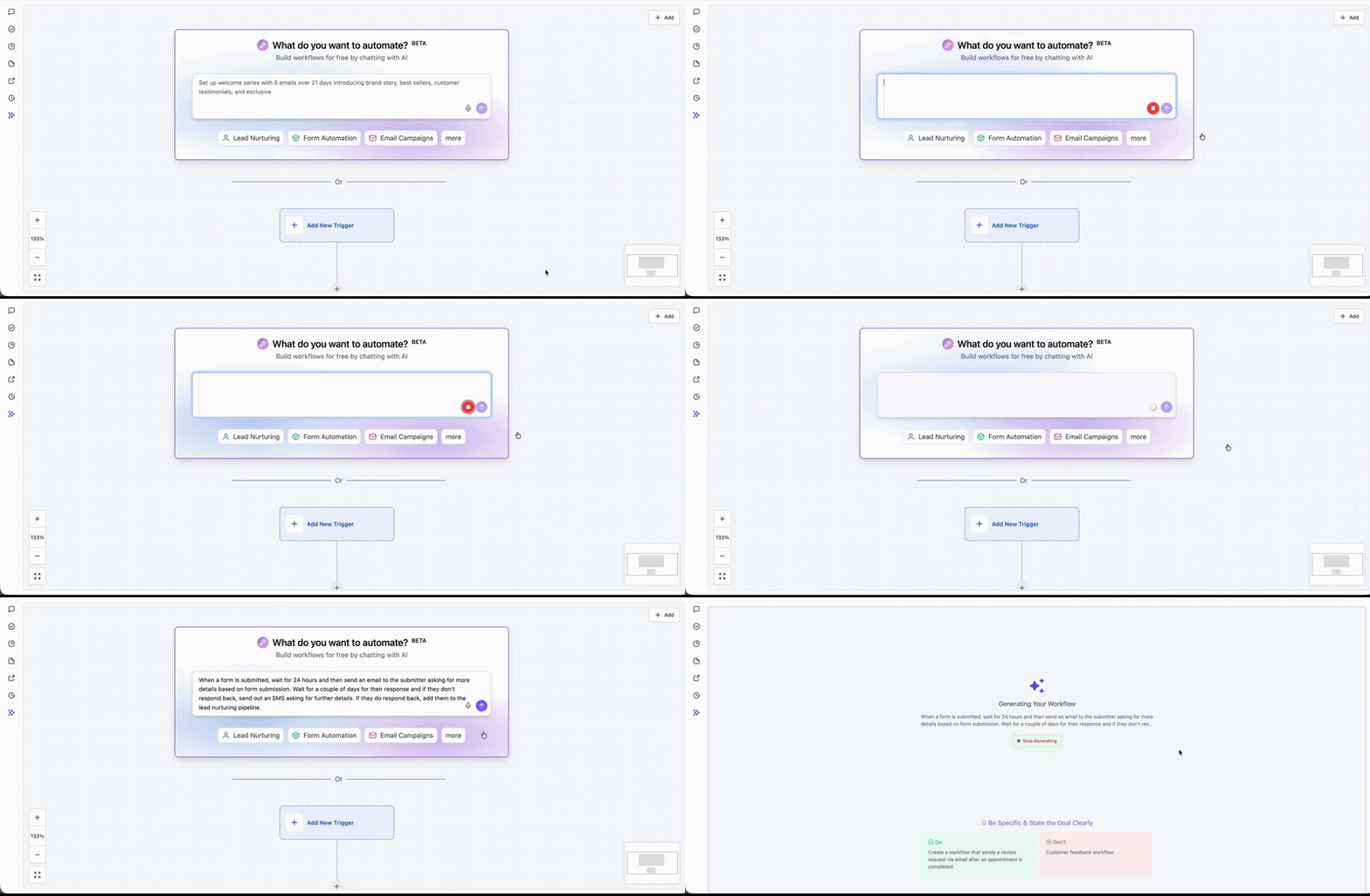
Workflow automation is powerful, but building workflows traditionally takes time. You must:
For experienced users, this may take 5 to 15 minutes per workflow. For beginners, much longer.
Voice dictation compresses that time significantly.
You go from idea to implementation in seconds.
It also lowers the technical barrier for team members who may not be comfortable navigating complex automation menus.
One of the most practical advantages of this feature is multi-language support.
You are not restricted to English.
You can dictate your workflow in your preferred language, and AI Builder will transcribe and interpret it accordingly.
This makes automation more accessible for:
Voice recognition works across supported languages, helping you operate naturally without language limitations.
Using the feature is simple and intuitive.
Navigate to Automations and open Workflows.
Create a new workflow or open an existing one.
Inside the Workflow Builder, you will see the AI Builder prompt box.
Inside the AI prompt box, click the microphone icon.
If prompted, allow browser access to your microphone.
Describe your automation naturally.
You do not need technical terminology. Speak as if explaining to a teammate.
For example:
“When a new lead fills out my website form, send them a welcome SMS immediately, wait two days, then send a follow-up email and notify the assigned user.”
Keep your instructions structured and clear.
Once you finish speaking:
Triggers, delays, and actions are automatically placed in logical order.
Before publishing:
Once everything looks good, publish your workflow.
Voice dictation is not limited to workflow creation.
It also works inside AI Assistant.
You can speak to:
Instead of typing long queries, you can speak naturally and receive instant AI assistance.
This creates a smoother and more conversational workflow-building experience.
Voice Dictation in AI Builder and Assistant does not require separate pricing.
It operates within the existing AI Builder functionality.
There are no additional per-use voice charges for basic usage.
If your account uses AI-powered features tied to usage limits, standard AI usage rules may apply, but voice dictation itself does not introduce separate fees.
Always review your account’s AI usage plan if you operate at scale.
To get the most accurate results:
Instead of saying:
“Send reminders.”
Say:
“Send SMS reminder 24 hours before the appointment.”
Specific instructions produce more accurate automation.
No. You can speak naturally. Technical terms are not required.
Voice Dictation in AI Builder and AI Assistant removes one of the biggest barriers to automation — complexity.
Instead of navigating menus and manually assembling workflows, you simply describe what you want.
Speak your idea.
Watch it build.
Refine and launch.
For agencies and automation-heavy businesses, this feature saves time, increases efficiency, and makes workflow creation more intuitive than ever.
If you have not tried voice-to-workflow creation yet, open your Workflow Builder, click the microphone icon, and test a simple automation.

If you’ve ever struggled with A2P 10DLC registration, you know how confusing and rejection-prone the process can be. One small
Build Powerful Workflows Just by Speaking Imagine building a complete automation without typing a single word. No clicking through triggers.

Design smarter. Move faster. Stop switching tabs. If you’ve ever designed something in Canva, downloaded it, uploaded it into your

The Smart Way to Re-Engage Leads Without Manual Work Leads don’t always ghost you on purpose. Sometimes they get busy.

AI automation is evolving fast. If you’ve ever wished you could fully control AI tasks inside your CRM without relying

Build Powerful Workflows Just by Speaking Imagine creating an entire workflow without touching your keyboard. No typing. No complicated setup.

Pick a design that fits your brand.

Integrate it seamlessly.

Tailor it to your business needs.

Start generating leads and sales.
No account yet?
Create an AccountWe use cookies to improve your experience on our site. By using our site, you consent to cookies.
Websites store cookies to enhance functionality and personalise your experience. You can manage your preferences, but blocking some cookies may impact site performance and services.
Essential cookies enable basic functions and are necessary for the proper function of the website.
These cookies are needed for adding comments on this website.
Google reCAPTCHA helps protect websites from spam and abuse by verifying user interactions through challenges.
These cookies are used for managing login functionality on this website.
Stripe is a payment processing platform that enables businesses to accept online payments securely and efficiently.
Service URL: stripe.com (opens in a new window)
Statistics cookies collect information anonymously. This information helps us understand how visitors use our website.
Google Analytics is a powerful tool that tracks and analyzes website traffic for informed marketing decisions.
Service URL: policies.google.com (opens in a new window)
Clarity is a web analytics service that tracks and reports website traffic.
Service URL: clarity.microsoft.com (opens in a new window)
SourceBuster is used by WooCommerce for order attribution based on user source.
You can find more information in our Privacy Policy and .



