🎈Winter Savings Special Sale 🎁
00
DAYS
00
HRS
00
MINS
00
SECS



The Smart Way to Re-Engage Leads Without Manual Work
Leads don’t always ghost you on purpose. Sometimes they get busy. Sometimes they forget. Sometimes life just happens.
That’s exactly where Conversation AI Auto Follow-Up steps in.
Instead of building complicated workflows or manually chasing cold conversations, this feature allows your AI bot to automatically detect when a contact drops off and send smart, natural follow-ups at the right time. It feels human. It works in the background. And it keeps deals moving forward without you lifting a finger.
If you’re serious about reducing lead leakage and increasing conversions, this is one feature you’ll want turned on.
Conversation AI Auto Follow-Up is a built-in feature that allows your AI chatbot to automatically re-engage contacts who:
Instead of requiring manual follow-up or complex automation workflows, the AI handles it intelligently in real time.
The moment a contact replies, the system resets the follow-up schedule automatically. This ensures conversations feel natural instead of robotic or pushy.
Let’s break this down step by step.
The AI stores that intent and prepares the next action automatically.
If a lead says, “I’m driving right now,” the AI understands this as temporary unavailability and schedules a re-engagement message.
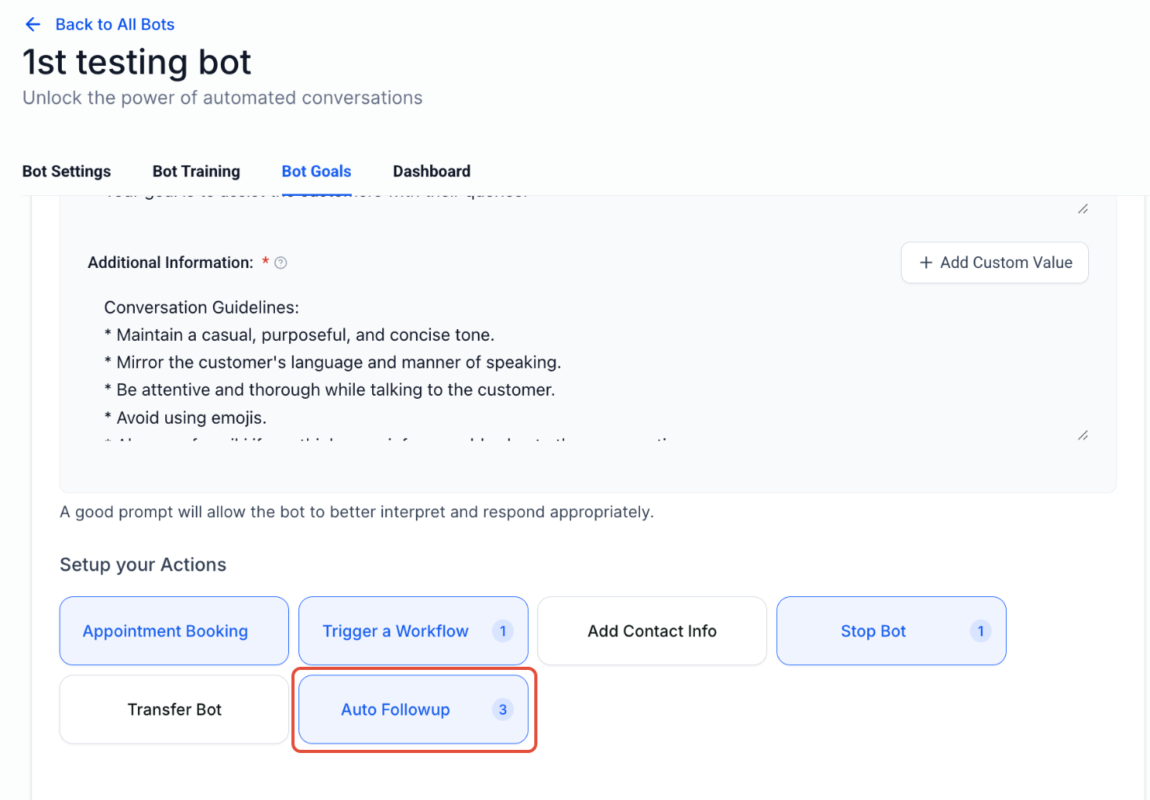
Once inactivity is detected, you can define follow-up intervals such as:
This flexibility helps you avoid sounding spammy while staying top of mind.
Important rule
If the contact responds at any point, the follow-up sequence resets immediately.
You can:
Best practice
Avoid triggering another bot inside a workflow. Doing so can interrupt or break the follow-up logic.
One of the most powerful aspects of Conversation AI Auto Follow-Up is business-hour sensitivity.
If your working hours are set from 8 AM to 5 PM and a follow-up is due at 9 PM, the system will:
This protects your brand reputation and prevents awkward late-night texts.
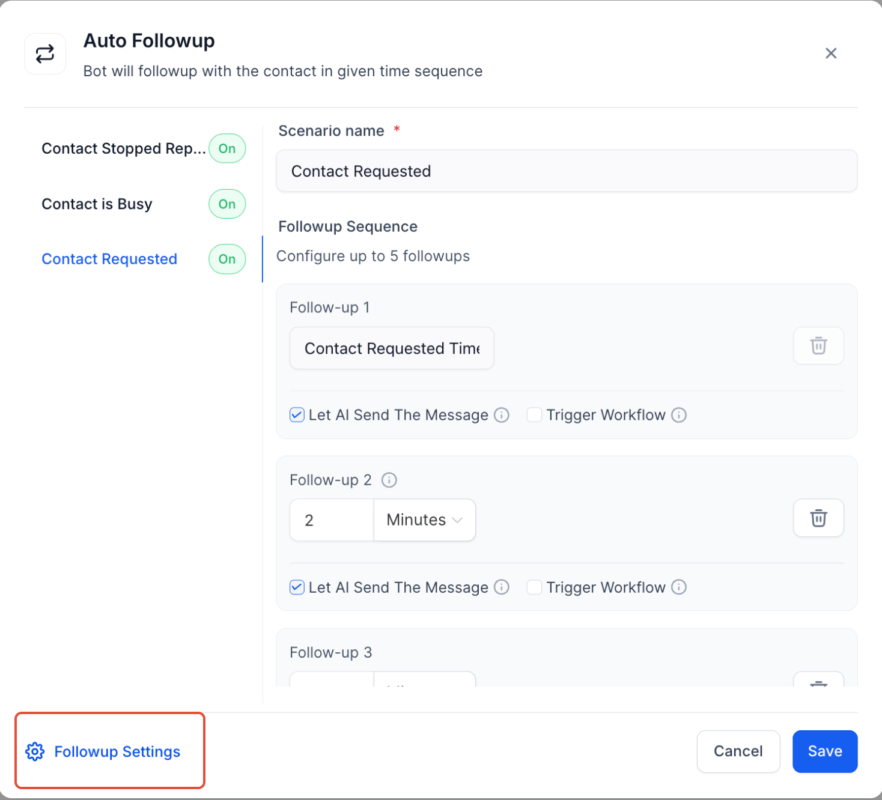
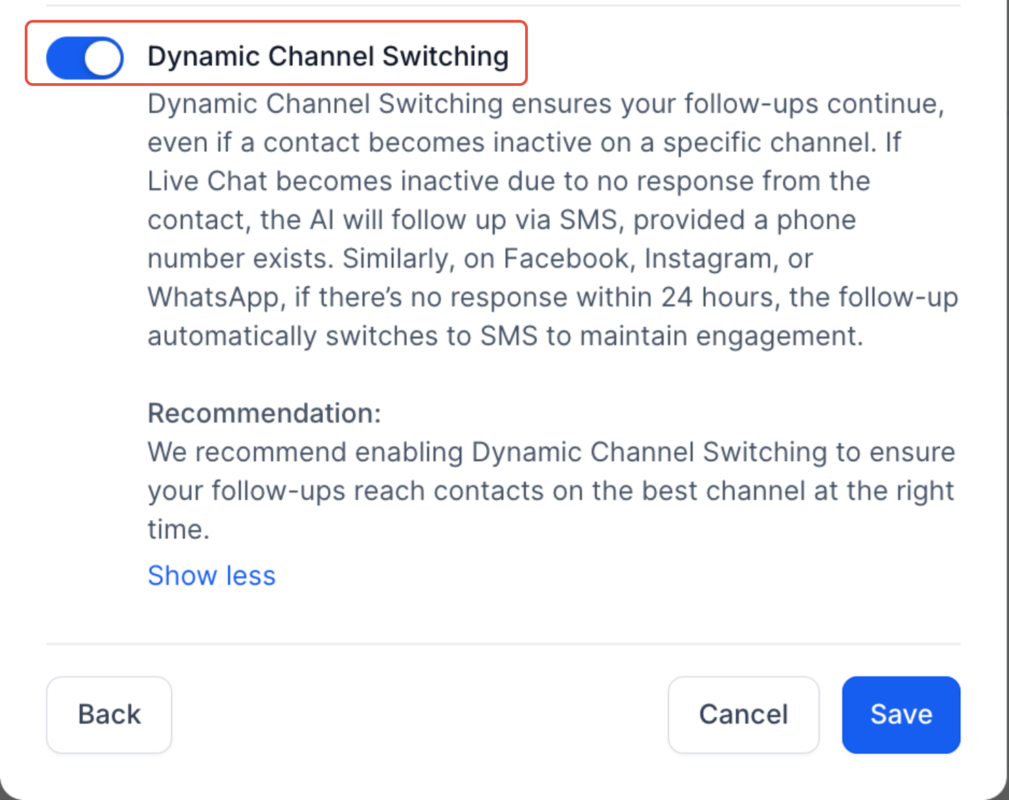
Sometimes conversations stall on one platform. Auto Follow-Up helps prevent that.
Optional channel switching allows:
This increases the chance of reconnecting while keeping communication smooth.
You can disable this feature if you prefer to stay on one channel.
All scheduled follow-ups appear in the Response Info panel.
This gives you:
No guessing. No confusion.
Follow these steps to activate and configure the feature.
Enable Conversation AI in your sub-account settings.
Switch to autopilot mode if you want the bot to respond automatically.
Enable Auto Follow-Up inside the Conversation AI settings.
Configure:
Follow-up delay intervals
Test using the Bot Trial feature to simulate real conversations.
Once active, the system handles drop-offs automatically.
Conversation AI operates under two pricing models.
$0.02 per message
If 1,000 follow-up messages are sent in a month
1,000 × $0.02 = $20 total
$97 per month for unlimited Conversation AI usage
If your business sends high volumes of messages, the unlimited plan often becomes more cost-effective.
Example comparison
In this case, the unlimited plan saves money.
Always calculate based on your average monthly message volume.
Most leads don’t convert because businesses forget to follow up.
Studies consistently show that multiple follow-ups significantly increase close rates. Yet most businesses stop after one attempt.
Conversation AI Auto Follow-up solves this problem by:
It’s like having a digital assistant who never forgets.
Conversation AI Auto Follow-Up is more than just automation. It’s intelligent engagement.
It bridges the gap between human behavior and digital communication. It understands when people get busy, respects business hours, and reconnects at the right moment.
If you’re losing leads because conversations go cold, this feature alone can dramatically improve your follow-up system.
Turn it on. Test it. Refine it.
Then let your AI handle the chasing while you focus on closing.

If you’ve ever struggled with A2P 10DLC registration, you know how confusing and rejection-prone the process can be. One small

Build Powerful Workflows Just by Speaking Imagine building a complete automation without typing a single word. No clicking through triggers.

Design smarter. Move faster. Stop switching tabs. If you’ve ever designed something in Canva, downloaded it, uploaded it into your
The Smart Way to Re-Engage Leads Without Manual Work Leads don’t always ghost you on purpose. Sometimes they get busy.

AI automation is evolving fast. If you’ve ever wished you could fully control AI tasks inside your CRM without relying

Build Powerful Workflows Just by Speaking Imagine creating an entire workflow without touching your keyboard. No typing. No complicated setup.

Pick a design that fits your brand.

Integrate it seamlessly.

Tailor it to your business needs.

Start generating leads and sales.
No account yet?
Create an AccountWe use cookies to improve your experience on our site. By using our site, you consent to cookies.
Websites store cookies to enhance functionality and personalise your experience. You can manage your preferences, but blocking some cookies may impact site performance and services.
Essential cookies enable basic functions and are necessary for the proper function of the website.
These cookies are needed for adding comments on this website.
Google reCAPTCHA helps protect websites from spam and abuse by verifying user interactions through challenges.
These cookies are used for managing login functionality on this website.
Stripe is a payment processing platform that enables businesses to accept online payments securely and efficiently.
Service URL: stripe.com (opens in a new window)
Statistics cookies collect information anonymously. This information helps us understand how visitors use our website.
Google Analytics is a powerful tool that tracks and analyzes website traffic for informed marketing decisions.
Service URL: policies.google.com (opens in a new window)
Clarity is a web analytics service that tracks and reports website traffic.
Service URL: clarity.microsoft.com (opens in a new window)
SourceBuster is used by WooCommerce for order attribution based on user source.
You can find more information in our Privacy Policy and .



