🎈Winter Savings Special Sale 🎁
00
DAYS
00
HRS
00
MINS
00
SECS


GoHighLevel’s calendar feature is a robust tool for managing appointments, streamlining client scheduling, and automating booking processes. Designed for businesses of all sizes, it helps you stay organized while providing a seamless experience for your clients. Here’s everything you need to know about GoHighLevel’s calendar functionality.
The GoHighLevel calendar is a built-in scheduling tool that lets you book and manage appointments directly within the platform. It’s designed for businesses and agencies to streamline client bookings, automate confirmations and reminders, and integrate seamlessly with funnels, workflows, and CRM.

Create personalized booking links for clients.
Add your branding, colors, and logos.
Set booking rules, availability, and buffer times.
Define multiple appointment types, such as consultations, follow-ups, or team meetings.
Set different durations and time slots for each type.
Send SMS and email reminders to reduce no-shows.
Customize reminder messages and schedule them to go out automatically.
Allow clients to book with specific team members.
Assign appointments based on availability or skills.
Sync with Google Calendar or Outlook to avoid double bookings.
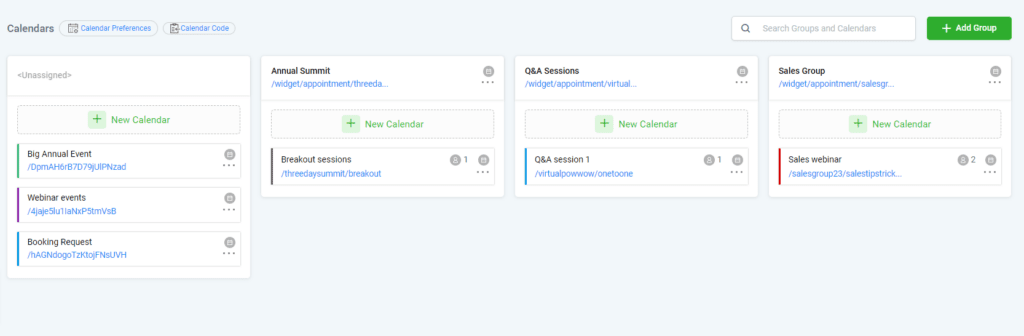
View and manage all appointments in one centralized dashboard.
Trigger automations based on bookings (e.g., send follow-up emails or post-appointment surveys).
Automatically add contacts to CRM pipelines.
Eliminate back-and-forth communication with automated scheduling.
Clients can book appointments at their convenience.
Centralized calendar management simplifies scheduling for teams.
Reduce missed appointments with automated reminders.
Professional booking pages create a seamless process for clients.
Automatic notifications keep clients informed and prepared.
Use appointment data to track client engagement and improve services.
Integrate bookings into marketing workflows to drive repeat business.

Go to Settings in your GoHighLevel dashboard.
Click on Calendars and select Create New Calendar.
Set your working hours and block out unavailable times.
Add buffer times between appointments if needed.
Add your branding, logos, and custom messages.
Configure booking fields to collect client information during scheduling.
Connect your Google Calendar or Outlook account for seamless syncing.
Enable two-way sync to update both platforms automatically.
Set up SMS and email reminders under the Automations tab.
Personalize messages with dynamic fields like {{contact.name}}.
Schedule strategy calls with clients.
Use reminders to reduce missed meetings.
Manage consultations or appointments with ease.
Provide clients with easy booking links.
Allow clients to choose team members based on expertise.
Automatically assign leads to team pipelines after booking.
Yes, GoHighLevel supports group bookings, allowing multiple attendees for a single event.
Yes, GoHighLevel automatically sends SMS and email reminders to reduce no-shows.
Yes, the calendar integrates with Google Calendar and Outlook for seamless scheduling.
Absolutely! You can add your branding, adjust fields, and set booking rules to suit your needs.
Yes, you can trigger workflows, reminders, and post-appointment actions based on bookings.
GoHighLevel’s calendar is a powerful tool for managing appointments and streamlining your scheduling process. Its integration with automations, reminders, and workflows makes it a valuable asset for agencies, businesses, and teams looking to enhance productivity and client experience. Whether you’re scheduling one-on-one consultations or managing a team’s availability, GoHighLevel’s calendar simplifies the entire process.

If you’ve ever struggled with A2P 10DLC registration, you know how confusing and rejection-prone the process can be. One small

Build Powerful Workflows Just by Speaking Imagine building a complete automation without typing a single word. No clicking through triggers.

Design smarter. Move faster. Stop switching tabs. If you’ve ever designed something in Canva, downloaded it, uploaded it into your

The Smart Way to Re-Engage Leads Without Manual Work Leads don’t always ghost you on purpose. Sometimes they get busy.

AI automation is evolving fast. If you’ve ever wished you could fully control AI tasks inside your CRM without relying

Build Powerful Workflows Just by Speaking Imagine creating an entire workflow without touching your keyboard. No typing. No complicated setup.

Pick a design that fits your brand.

Integrate it seamlessly.

Tailor it to your business needs.

Start generating leads and sales.
No account yet?
Create an AccountWe use cookies to improve your experience on our site. By using our site, you consent to cookies.
Websites store cookies to enhance functionality and personalise your experience. You can manage your preferences, but blocking some cookies may impact site performance and services.
Essential cookies enable basic functions and are necessary for the proper function of the website.
These cookies are needed for adding comments on this website.
Google reCAPTCHA helps protect websites from spam and abuse by verifying user interactions through challenges.
These cookies are used for managing login functionality on this website.
Stripe is a payment processing platform that enables businesses to accept online payments securely and efficiently.
Service URL: stripe.com (opens in a new window)
Statistics cookies collect information anonymously. This information helps us understand how visitors use our website.
Google Analytics is a powerful tool that tracks and analyzes website traffic for informed marketing decisions.
Service URL: policies.google.com (opens in a new window)
Clarity is a web analytics service that tracks and reports website traffic.
Service URL: clarity.microsoft.com (opens in a new window)
SourceBuster is used by WooCommerce for order attribution based on user source.
You can find more information in our Privacy Policy and .



