🎈Winter Savings Special Sale 🎁
00
DAYS
00
HRS
00
MINS
00
SECS


SaaS stands for Software as a Service. It is a software distribution model in which applications are hosted by a third-party provider and made available to customers over the internet. Instead of purchasing and installing software on individual computers or servers, users can access the software via a web browser.
GoHighLevel (often abbreviated as HighLevel) is a comprehensive SaaS platform designed primarily for digital marketing agencies, consultants, and businesses looking to manage client relationships, marketing campaigns, and communications in one place.
HighLevel SaaS mode is a powerful tool that lets agencies use the platform and rebrand it as their own. This feature allows agencies to create a customized version of the HighLevel software for their clients, while still taking advantage of all the great features and functions of the original HighLevel platform.
With HighLevel’s SaaS mode, agencies can fully white-label the software, meaning they can change the branding so that it looks like their own product, with no signs of HighLevel’s name or logo. This makes it easier for agencies to offer a smooth, integrated experience to their clients.
Setting up HighLevel’s SaaS mode is also simple, convenient, and affordable, making it a great choice for agencies that want to grow their services and earn more recurring income.
Setting up GoHighLevel’s SaaS mode allows you to offer a fully branded version of the platform to your clients, enabling you to create a customized SaaS solution under your brand. Here’s how to set it up .
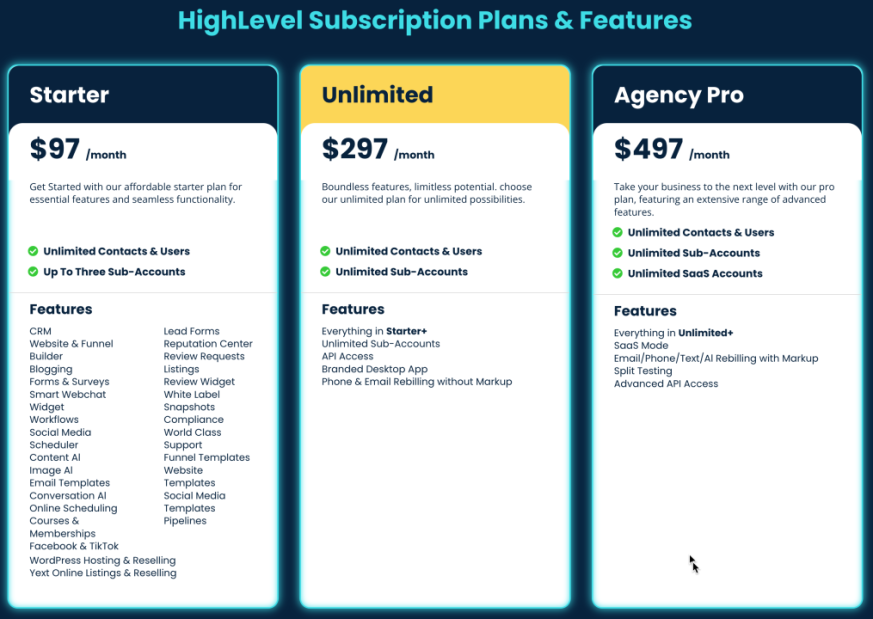
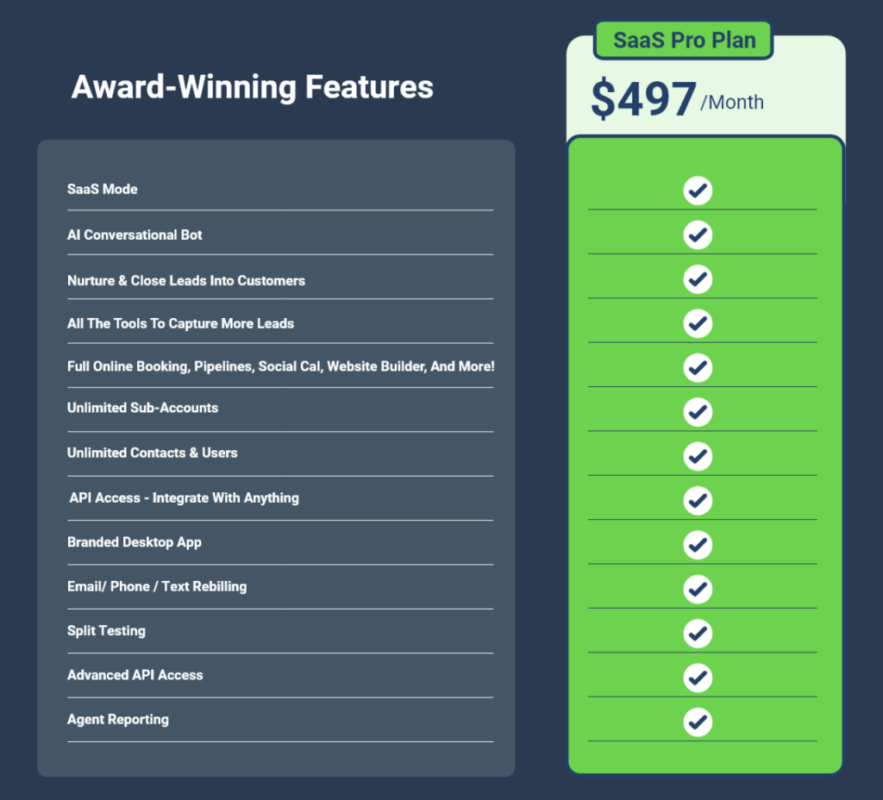
SaaS mode is available in the Agency Pro plan, which includes white-labeling and SaaS features.
Sign Up: If you don’t already have the Agency Pro plan, upgrade your account via the GoHighLevel website.
Login: Log in to your GoHighLevel account.
Navigate to SaaS Mode: From the dashboard, click on the “Settings” icon in the lower left corner. Then, select “SaaS Config” from the options.
White Label Settings
Pricing Tiers
In the SaaS Config settings, go to the “SaaS Plans” tab. Create different pricing tiers based on the features you want to offer at each level. For example, you might have Basic, Pro, and Premium plans with varying levels of access to features like CRM, automation, and funnel building.
Set Pricing
Decide on the pricing for each tier. This will be the amount your clients pay to access your SaaS platform.
Payment Integration
Go to the “Payments” section under SaaS Config.
Integrate a payment gateway such as Stripe or PayPal to handle billing. This allows you to automatically charge clients based on the pricing tiers you set up.
Email Configuration
Under “Settings,” go to “Mailgun” or another email service provider to set up your email services. This ensures your clients can send marketing emails through the platform.
SMS Configuration
Under “Settings,” set up your SMS service provider like Twilio. This enables SMS marketing and communication features for your clients.
Email and Funnel Templates
In the “Marketing” or “Funnels” sections, create or import templates that your clients can use.
Save these templates so that they’re available for clients based on the pricing tier they’re subscribed to.
Client Accounts:
Navigate to the “Sub-Accounts” section.
Create accounts for your clients, assigning them to the appropriate pricing tier. Each client will have their own dashboard under your branded platform.
Permissions: Set permissions for each sub-account, controlling what features and tools your clients can access based on their plan.
Testing
Before launching, create a test sub-account to ensure everything is functioning as expected. Test the login process, branding, payment processing, and access to features.
Launch
Once testing is complete, you can start onboarding real clients. Promote your new SaaS platform to your target audience, offering free trials or demos to attract initial users.
Client Support
Offer ongoing support to your clients through live chat, email, or a help center. Regularly check in to ensure they’re satisfied and address any issues they may encounter.
Platform Updates
Keep your platform updated with new features and improvements. GoHighLevel regularly updates its platform, so make sure these are integrated into your SaaS offering.
What is GoHighLevel SaaS?
GoHighLevel SaaS is a white-label platform that allows agencies to resell GoHighLevel’s powerful marketing and CRM tools under their own brand. Agencies can offer features like lead generation, email and SMS marketing, sales automation, and more as part of their service packages.
How do agencies benefit from the GoHighLevel SaaS plan?
Agencies benefit from the GoHighLevel SaaS plan by creating a new revenue stream through software sales. They can offer their clients a branded platform with robust marketing and CRM features, enhancing client retention and satisfaction while generating recurring income.
What features are included in the GoHighLevel SaaS plan?
The GoHighLevel SaaS plan includes a range of features such as CRM, sales funnels, landing pages, email and SMS marketing, appointment scheduling, pipeline management, automation, and reputation management. These tools are designed to help businesses streamline their marketing and sales processes.
Can I customize GoHighLevel when using the SaaS plan?
Yes, with the SaaS plan, agencies can fully customize the platform to reflect their brand. This includes using their own logo, color scheme, and domain name, allowing them to present the software as a proprietary solution to their clients.
How does pricing work for the GoHighLevel SaaS plan?
Agencies pay a flat monthly fee to use the GoHighLevel SaaS plan and have the freedom to set their own pricing for their clients. This means agencies can create their own pricing tiers, offering different levels of service and maximizing their profit margins.
What kind of support does GoHighLevel provide for SaaS users?
GoHighLevel offers comprehensive support to SaaS users, including onboarding assistance, training resources, and access to a community of users. Agencies also receive customer support to help resolve any issues they or their clients might face.
Can I integrate GoHighLevel SaaS with other tools and platforms?
Yes, GoHighLevel supports integrations with a variety of third-party tools and platforms through APIs and services like Zapier. This allows agencies to extend the functionality of the platform and connect it with other systems their clients may be using.
Who is the GoHighLevel SaaS plan best suited for?
The GoHighLevel SaaS plan is ideal for digital marketing agencies, consultants, and entrepreneurs who want to offer marketing automation and CRM services to their clients without having to develop their own software. It’s also suitable for agencies looking to add value to their existing services.
How does GoHighLevel SaaS help with client retention?
By providing a comprehensive, all-in-one platform that meets various marketing and sales needs, GoHighLevel SaaS helps agencies offer more value to their clients. The ease of use and effectiveness of the tools lead to higher client satisfaction, which in turn improves client retention.
10. What kind of training is available for agencies using the GoHighLevel SaaS plan?
GoHighLevel provides extensive training materials, including tutorials, webinars, and a knowledge base, to help agencies get the most out of the SaaS plan. This training covers everything from setting up the platform to advanced marketing strategies, ensuring agencies can fully leverage the platform’s capabilities
GoHighLevel’s SaaS mode is a game-changing feature that empowers agencies and entrepreneurs to create their own branded software solution without the need for extensive development or technical expertise. By leveraging GoHighLevel’s robust platform, you can offer a full suite of marketing, CRM, and automation tools to your clients, all under your own brand. The ability to customize pricing, features, and branding provides you with the flexibility to meet the specific needs of your target market, while also generating recurring revenue. Whether you’re looking to scale your agency, diversify your services, or enter the SaaS market, GoHighLevel’s SaaS mode offers a powerful, scalable, and cost-effective solution to help you achieve your business goals.

Design smarter. Move faster. Stop switching tabs. If you’ve ever designed something in Canva, downloaded it, uploaded it into your

The Smart Way to Re-Engage Leads Without Manual Work Leads don’t always ghost you on purpose. Sometimes they get busy.

AI automation is evolving fast. If you’ve ever wished you could fully control AI tasks inside your CRM without relying

Build Powerful Workflows Just by Speaking Imagine creating an entire workflow without touching your keyboard. No typing. No complicated setup.
If you’re using Conversation AI to handle customer interactions, you’re already ahead of the game. But what if you could
If you’ve ever wished your workflows could think before sending a message, you’re going to love what’s new in HighLevel.

Pick a design that fits your brand.

Integrate it seamlessly.

Tailor it to your business needs.

Start generating leads and sales.
No account yet?
Create an AccountWe use cookies to improve your experience on our site. By using our site, you consent to cookies.
Websites store cookies to enhance functionality and personalise your experience. You can manage your preferences, but blocking some cookies may impact site performance and services.
Essential cookies enable basic functions and are necessary for the proper function of the website.
These cookies are needed for adding comments on this website.
Google reCAPTCHA helps protect websites from spam and abuse by verifying user interactions through challenges.
These cookies are used for managing login functionality on this website.
Stripe is a payment processing platform that enables businesses to accept online payments securely and efficiently.
Service URL: stripe.com (opens in a new window)
Statistics cookies collect information anonymously. This information helps us understand how visitors use our website.
Google Analytics is a powerful tool that tracks and analyzes website traffic for informed marketing decisions.
Service URL: policies.google.com (opens in a new window)
Clarity is a web analytics service that tracks and reports website traffic.
Service URL: clarity.microsoft.com (opens in a new window)
SourceBuster is used by WooCommerce for order attribution based on user source.
You can find more information in our Privacy Policy and .



