🎈Winter Savings Special Sale 🎁
00
DAYS
00
HRS
00
MINS
00
SECS


Let’s face it—picking up the phone all day is tough. Local businesses are often swamped with the same five to ten questions: “What are your hours?”, “Where are you located?”, “How do I pay?”. What if a smart voice assistant could handle those calls for you?
That’s exactly what HighLevel’s Inbound Voice AI does. Whether you’re a coach, a marketer, or running an agency, this tool can answer calls, help customers, and even pass the call to a real person if needed. It’s like having an extra team member who never takes a day off.
Inbound Voice AI in HighLevel is like a smart phone receptionist. It picks up the phone, talks to customers, answers questions, and takes action. You don’t need fancy tech skills—just tell the bot what to say, and it handles the rest.
For example, you can name your voice agent “Angela,” pick a voice style (cheerful or serious), and write what she should say when someone calls. You can even give her a list of answers for questions about hours, prices, or directions.
Here’s how you can get started in just a few steps.
Go to Settings > Company
Click the toggle to Enable Conversation AI
Accept the terms

Go to Settings > Conversation AI
Click Voice AI Agents
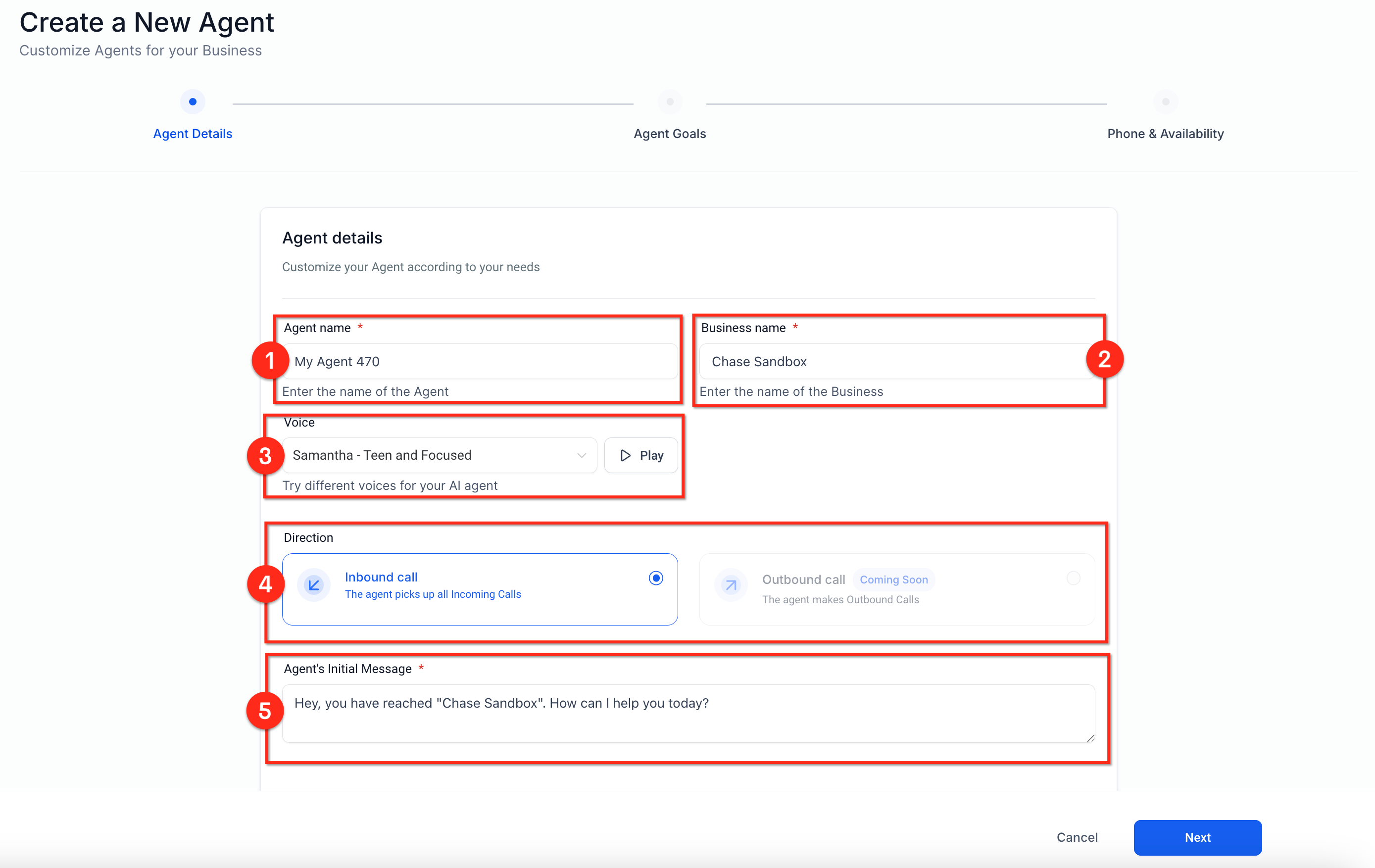
Click Create Agent
Choose a name and a voice (like Samantha or Tony)

Write a message like “Hi, thanks for calling. How can I help you today?”
Set the goal for the agent (like answering FAQs or booking appointments)

Add a phone number of someone on your team (like a sales rep)
Choose when the AI should pass the call (example: someone wants to buy something)
You can also set it to send a link for things like updating payment info
| Plan Type | Cost | Details |
|---|---|---|
| Pay-As-You-Go | $0.02 per message | You are charged each time the AI responds to a caller or provides a suggestion. |
| Unlimited Plan | $49 per sub-account/month | Use unlimited AI messages and calls for one sub-account with no per-message fees. |
| Bot Training & Testing | FREE | Train your AI agent and test it with sample calls at no cost before going live. |
Offering a voice bot to your clients can open the door to more services. You don’t need to start with Facebook ads or SEO. Just show your clients how this tool can help them save money, reduce missed calls, and impress their customers.
You can:
Set it up under your HighLevel affiliate link
White-label it under your agency name
Use it as a “foot-in-the-door” offer to win bigger deal.
Inbound Voice AI in HighLevel is like a smart phone receptionist. It picks up the phone, talks to customers, answers questions, and takes action. You don’t need fancy tech skills—just tell the bot what to say, and it handles the rest.
Yes! Training and testing your voice agent is free inside HighLevel.
You can tell it to send the call to live chat or a support number.
Yes, HighLevel gives you different voice options—cheerful, formal, male, female, even accents.
Inbound Voice AI in HighLevel is more than just a cool feature—it’s a smart way to grow your business. Whether you’re using it for your own calls or offering it to clients, it helps save time, reduce costs, and make customers happy.
It’s easy to set up, simple to train, and powerful enough to handle real conversations.
Ready to give it a try? Set up your free trial, train your voice agent, and start impressing clients with just a phone call.

Design smarter. Move faster. Stop switching tabs. If you’ve ever designed something in Canva, downloaded it, uploaded it into your

The Smart Way to Re-Engage Leads Without Manual Work Leads don’t always ghost you on purpose. Sometimes they get busy.

AI automation is evolving fast. If you’ve ever wished you could fully control AI tasks inside your CRM without relying

Build Powerful Workflows Just by Speaking Imagine creating an entire workflow without touching your keyboard. No typing. No complicated setup.
If you’re using Conversation AI to handle customer interactions, you’re already ahead of the game. But what if you could
If you’ve ever wished your workflows could think before sending a message, you’re going to love what’s new in HighLevel.

Pick a design that fits your brand.

Integrate it seamlessly.

Tailor it to your business needs.

Start generating leads and sales.
No account yet?
Create an AccountWe use cookies to improve your experience on our site. By using our site, you consent to cookies.
Websites store cookies to enhance functionality and personalise your experience. You can manage your preferences, but blocking some cookies may impact site performance and services.
Essential cookies enable basic functions and are necessary for the proper function of the website.
These cookies are needed for adding comments on this website.
Google reCAPTCHA helps protect websites from spam and abuse by verifying user interactions through challenges.
These cookies are used for managing login functionality on this website.
Stripe is a payment processing platform that enables businesses to accept online payments securely and efficiently.
Service URL: stripe.com (opens in a new window)
Statistics cookies collect information anonymously. This information helps us understand how visitors use our website.
Google Analytics is a powerful tool that tracks and analyzes website traffic for informed marketing decisions.
Service URL: policies.google.com (opens in a new window)
Clarity is a web analytics service that tracks and reports website traffic.
Service URL: clarity.microsoft.com (opens in a new window)
SourceBuster is used by WooCommerce for order attribution based on user source.
You can find more information in our Privacy Policy and .



