🎈Winter Savings Special Sale 🎁
00
DAYS
00
HRS
00
MINS
00
SECS


If you’re building global client experiences, offering support in just one language is no longer enough. Whether you’re managing a digital agency or serving diverse markets, GoHighLevel’s multi-language support in AI tools and platform interfaces is a game-changer.
In this article, we’re breaking down how to seamlessly configure HighLevel’s AI (Conversation AI and Voice AI), chat widgets, and platform settings to function in different languages—so your business can connect with customers wherever they are, in the language they prefer.
🌐 Set platform language preferences at both the agency and sub-account levels.
🛠️ Chat widgets and AI bots must be manually translated.
🤖 Conversation AI uses ChatGPT, which supports many languages naturally.
🎙️ Voice AI supports multilingual speech, though still in beta.
Agency users’ settings override sub-account preferences when logged in
HighLevel AI is a suite of intelligent automation tools embedded within the GoHighLevel CRM platform. It allows businesses to:
Talk to leads and customers through chat and voice using AI
Automate replies, reviews, emails, and more
Train bots to understand your business
Scale support without hiring more people
🧠 The AI is powered by tools like ChatGPT for conversations and advanced voice synthesis for calls.
Set the language for all users under the agency profile:
Go to Agency View > Settings > Company > Profile
Select your preferred language (e.g., English, Spanish, French)
This will apply across all sub-accounts if you’re logged in as an agency user.
Go to Sub-Account > Settings > Business Profile
Choose a local language specific to that client or region.
✅ Pro Tip: A Spanish-speaking client? Set their sub-account to Spanish for a localized interface.

The Live Chat Widget is your first impression—make it count in the right language.
Go to Sites > Chat Widget
Choose the widget you’d like to edit
Translate:
Welcome message
Button label (e.g., “Send” → “Enviar”)
Title and intro text
🛑 Note: The language dropdown setting doesn’t auto-translate; use manual translations.
Create separate widgets for each language and assign them to specific funnels or regions.
Go to Sub-Account > Settings > Conversation AI
Open or create your bot in the Bot Goals section
* All responses should be in French.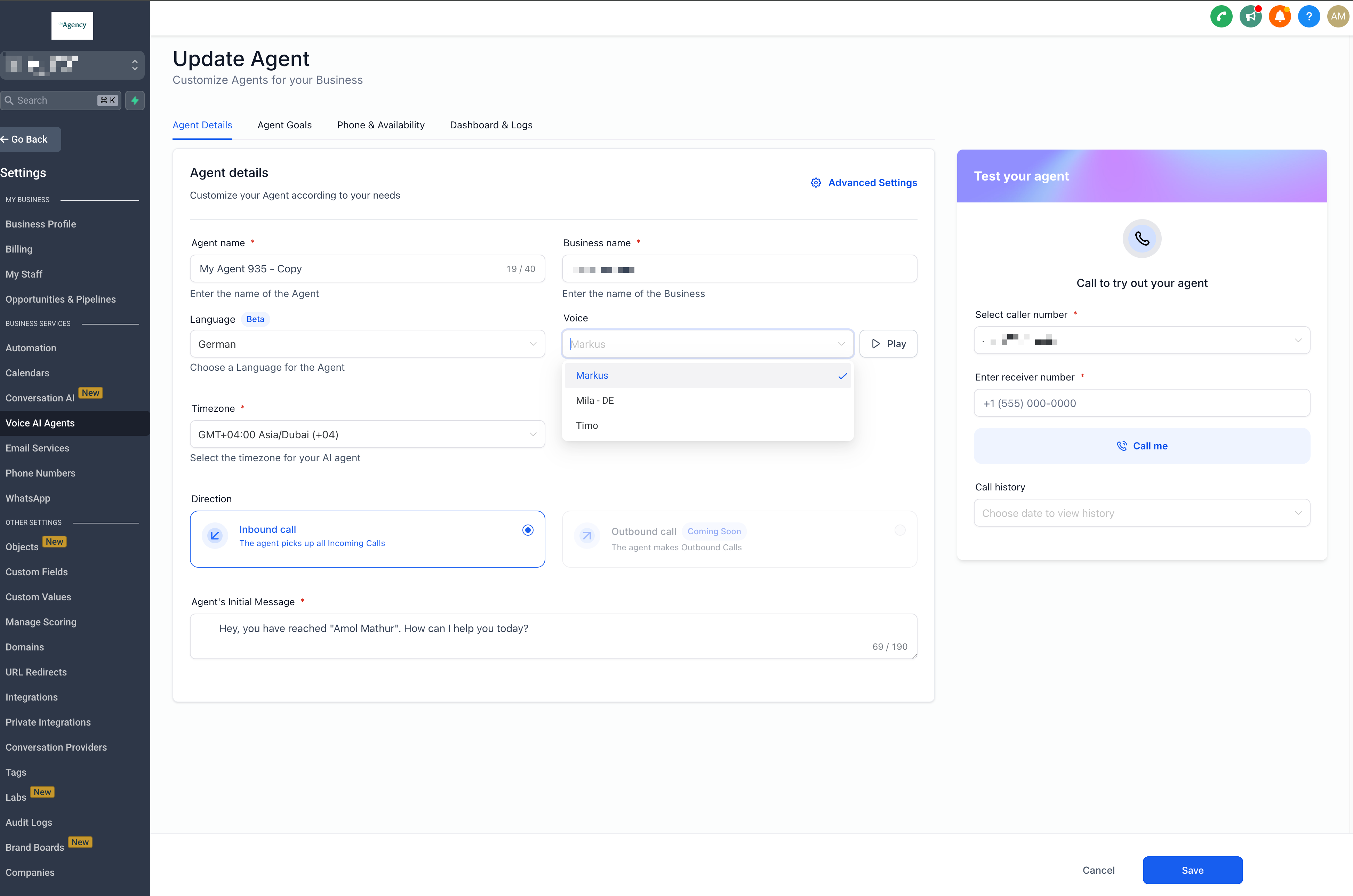
n Configure Intent > Edit Prompt, define:
Who the bot is (e.g., a friendly Spanish-speaking assistant)
What it does (e.g., book appointments, answer service questions)
Any other helpful context (e.g., location details, opening hours)
✅ Example:
“You are a helpful AI assistant who only speaks Spanish and helps users book appointments.”
Voice AI enables your AI agent to answer calls in different languages. Perfect for multilingual support lines.
Go to Settings > AI Agents (Voice AI)
Choose your agent
Under Voice Settings, select the preferred language
Update the initial greeting to match the language
🛑 Beta Alert: Switching between languages mid-call can cause glitches—test carefully.
| Feature | Pay-As-You-Go | Unlimited Plan |
|---|---|---|
| Conversation AI | $0.02/message | Included in $97/month AI Employee Plan |
| Voice AI | $0.13/minute | Included in $97/month AI Employee Plan |
| Content AI | $0.09/1,000 words | Included in AI Employee Plan |
| Review AI | $0.08/review | Included in AI Employee Plan |
| Chat Widget | Free (manual translations) | N/A |
📌 The $97 AI Employee plan unlocks unlimited usage across all AI features, including multilingual capabilities.
Not yet. You need separate bots or instructions in different languages.
Yes, but it works best when you prompt it to use a specific language.
No. They’re configured separately—for now.
No. Manual translation or language-specific bot instructions are required.
HighLevel AI is already a powerful tool—but when paired with multi-language support, it becomes a global business solution. Whether you’re serving clients across borders or supporting local communities in their preferred language, HighLevel has the tools to help you connect.
With a little setup, you can create a seamless, personalized experience for every user—regardless of what language they speak.

If you’ve ever struggled with A2P 10DLC registration, you know how confusing and rejection-prone the process can be. One small

Build Powerful Workflows Just by Speaking Imagine building a complete automation without typing a single word. No clicking through triggers.

Design smarter. Move faster. Stop switching tabs. If you’ve ever designed something in Canva, downloaded it, uploaded it into your

The Smart Way to Re-Engage Leads Without Manual Work Leads don’t always ghost you on purpose. Sometimes they get busy.

AI automation is evolving fast. If you’ve ever wished you could fully control AI tasks inside your CRM without relying

Build Powerful Workflows Just by Speaking Imagine creating an entire workflow without touching your keyboard. No typing. No complicated setup.

Pick a design that fits your brand.

Integrate it seamlessly.

Tailor it to your business needs.

Start generating leads and sales.
No account yet?
Create an AccountWe use cookies to improve your experience on our site. By using our site, you consent to cookies.
Websites store cookies to enhance functionality and personalise your experience. You can manage your preferences, but blocking some cookies may impact site performance and services.
Essential cookies enable basic functions and are necessary for the proper function of the website.
These cookies are needed for adding comments on this website.
Google reCAPTCHA helps protect websites from spam and abuse by verifying user interactions through challenges.
These cookies are used for managing login functionality on this website.
Stripe is a payment processing platform that enables businesses to accept online payments securely and efficiently.
Service URL: stripe.com (opens in a new window)
Statistics cookies collect information anonymously. This information helps us understand how visitors use our website.
Google Analytics is a powerful tool that tracks and analyzes website traffic for informed marketing decisions.
Service URL: policies.google.com (opens in a new window)
Clarity is a web analytics service that tracks and reports website traffic.
Service URL: clarity.microsoft.com (opens in a new window)
SourceBuster is used by WooCommerce for order attribution based on user source.
You can find more information in our Privacy Policy and .



