🎈Winter Savings Special Sale 🎁
00
DAYS
00
HRS
00
MINS
00
SECS


If you’re always on the move and still want to handle business like a pro, understanding how to manage GoHighLevel incoming calls via your mobile phone can be a real game-changer. GoHighLevel isn’t just about automation and funnels—it also gives you the ability to handle real-time conversations through the LeadConnector mobile app.
No more switching between tools or missing critical leads. With just a few simple settings, you can receive GoHighLevel incoming calls directly on your smartphone while keeping your business line separate from your personal number.
✅ You can route calls from GoHighLevel directly to your mobile using the LeadConnector app
✅ Mobile call routing keeps your personal number private and your business accessible
✅ Setup requires assigning a voice-enabled number and enabling mobile forwarding
✅ The feature works on both iOS and Android devices
✅ Inbound call history, recordings, and automations all sync within your CRM
Imagine a hot lead calls your number while you’re away from your desk. If you don’t have mobile call forwarding enabled, it’s a missed opportunity.
GoHighLevel solves this with a built-in solution—by routing incoming calls through the LeadConnector mobile app. The app acts as your virtual business line. All calls, logs, recordings, and follow-up workflows stay tied to your CRM account, helping you stay responsive while remaining organized.
This feature is perfect for:
“The ability to answer inbound calls directly through the GoHighLevel mobile app means you're never tied to a desk — your CRM and your conversations go wherever you do.”
Getting started is easy. You just need to set up a few things inside GoHighLevel and your mobile device.
GoHighLevel uses the LeadConnector app to handle mobile calls. Once installed, log in using your GoHighLevel user credentials.
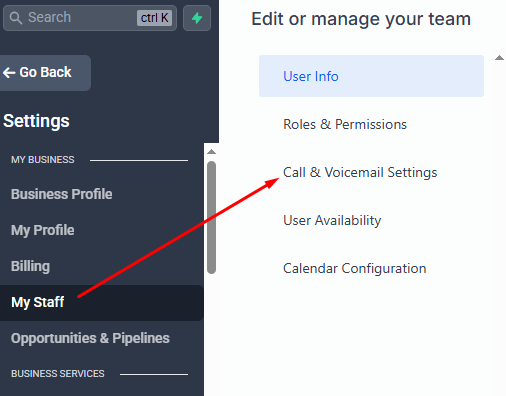
To route calls, your GoHighLevel account must have a number that supports voice.
If you don’t have a number yet:
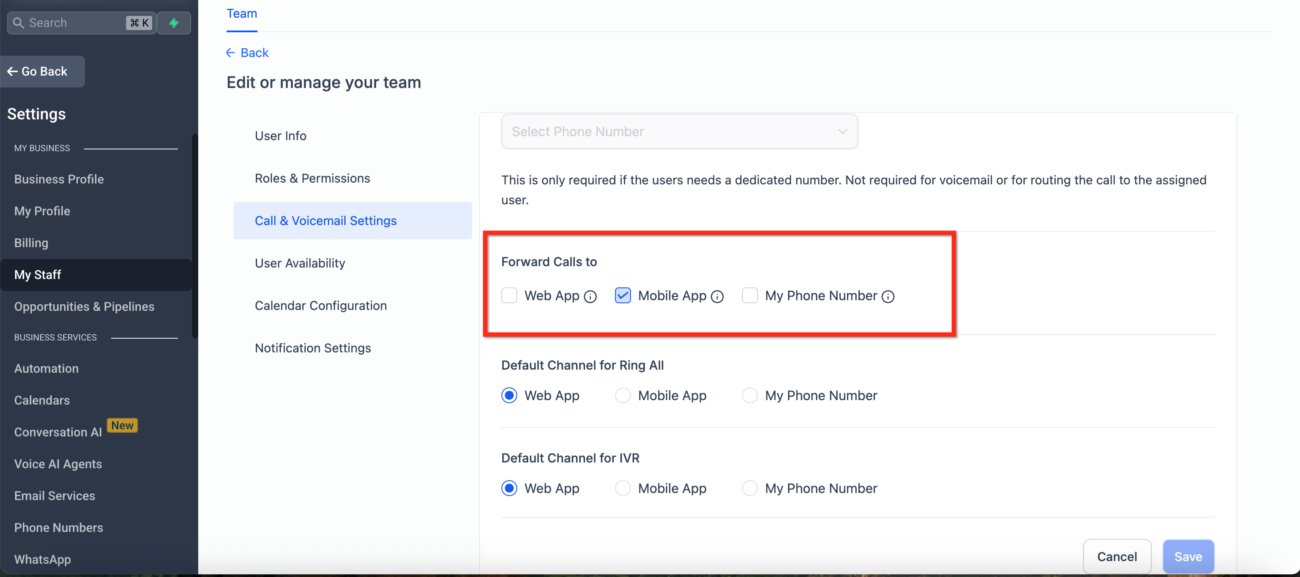
Stay in My Staff > Edit and scroll to:
Call Settings
Enable ✅ Forward Calls to Mobile App
Save changes
Now, whenever a lead calls the assigned number, your mobile device will ring through the LeadConnector app.
In order for calls to ring properly, your phone must allow the app to notify and run in the background.
Enable Notifications
Allow Microphone access
Turn ON Background App Refresh
Keep Cellular Data enabled for the app
Go to App Settings → Battery → Disable optimization for LeadConnector
Allow permissions: Notifications, Microphone, Background Data
Toggle “Run in background” to Always
📌 Without these settings, you may miss or delay call alerts.
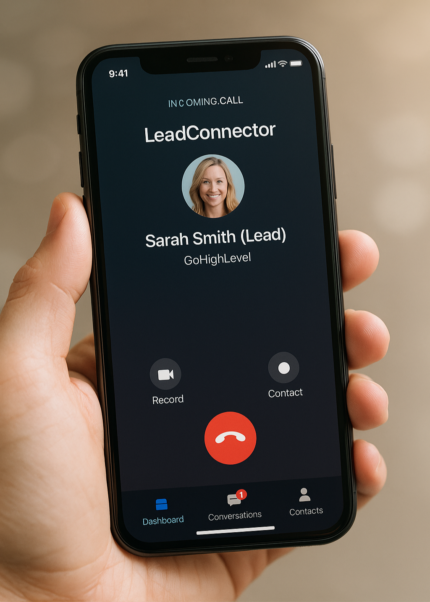
Make a test call to your assigned GoHighLevel number from another device.
✅ If set up correctly, your LeadConnector app will ring just like a standard phone call.
You’ll be able to:
Answer the call
View caller details from CRM
Access call history and logs in the ap
It’s helpful to know how the app prioritizes calls when:
📎 For routing workflows and logic, visit our blog on GoHighLevel call routing tips.
If you happen to miss a call, you can still engage the lead by using GoHighLevel’s “Missed Call Text Back” automation.
To set this up:
Go to Automations > Workflows
Create a new workflow
Trigger: Call → Missed Call
Action: Send SMS
Type something like:
“Hi there! Sorry we missed your call. How can we help you?”
This lets you continue conversations even if you’re unavailable in the moment.
If you need to pass a call to someone else:
Tap Transfer during the call
Choose between:
Blind Transfer (connect directly)
Warm Transfer (speak with the other user before completing the handoff)
This is great for teams who handle calls across departments or locations.
GoHighLevel uses LC Phone for voice features. Here’s what you can expect in terms of cost:
| Feature | Price (USD) |
|---|---|
| Local Number (monthly) | $1.15 |
| Toll-Free Number (monthly) | $2.15 |
| Inbound Call (local) | $0.0085 / minute |
| Inbound Call (toll-free) | $0.0220 / minute |
| Call Recording (optional) | $0.0025 / minute |
| Call Transcription (optional) | $0.024 / minute |
No. The app must be logged in and running in the background.
No. All calls come through your GoHighLevel-assigned number.
Yes. All calls appear under Conversations, including recordings and duration.
Use workflows or call menus to distribute calls across staff members.
Yes. HighLevel supports automatic call recording, which can be reviewed in the conversation or call logs.
GoHighLevel’s mobile call forwarding feature is a practical, powerful tool that helps you stay accessible while on the move. Whether you’re solo or managing a team, the ability to answer calls through the LeadConnector app keeps your CRM, calls, and communications all in one place.
It’s simple to set up and even easier to use — so you can focus on what matters most: closing deals, helping clients, and growing your business.
Looking to explore more GoHighLevel features that support mobile communication? Visit the GoHighLevel Shop for more guides just like this one.
If you found this helpful, you’ll love the next article where we dive deeper into how to personalize your GoHighLevel AI voice conversations to sound more human and close more leads.
👉 Read: Transfer Incoming Calls to Multiple Agents in GoHighLevel

Design smarter. Move faster. Stop switching tabs. If you’ve ever designed something in Canva, downloaded it, uploaded it into your

The Smart Way to Re-Engage Leads Without Manual Work Leads don’t always ghost you on purpose. Sometimes they get busy.

AI automation is evolving fast. If you’ve ever wished you could fully control AI tasks inside your CRM without relying

Build Powerful Workflows Just by Speaking Imagine creating an entire workflow without touching your keyboard. No typing. No complicated setup.
If you’re using Conversation AI to handle customer interactions, you’re already ahead of the game. But what if you could
If you’ve ever wished your workflows could think before sending a message, you’re going to love what’s new in HighLevel.

Pick a design that fits your brand.

Integrate it seamlessly.

Tailor it to your business needs.

Start generating leads and sales.
No account yet?
Create an AccountWe use cookies to improve your experience on our site. By using our site, you consent to cookies.
Websites store cookies to enhance functionality and personalise your experience. You can manage your preferences, but blocking some cookies may impact site performance and services.
Essential cookies enable basic functions and are necessary for the proper function of the website.
These cookies are needed for adding comments on this website.
Google reCAPTCHA helps protect websites from spam and abuse by verifying user interactions through challenges.
These cookies are used for managing login functionality on this website.
Stripe is a payment processing platform that enables businesses to accept online payments securely and efficiently.
Service URL: stripe.com (opens in a new window)
Statistics cookies collect information anonymously. This information helps us understand how visitors use our website.
Google Analytics is a powerful tool that tracks and analyzes website traffic for informed marketing decisions.
Service URL: policies.google.com (opens in a new window)
Clarity is a web analytics service that tracks and reports website traffic.
Service URL: clarity.microsoft.com (opens in a new window)
SourceBuster is used by WooCommerce for order attribution based on user source.
You can find more information in our Privacy Policy and .



