🎈Winter Savings Special Sale 🎁
00
DAYS
00
HRS
00
MINS
00
SECS


If you’re an agency using GoHighLevel, you’re likely focused on building streamlined funnels, automations, and client experiences. But there’s one critical, often-missed setup detail that can quietly damage trust, hurt click-through rates, and create confusion:
Failing to configure branded domains for client sub-accounts.
By default, GoHighLevel sends out links from your agency-level domain, like calendar invites, form submissions, or trigger links. That means every client’s automation might be using your domain rather than their own.
This looks unprofessional, off-brand, and even suspicious to your clients’ leads.
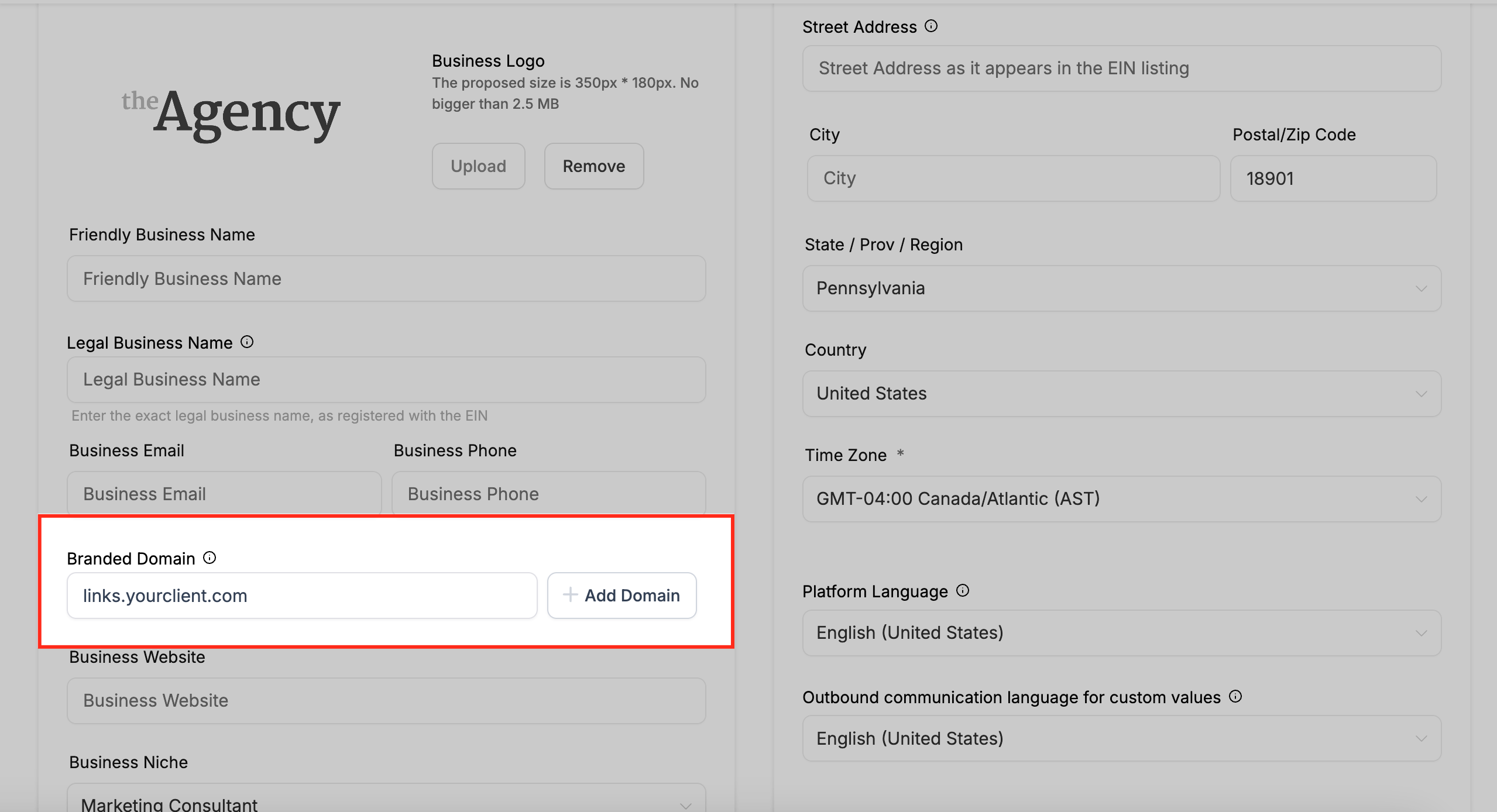
Branded domains in GoHighLevel are custom subdomains that agencies set up for each client (sub-account) to ensure that all outbound links, such as calendar invites, form links, and trigger links, match the client’s actual business name or website.
Instead of sending links that look like this:
https://link.agencydomain.com/form/abc123
Your client can send links like
https://link.clientbrand.com/form/abc123
This simple change enhances brand consistency, boosts recipient trust, and improves click-through rates because the link looks like it’s truly coming from the business the lead interacted with.
Key Benefits of Branded Domains:
✅ Boosts Brand Recognition
Leads see a domain that matches the sender’s business.
✅ Improves Trust & Credibility
People are more likely to click on familiar-looking links.
✅ Reduces Spam Flags
Domain-matched URLs are less likely to be flagged by email or SMS filters.
✅ Enhances the White-Labeled Experience
Your clients won’t see your agency’s name in their links—only theirs.
Would you like a visual diagram showing how branded domains work?

Fixing this issue takes just a few minutes. Here’s how to do it the right way:
Access the Client Sub-Account
Go to the sub-account → Settings → Domains.
Click “Add Branded Domain“
Choose a subdomain (e.g., link.clientname.com) that reflects your client’s brand.
Update DNS Settings
If the domain is hosted with:
GoDaddy, Google Domains, Cloudflare, or purchased through GoHighLevel → DNS is updated automatically.
Other providers → Manually add the provided CNAME record in the DNS dashboard.
Verify the Domain
Once the DNS propagates, GoHighLevel will mark the domain as verified and ready to use.
Test Your Automation
Send a trigger link or calendar invite to confirm that links now display your client’s branded domain.
To ensure every client benefits from this setup:
While GoHighLevel does not charge extra for branded domain support, here’s what you might expect in terms of costs:
| Item | Typical Cost |
|---|---|
| Domain Registration | $10–$20/year (GoDaddy, Namecheap) |
| SSL Certificate | Free via GoHighLevel |
| DNS Setup (Auto-configured) | Free (with supported providers) |
| Manual DNS Setup Time | ~10–15 mins (internal task) |
Tip: If you offer done-for-you services, you can easily charge $49–$99 for branded domain setup as part of a client’s onboarding package.
Let’s say your client is “Green Horizon Landscapes.” Without a branded domain, the trigger link in their SMS campaign might look like this:
https://link.youragency.com/quote-request
But with a branded domain setup, it becomes
https://link.greenhorizonlandscapes.com/quote-request
Not only does this look polished—it builds immediate trust, ensures consistency, and increases engagement rates.
Yes. Every client should have their own branded domain or subdomain to maintain brand consistency and trust.
Not entirely, but you can streamline it by adding it to your onboarding checklist or using automated task reminders in your workflows.
Yes, the branded domain feature is available across all sub-accounts, regardless of pricing tier.
Yes! Branded domains are less likely to be flagged by spam filters and increase link click-through rates.
Branded domains might seem like a small detail, but they carry a big impact. Ignoring them can erode client trust, damage your brand’s reputation, and reduce conversion rates.
The fix is simple. Take 10 minutes to set up a branded domain for each client sub-account, and your agency will instantly look more professional, secure, and on-brand.
💡 Pro tip: Add “Branded Domain Configuration” to your onboarding checklist today and watch how much smoother client launches become.

If you’ve ever struggled with A2P 10DLC registration, you know how confusing and rejection-prone the process can be. One small

Build Powerful Workflows Just by Speaking Imagine building a complete automation without typing a single word. No clicking through triggers.

Design smarter. Move faster. Stop switching tabs. If you’ve ever designed something in Canva, downloaded it, uploaded it into your

The Smart Way to Re-Engage Leads Without Manual Work Leads don’t always ghost you on purpose. Sometimes they get busy.

AI automation is evolving fast. If you’ve ever wished you could fully control AI tasks inside your CRM without relying

Build Powerful Workflows Just by Speaking Imagine creating an entire workflow without touching your keyboard. No typing. No complicated setup.

Pick a design that fits your brand.

Integrate it seamlessly.

Tailor it to your business needs.

Start generating leads and sales.
No account yet?
Create an AccountWe use cookies to improve your experience on our site. By using our site, you consent to cookies.
Websites store cookies to enhance functionality and personalise your experience. You can manage your preferences, but blocking some cookies may impact site performance and services.
Essential cookies enable basic functions and are necessary for the proper function of the website.
These cookies are needed for adding comments on this website.
Google reCAPTCHA helps protect websites from spam and abuse by verifying user interactions through challenges.
These cookies are used for managing login functionality on this website.
Stripe is a payment processing platform that enables businesses to accept online payments securely and efficiently.
Service URL: stripe.com (opens in a new window)
Statistics cookies collect information anonymously. This information helps us understand how visitors use our website.
Google Analytics is a powerful tool that tracks and analyzes website traffic for informed marketing decisions.
Service URL: policies.google.com (opens in a new window)
Clarity is a web analytics service that tracks and reports website traffic.
Service URL: clarity.microsoft.com (opens in a new window)
SourceBuster is used by WooCommerce for order attribution based on user source.
You can find more information in our Privacy Policy and .



