🎈Winter Savings Special Sale 🎁
00
DAYS
00
HRS
00
MINS
00
SECS


If you’ve ever built WhatsApp templates inside GoHighLevel, you know how powerful they are—and also how repetitive the process could feel. Uploading the same image, PDF, or video again and again might seem minor, but over time, it slows teams down and increases the risk of mistakes.
That’s exactly why the Media Library for WhatsApp Templates update is such a big deal.
With this enhancement, GoHighLevel now allows you to access your Media Library directly while creating or editing WhatsApp template headers. You can reuse existing assets or upload new ones—including audio files—without ever leaving the template builder.
The result is faster workflows, better brand consistency, and a smoother experience for businesses, agencies, and marketing teams.
The Media Library in GoHighLevel has always been a centralized place to store assets like images, documents, and videos. What’s new is how tightly it’s now integrated into the WhatsApp template creation flow.
Instead of treating WhatsApp templates as a separate process, HighLevel has embedded the Media Library directly inside the builder. This means your assets are available exactly where and when you need them.
This update applies to:
Nothing extra to enable, nothing new to learn—just a smarter workflow.
WhatsApp templates are often reused across:
Before this update, even if a file already existed in your account, you had to:
This process introduced friction, wasted time, and occasionally caused errors. The Media Library integration removes all of that.
The new flow is designed to feel natural and intuitive.
1: Create or edit a WhatsApp template in GoHighLevel
2: Select a header type
3: Choose how to add media
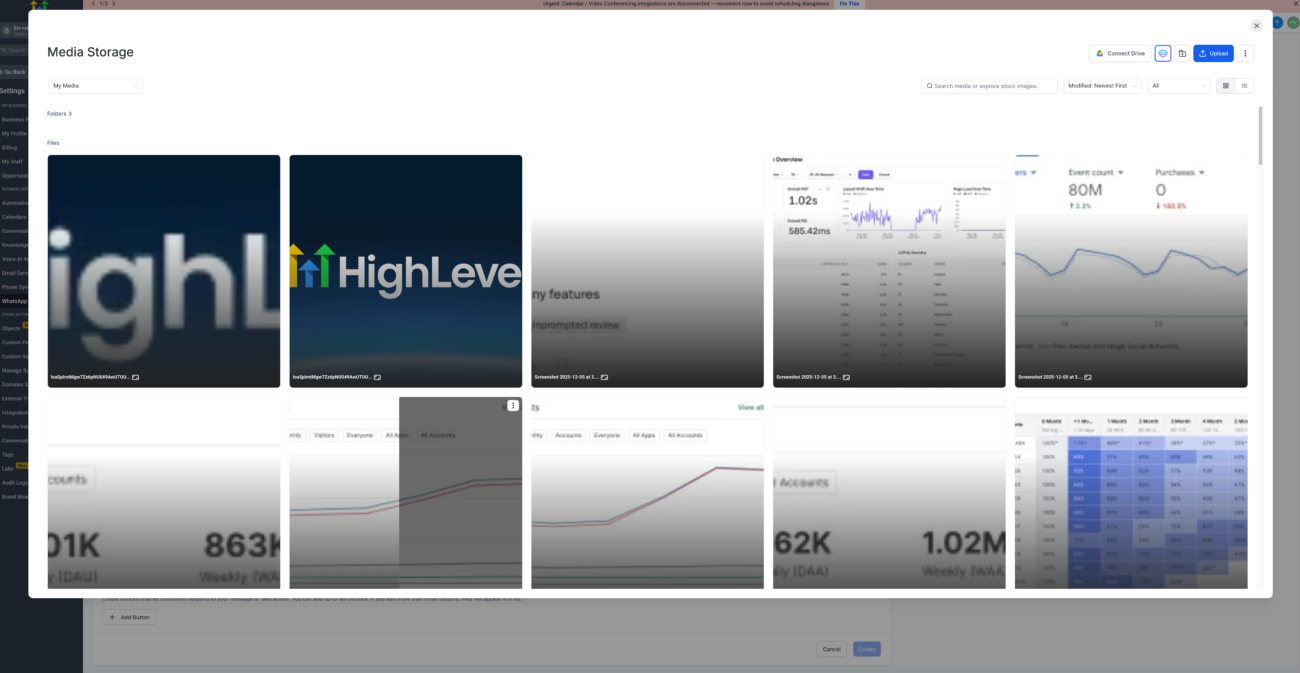
4: The Media Library opens inside the builder
5: Files are automatically filtered by header type
6: Choose the asset and continue building your template
There’s no switching tabs, no unnecessary steps, and no duplicate uploads.
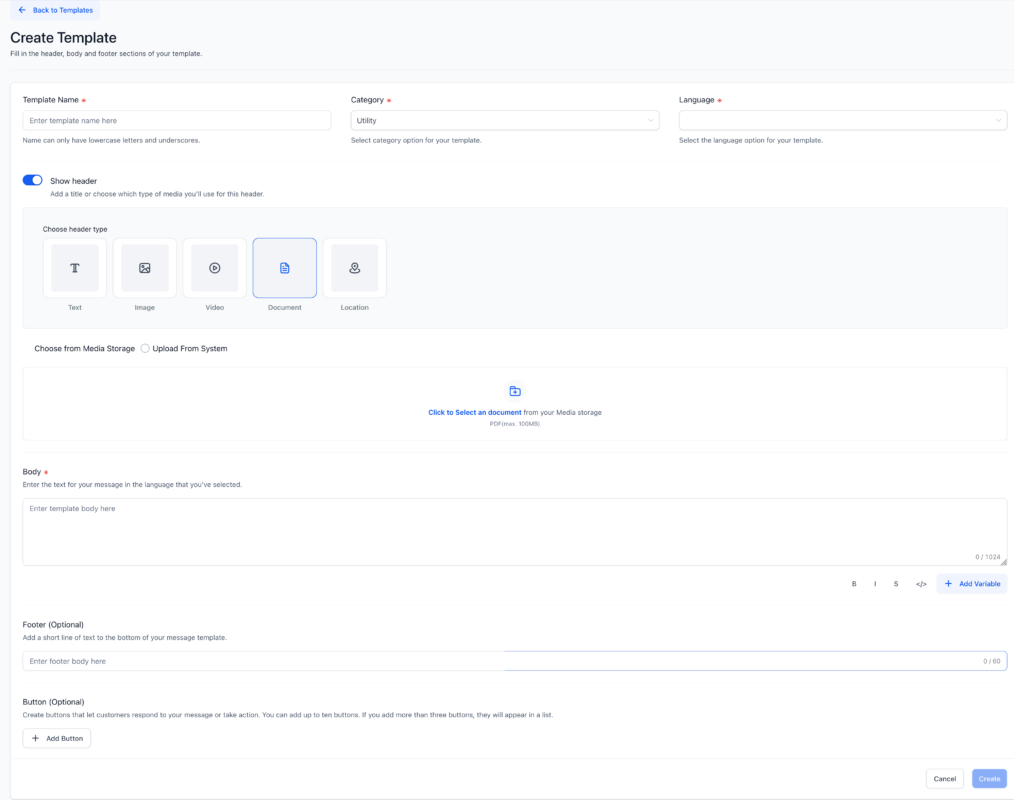
GoHighLevel supports all WhatsApp-approved formats, making it easy to build compliant templates.
Perfect for logos, promotional banners, or branded visuals.
Great for short product demos, announcements, or promotional clips.
Ideal for brochures, menus, catalogs, invoices, or guides.
Perfect for voice notes, announcements, or personalized messages.
The addition of audio support makes WhatsApp templates more engaging and human.
Speed matters in marketing. When teams can move quickly, campaigns go live faster and opportunities aren’t missed.
With Media Library integration:
For agencies managing multiple clients, this update alone can shave hours off weekly workloads.
One of the biggest challenges for growing teams is consistency.
Using a centralized media library ensures the following:
This is especially important for brands that run frequent WhatsApp broadcasts or automated messages.
One of the most exciting parts of this update is MP3 audio support for WhatsApp template headers.
This allows businesses to:
Audio adds a human touch that text and images alone often can’t deliver, especially in service-based industries.
For agencies and multi-team businesses, file management can be messy.
This update introduces a single source of truth:
Collaboration becomes smoother and more structured.
WhatsApp template submissions can fail if the wrong file type or format is used.
The integrated Media Library helps by:
This results in fewer delays and more reliable template approvals.
The new upload flow aligns perfectly with GoHighLevel’s design system.
Users benefit from
Both beginners and advanced users can build templates without confusion.
There is no separate or additional cost for using the Media Library in WhatsApp Templates.
Pricing Breakdown
If you already use WhatsApp templates in GoHighLevel, this feature is automatically available to you.
Yes. The Media Library works for both new templates and updates to existing ones.
Yes. MP3 audio files are fully supported for WhatsApp template headers.
Yes. It is especially useful for agencies managing multiple clients and teams.
Only WhatsApp-approved formats are supported, including JPG, PNG, MP4, PDF, and MP3.
The Media Library for WhatsApp Templates in GoHighLevel is a smart, practical update that solves real problems marketers face every day.
By reducing friction, improving consistency, and enabling richer communication, this feature makes WhatsApp marketing faster, cleaner, and more scalable.
If WhatsApp plays a role in your customer communication strategy, this update isn’t optional it’s essential. 🚀

If you’ve ever struggled with A2P 10DLC registration, you know how confusing and rejection-prone the process can be. One small

Build Powerful Workflows Just by Speaking Imagine building a complete automation without typing a single word. No clicking through triggers.

Design smarter. Move faster. Stop switching tabs. If you’ve ever designed something in Canva, downloaded it, uploaded it into your

The Smart Way to Re-Engage Leads Without Manual Work Leads don’t always ghost you on purpose. Sometimes they get busy.

AI automation is evolving fast. If you’ve ever wished you could fully control AI tasks inside your CRM without relying

Build Powerful Workflows Just by Speaking Imagine creating an entire workflow without touching your keyboard. No typing. No complicated setup.

Pick a design that fits your brand.

Integrate it seamlessly.

Tailor it to your business needs.

Start generating leads and sales.
No account yet?
Create an AccountWe use cookies to improve your experience on our site. By using our site, you consent to cookies.
Websites store cookies to enhance functionality and personalise your experience. You can manage your preferences, but blocking some cookies may impact site performance and services.
Essential cookies enable basic functions and are necessary for the proper function of the website.
These cookies are needed for adding comments on this website.
Google reCAPTCHA helps protect websites from spam and abuse by verifying user interactions through challenges.
These cookies are used for managing login functionality on this website.
Stripe is a payment processing platform that enables businesses to accept online payments securely and efficiently.
Service URL: stripe.com (opens in a new window)
Statistics cookies collect information anonymously. This information helps us understand how visitors use our website.
Google Analytics is a powerful tool that tracks and analyzes website traffic for informed marketing decisions.
Service URL: policies.google.com (opens in a new window)
Clarity is a web analytics service that tracks and reports website traffic.
Service URL: clarity.microsoft.com (opens in a new window)
SourceBuster is used by WooCommerce for order attribution based on user source.
You can find more information in our Privacy Policy and .



