🎈Winter Savings Special Sale 🎁
00
DAYS
00
HRS
00
MINS
00
SECS


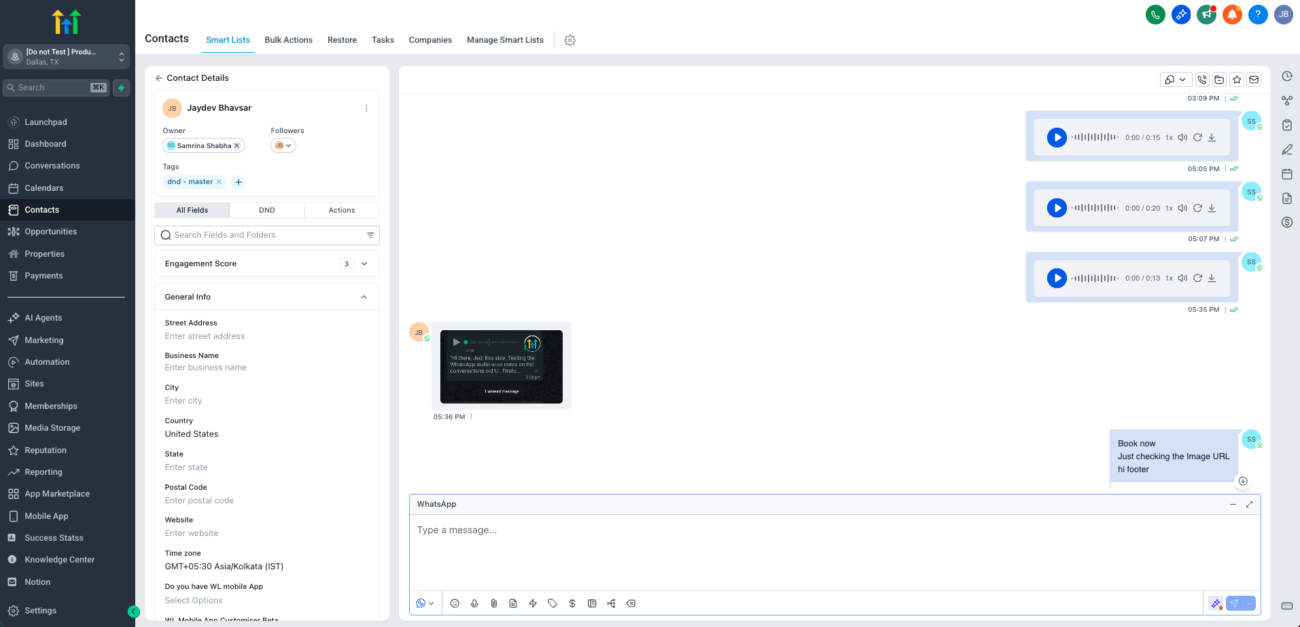
WhatsApp conversations work best when they feel natural. With GoHighLevel’s latest enhancement, outbound WhatsApp voice notes sent from the Conversations UI are now delivered as native WhatsApp voice messages, complete with instant playback and optional transcriptions.
This update removes friction, improves accessibility, and helps businesses communicate in a more personal, human way without changing how teams work inside GoHighLevel.
Previously, WhatsApp voice notes sent from GoHighLevel arrived as audio attachments. Customers had to download the file before listening, which often slowed conversations and reduced engagement.
Now, GoHighLevel sends voice notes in WhatsApp’s native voice note format, creating a seamless experience that matches how people already use WhatsApp every day.
What’s different now:
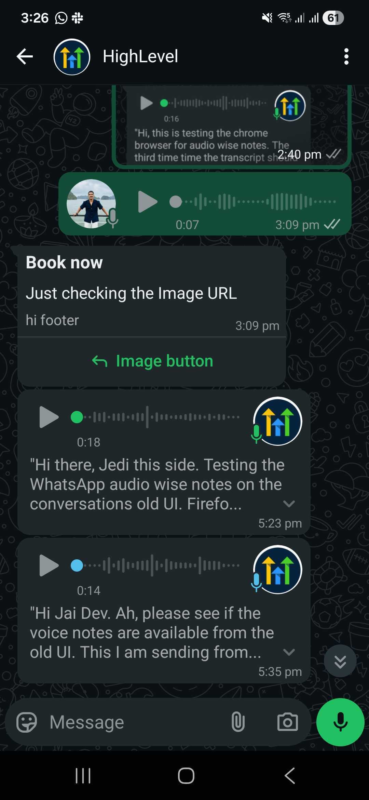
When a voice message plays instantly, customers are more likely to listen—or quickly scan the transcript. Fewer steps mean faster responses and better conversations.
Not everyone can listen to audio at all times. Transcriptions allow customers to read messages instead, making communication more inclusive and convenient.
Voice transcripts are especially helpful when customers are:
Voice notes feel warmer than text but don’t interrupt like phone calls. Businesses can stay human while still operating efficiently.
Everything works automatically behind the scenes.
As soon as you send a voice note from the Conversations UI, it’s delivered as a native WhatsApp voice message.
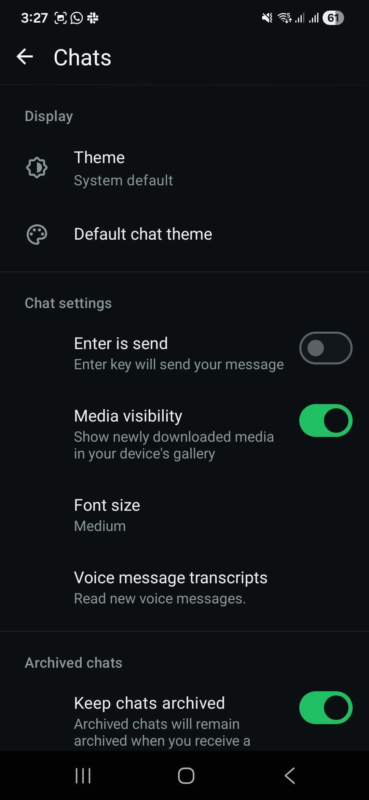
Voice transcriptions are controlled entirely by the end customer’s WhatsApp settings.
Steps for customers to enable transcriptions:
If this setting is turned off or set to Never, transcripts will not appear.
Native voice notes with transcriptions are ideal for:
Customers can listen when it’s convenient or read the transcript when they’re busy.
There is no additional GoHighLevel fee for native WhatsApp voice notes or transcriptions.
Here’s how pricing works:
Your current WhatsApp messaging costs remain unchanged.
No. Native WhatsApp voice notes work automatically for all outbound voice notes sent from the Conversations UI.
Only customers who have voice message transcripts enabled in their WhatsApp settings will see the Transcribe option.
Native WhatsApp voice notes with transcriptions bring GoHighLevel conversations closer to how people naturally communicate. By removing friction, improving accessibility, and keeping conversations human, this update helps SMBs connect faster and more effectively with their customers.

If you’ve ever struggled with A2P 10DLC registration, you know how confusing and rejection-prone the process can be. One small

Build Powerful Workflows Just by Speaking Imagine building a complete automation without typing a single word. No clicking through triggers.

Design smarter. Move faster. Stop switching tabs. If you’ve ever designed something in Canva, downloaded it, uploaded it into your

The Smart Way to Re-Engage Leads Without Manual Work Leads don’t always ghost you on purpose. Sometimes they get busy.

AI automation is evolving fast. If you’ve ever wished you could fully control AI tasks inside your CRM without relying

Build Powerful Workflows Just by Speaking Imagine creating an entire workflow without touching your keyboard. No typing. No complicated setup.

Pick a design that fits your brand.

Integrate it seamlessly.

Tailor it to your business needs.

Start generating leads and sales.
No account yet?
Create an AccountWe use cookies to improve your experience on our site. By using our site, you consent to cookies.
Websites store cookies to enhance functionality and personalise your experience. You can manage your preferences, but blocking some cookies may impact site performance and services.
Essential cookies enable basic functions and are necessary for the proper function of the website.
These cookies are needed for adding comments on this website.
Google reCAPTCHA helps protect websites from spam and abuse by verifying user interactions through challenges.
These cookies are used for managing login functionality on this website.
Stripe is a payment processing platform that enables businesses to accept online payments securely and efficiently.
Service URL: stripe.com (opens in a new window)
Statistics cookies collect information anonymously. This information helps us understand how visitors use our website.
Google Analytics is a powerful tool that tracks and analyzes website traffic for informed marketing decisions.
Service URL: policies.google.com (opens in a new window)
Clarity is a web analytics service that tracks and reports website traffic.
Service URL: clarity.microsoft.com (opens in a new window)
SourceBuster is used by WooCommerce for order attribution based on user source.
You can find more information in our Privacy Policy and .



