🎈Winter Savings Special Sale 🎁
00
DAYS
00
HRS
00
MINS
00
SECS


Finally, an Easier Way to Get Your SMS Campaigns Approved
If you’ve ever had an A2P SMS campaign rejected, you know the frustration: back-and-forth edits, mysterious carrier requirements, and precious time lost.
Now imagine having a smart assistant that catches those compliance issues before you even submit. That’s exactly what HighLevel’s new AI-powered A2P Compliance Validation does, and it’s here to change the game for businesses using SMS to reach customers.
Whether you’re a seasoned marketer or just diving into A2P registration, this powerful update helps you get it right the first time.
✅ Automatically scans your opt-in form, privacy policy, and terms of service for compliance issues
📋 Provides a detailed checklist of what passes or fails — in plain English
🚫 Blocks submissions until review is completed, reducing chances of rejection
💡 Offers tooltip guidance and (soon) linked support articles to help you fix errors fast
🌐 Supports Website Form and Facebook Lead Form opt-ins, with more coming soon
A2P (Application-to-Person) messaging is the standard for sending business texts in the U.S. through a 10-digit number (10DLC). Due to increased regulations, campaigns must meet specific carrier rules to be approved.
Most rejections happen because of:
HighLevel’s AI compliance tool helps solve these exact problems — before you hit submit.
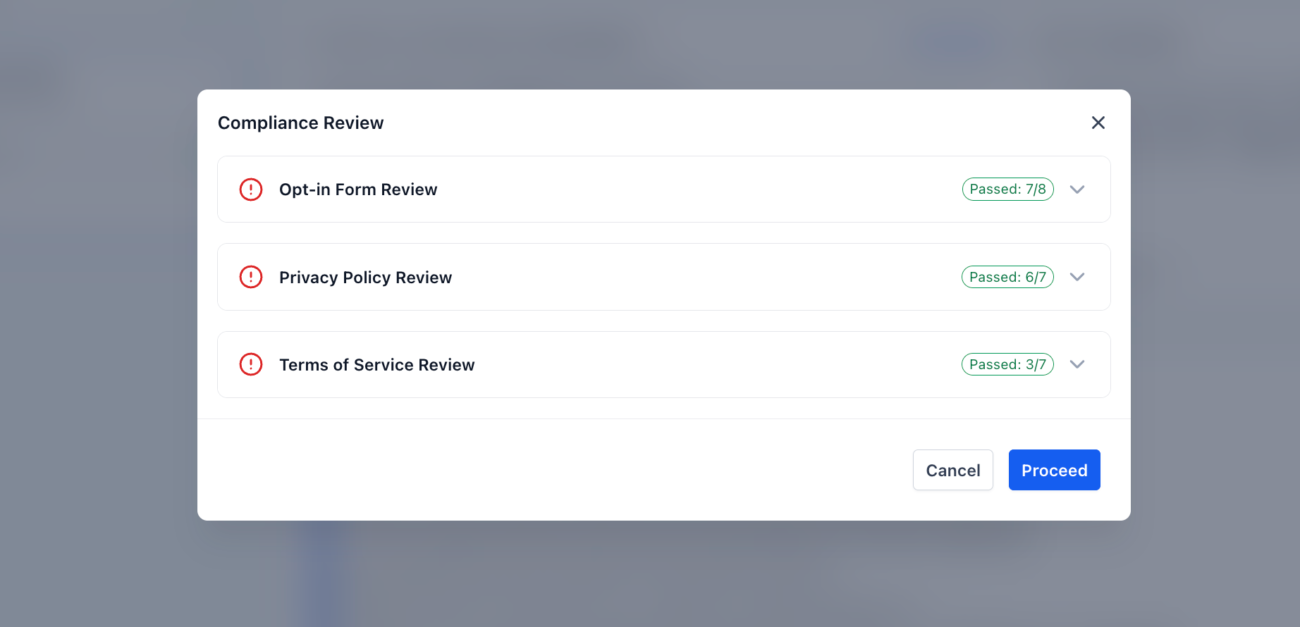
When you’re about to submit an A2P SMS campaign in HighLevel, the system now performs a real-time scan and validation of the links you’ve provided.
Here’s what happens:
You must complete the compliance check before you can proceed with your A2P campaign submission.
Let’s say you submit a lead generation campaign with this opt-in page:
Problem: Your checkbox is pre-checked, and your privacy policy is just one sentence.
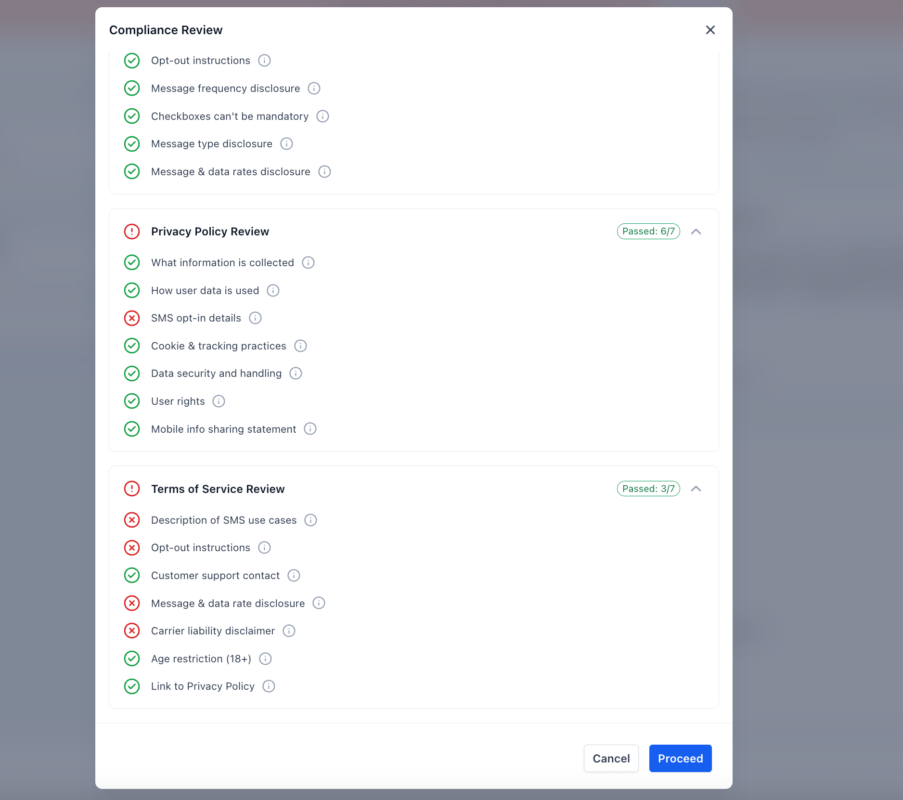
AI Review Feedback:
❌ The consent checkbox must not be pre-selected
❌ The privacy policy must include data usage and tracking practices
✅ Business name is shown
✅ Terms of Service are linked
In this case, the AI clearly identifies and explains what needs fixing, no guessing games, no back-and-forth with support.
1. Navigate to your A2P campaign submission inside HighLevel
2. Enter your Opt-in form URL
3. The system automatically scans your:
4. A modal window pops up with validation results
5. Address any flagged issues using the tooltip help
6. Once resolved, complete your submission
You can also choose to proceed at your own risk if issues remain, though it’s highly recommended to fix them.
Currently, the AI-powered validation is included at no extra charge. However, standard A2P registration costs still apply, depending on your phone number type and campaign tier.
Want to understand A2P registration pricing? You can find the full breakdown here:
👉 A2P Registration Pricing & Guide
No. You must complete the review before proceeding. However, you can submit with issues if you choose to accept the risks.
This review is specifically for U.S.-based A2P 10DLC campaigns.
HighLevel’s AI-powered A2P Compliance Validation is a big leap forward in simplifying SMS campaign submissions. By catching issues early and helping you fix them, it reduces stress, saves time, and boosts your approval rate.
If you’re serious about SMS marketing, this tool isn’t just helpful, it’s essential.
🧩 Want help optimizing your opt-in flow or policy pages for approval? I can guide you step-by-step. Just ask!

If you’ve ever struggled with A2P 10DLC registration, you know how confusing and rejection-prone the process can be. One small

Build Powerful Workflows Just by Speaking Imagine building a complete automation without typing a single word. No clicking through triggers.

Design smarter. Move faster. Stop switching tabs. If you’ve ever designed something in Canva, downloaded it, uploaded it into your

The Smart Way to Re-Engage Leads Without Manual Work Leads don’t always ghost you on purpose. Sometimes they get busy.

AI automation is evolving fast. If you’ve ever wished you could fully control AI tasks inside your CRM without relying

Build Powerful Workflows Just by Speaking Imagine creating an entire workflow without touching your keyboard. No typing. No complicated setup.

Pick a design that fits your brand.

Integrate it seamlessly.

Tailor it to your business needs.

Start generating leads and sales.
No account yet?
Create an AccountWe use cookies to improve your experience on our site. By using our site, you consent to cookies.
Websites store cookies to enhance functionality and personalise your experience. You can manage your preferences, but blocking some cookies may impact site performance and services.
Essential cookies enable basic functions and are necessary for the proper function of the website.
These cookies are needed for adding comments on this website.
Google reCAPTCHA helps protect websites from spam and abuse by verifying user interactions through challenges.
These cookies are used for managing login functionality on this website.
Stripe is a payment processing platform that enables businesses to accept online payments securely and efficiently.
Service URL: stripe.com (opens in a new window)
Statistics cookies collect information anonymously. This information helps us understand how visitors use our website.
Google Analytics is a powerful tool that tracks and analyzes website traffic for informed marketing decisions.
Service URL: policies.google.com (opens in a new window)
Clarity is a web analytics service that tracks and reports website traffic.
Service URL: clarity.microsoft.com (opens in a new window)
SourceBuster is used by WooCommerce for order attribution based on user source.
You can find more information in our Privacy Policy and .



