🎈Winter Savings Special Sale 🎁
00
DAYS
00
HRS
00
MINS
00
SECS


Customer communication is evolving—and fast.
Gone are the days when visitors were happy to fill out a contact form and wait 24-48 hours for a response. Now, they expect real-time answers and the ability to communicate on their own terms, using channels they already trust.
Enter: Facebook Messenger and Instagram Direct Messages.
With GoHighLevel’s latest update, businesses and agencies can now add native Facebook and Instagram chat widgets to any website or funnel—seamlessly connecting site visitors with brands through Meta’s most popular platforms.
This long-form guide dives deep into:
✅ What these chat widgets are
🔧 How to set them up in HighLevel
💼 Use cases across industries
🤖 Facebook AI automation potential
💡 Expert-level tips for better results
Let’s get into it.
🌐 Native support for Facebook and Instagram chat widgets inside GoHighLevel
💬 Redirect visitors instantly to Facebook Messenger or Instagram DMs
🛠 Setup handled in Sites → Chat Widget (no third-party tools)
🤖 Facebook Chat integrates with Conversation AI & workflows
📲 Instagram chat offers a frictionless mobile experience
💸 Available on all GoHighLevel plans — at no additional cost
Chat is the future of business communication. But not just any chat—it needs to be:
Meta’s platforms check all the boxes. Most visitors already use Messenger and Instagram, which makes these widgets a low-friction, high-trust entry point for starting conversations with your brand.
And with GoHighLevel’s native integration, you can now:
💡 Capture more leads directly through Messenger or DMs
📈 Increase engagement without forms or email opt-ins
🤖 Trigger automations based on chat interactions
🧰 Offer this capability as a value-add to clients or in SaaS plans
Meta Chat Widgets are new channel-specific options inside GoHighLevel’s Chat Widget Builder.
They allow you to route visitors from your website or funnel to:
They appear alongside other chat types like
Unlike SMS or web chat (which keep the conversation inside GHL), these widgets redirect users to Meta’s native platforms, providing a smoother experience — especially for mobile users.
Let’s walk through a complete setup process for both widgets.
Go to your GHL sub-account and navigate to:
Sites → Chat Widgets → + New Widget
You’ll see a pop-up to choose the chat type. Select either:
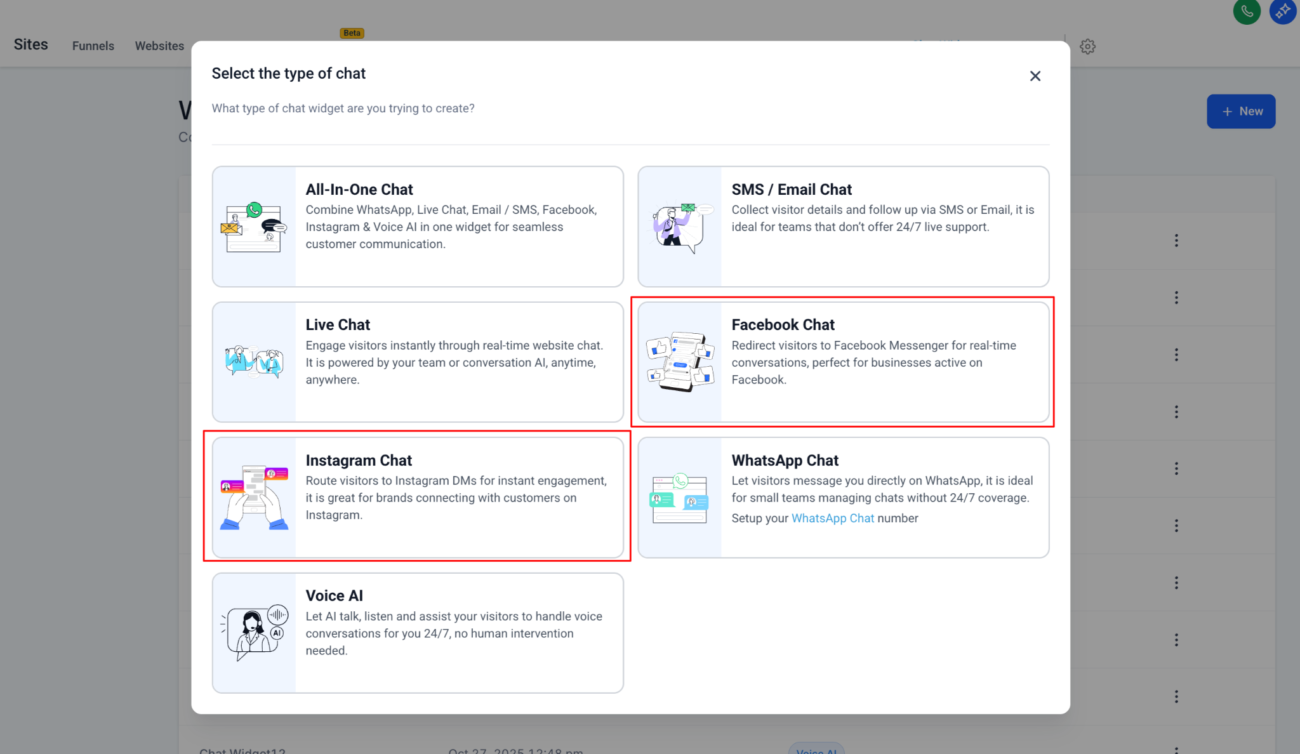
If this is your first time using Meta chat types:
👉 Already connected? Simply select the account from the dropdown.
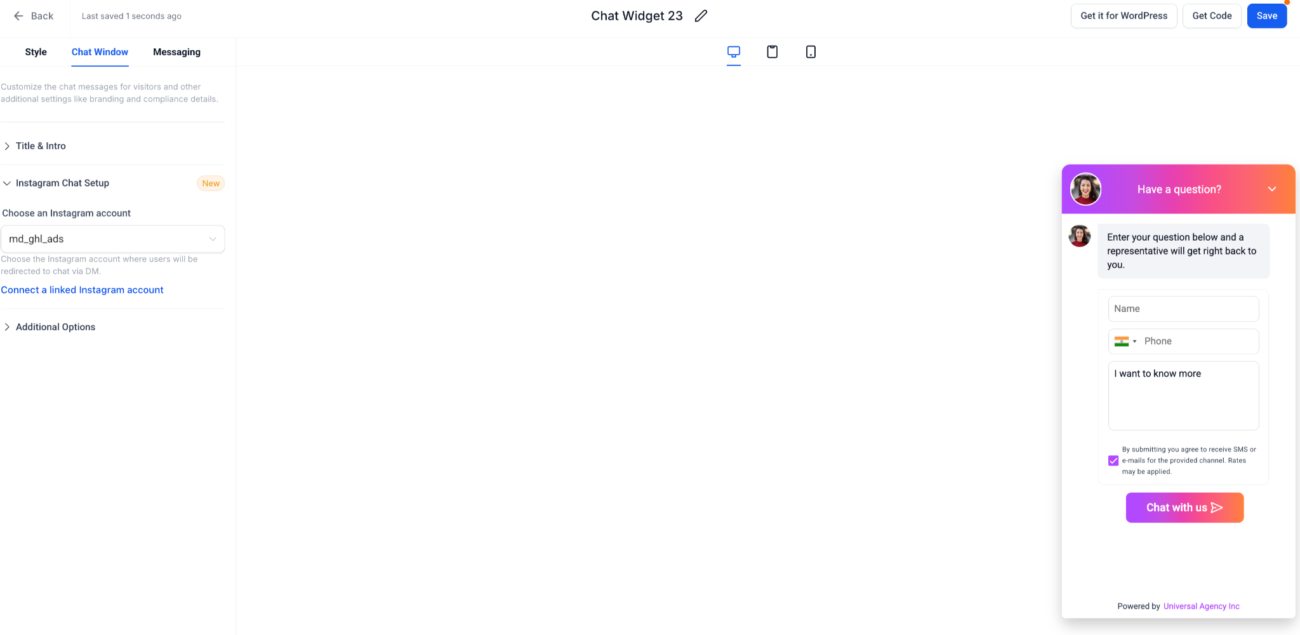
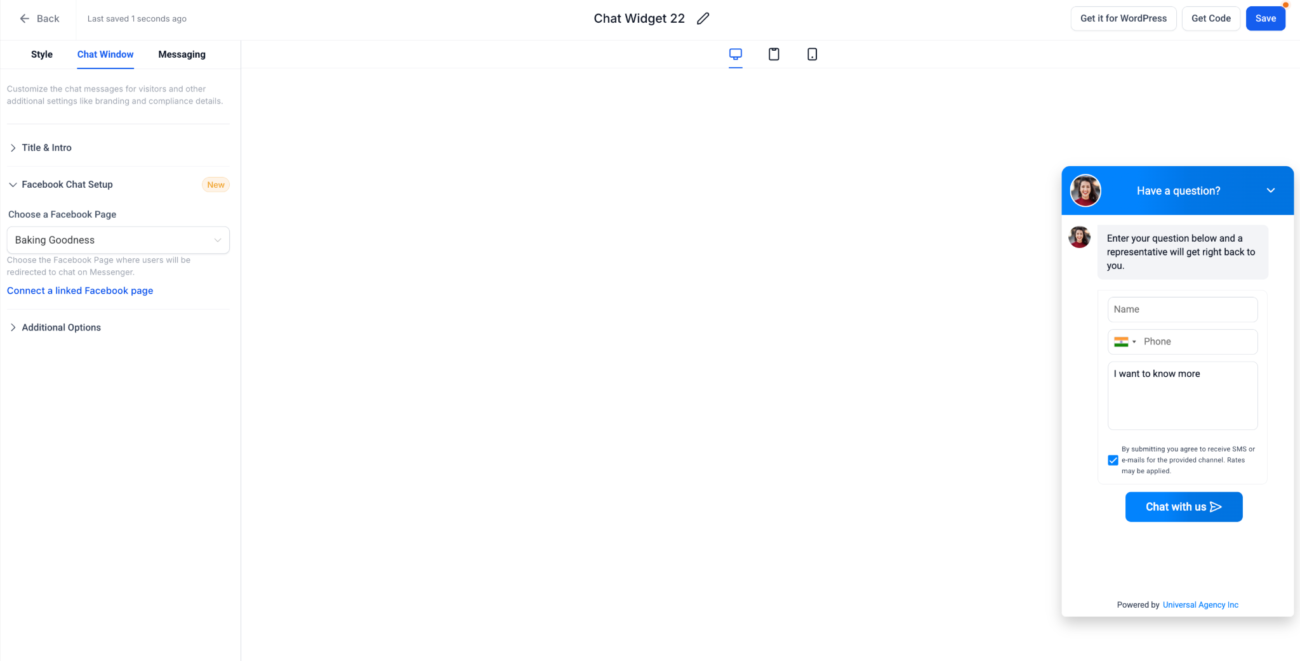
💡 Tip: You can create multiple widgets for different Pages or clients.
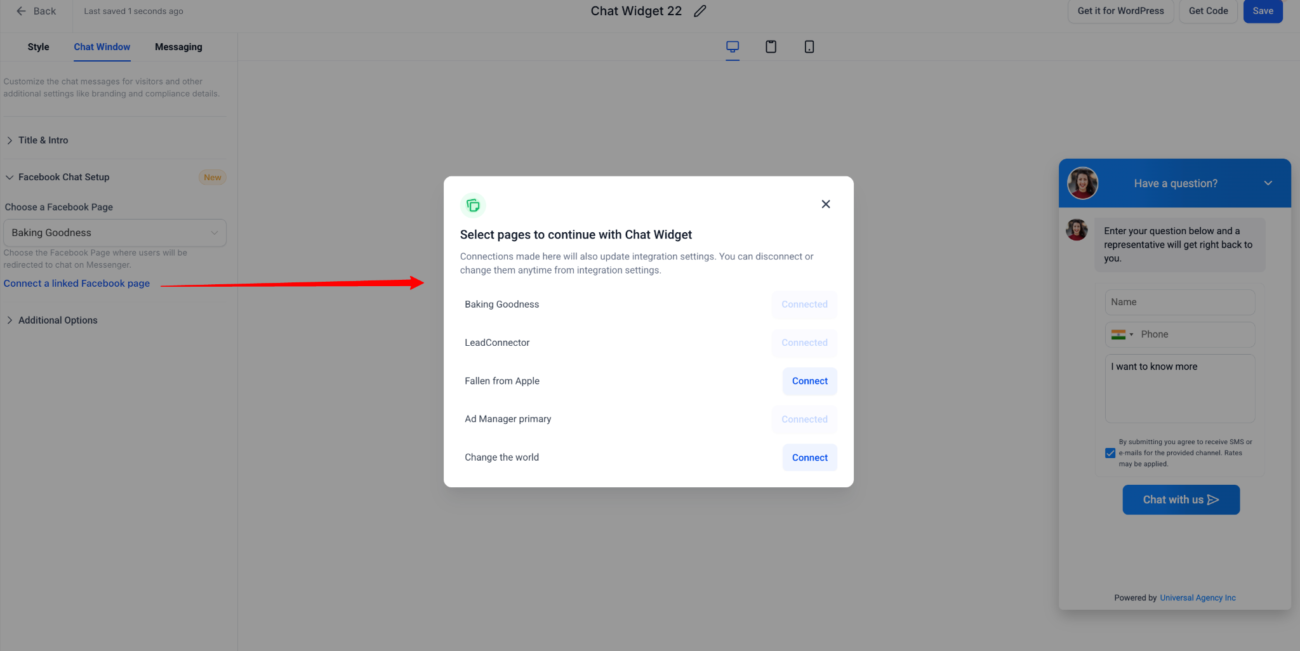
Even though the conversation happens on Meta, you can still:
This ensures your widget blends in with your website’s design.
Once you’ve saved your widget:
🎉 You’re done! Your widget is now live.
Both routes let the user message you in real time — using their existing Meta credentials. There’s no need for extra logins or form fills.
Best of all, the chat is persistent — users can return to it later, unlike web-only sessions.
If you activate the Facebook Chat Widget, you can go a step further and integrate it with HighLevel’s AI-powered features, including:
Example Workflow:
Visitor sends message → AI replies → GHL triggers workflow → Contact added to pipeline
This turns casual Messenger conversations into automated, conversion-ready workflows.
⚠️ Instagram DMs do not yet support automation or AI in GHL — only manual replies.
Here’s how top industries can benefit from these widgets:
| Industry | Facebook Chat | Instagram Chat |
|---|---|---|
| E-Commerce | Messenger for order updates, support | DMs for product Q&A, influencer chats |
| Local Services | Bookings via Messenger, service follow-up | Brand DMs for location or pricing questions |
| Coaches & Creators | Messenger for call scheduling, sales | DMs for quick replies to story viewers |
| Real Estate | Chat on listing pages, lead nurturing | DMs on property promo posts |
| Beauty & Salons | IG DMs for booking/rescheduling | Messenger for confirmations or reviews |
| Agencies | Multiple FB/IG widgets per client | Added to SaaS plan as premium feature |
The best part? These widgets are included in your existing plan.
| Feature | Free | Extra Cost |
|---|---|---|
| Facebook Chat Widget | ✅ | No |
| Instagram Chat Widget | ✅ | No |
| Meta account integration | ✅ | No |
| AI auto-responses via Facebook Chat | ❌ | $0.02 per message (usage) |
💡 Use GHL rebilling to charge clients for AI usage and build a revenue stream.
If you’re an agency or SaaS owner, here’s how to leverage chat widgets for growth:
Provide monthly support or reporting
Use snapshot templates with pre-configured widgets and automations for faster onboarding and cloning.
✔️ Add UTM parameters to the widget URLs for analytics
✔️ Trigger workflows when FB chats begin (e.g., send onboarding emails)
✔️ Segment leads based on chat source (Messenger vs. IG DM)
✔️ Use sticky headers to keep the widget visible on scroll
✔️ Test mobile vs. desktop behavior for performance differences
✔️ Create fallback options if user closes chat without submitting
Yes! Use Facebook Chat on one funnel, Instagram on another — or both on the same page.
No character limits are enforced by HighLevel, but Meta may limit responses depending on context.
GoHighLevel’s Facebook and Instagram Chat Widgets unlock a powerful new channel of communication—one that your audience already uses and trusts.
They provide:
Whether you’re capturing more leads, delivering better support, or offering premium features to your clients, Meta chat widgets give you the competitive edge.
✅ Simple to set up
✅ Free to use
✅ Fully integrated with GHL’s automation stack

If you’ve ever struggled with A2P 10DLC registration, you know how confusing and rejection-prone the process can be. One small

Build Powerful Workflows Just by Speaking Imagine building a complete automation without typing a single word. No clicking through triggers.

Design smarter. Move faster. Stop switching tabs. If you’ve ever designed something in Canva, downloaded it, uploaded it into your

The Smart Way to Re-Engage Leads Without Manual Work Leads don’t always ghost you on purpose. Sometimes they get busy.

AI automation is evolving fast. If you’ve ever wished you could fully control AI tasks inside your CRM without relying

Build Powerful Workflows Just by Speaking Imagine creating an entire workflow without touching your keyboard. No typing. No complicated setup.

Pick a design that fits your brand.

Integrate it seamlessly.

Tailor it to your business needs.

Start generating leads and sales.
No account yet?
Create an AccountWe use cookies to improve your experience on our site. By using our site, you consent to cookies.
Websites store cookies to enhance functionality and personalise your experience. You can manage your preferences, but blocking some cookies may impact site performance and services.
Essential cookies enable basic functions and are necessary for the proper function of the website.
These cookies are needed for adding comments on this website.
Google reCAPTCHA helps protect websites from spam and abuse by verifying user interactions through challenges.
These cookies are used for managing login functionality on this website.
Stripe is a payment processing platform that enables businesses to accept online payments securely and efficiently.
Service URL: stripe.com (opens in a new window)
Statistics cookies collect information anonymously. This information helps us understand how visitors use our website.
Google Analytics is a powerful tool that tracks and analyzes website traffic for informed marketing decisions.
Service URL: policies.google.com (opens in a new window)
Clarity is a web analytics service that tracks and reports website traffic.
Service URL: clarity.microsoft.com (opens in a new window)
SourceBuster is used by WooCommerce for order attribution based on user source.
You can find more information in our Privacy Policy and .




