🎈Winter Savings Special Sale 🎁
00
DAYS
00
HRS
00
MINS
00
SECS



Thinking about launching a software-as-a-service (SaaS) business? GoHighLevel’s SaaS Mode is one of the fastest and most profitable ways to do it. With built-in tools for billing, onboarding, automation, and client management—all under your brand—it’s a complete platform to run your own SaaS company without coding or development.
Whether you’re a solo marketer or an agency owner, this guide will walk you through setting up GoHighLevel SaaS Mode from scratch.
Learn what GoHighLevel and SaaS Mode are all about
Step-by-step setup instructions for domains, billing, and user onboarding
Create pricing plans with features, credits, and usage-based charges
Attach branded templates using snapshots
Automate client workflows and syncing
Use sub-accounts for cleaner management and scalability
GoHighLevel is a powerful CRM and marketing automation platform built specifically for agencies. It combines tools like
Funnel and landing page builders
SMS and email marketing
Calendar booking
Call tracking and voicemail
Memberships and surveys
AI automation and conversation flows
Think of it as a Swiss army knife for marketing and sales, helping agencies manage leads, nurture relationships, and close more deals.
SaaS Mode turns your GoHighLevel account into a white-label SaaS business. That means you can sell access to your own branded platform—with features, billing, and limits you control.
You become the software company. Clients pay you monthly or annually for access, and GoHighLevel powers everything in the background.
Benefits of SaaS Mode:
💰 Recurring revenue
🧩 Automated onboarding
🧾 Usage-based billing and credits
🎨 Custom branding on login, email, and domain
⚙️ Built-in support and automation flows
🔁 Sell to any niche—real estate, medspas, coaches, etc.
Digital marketing agencies want recurring revenue
Consultants looking to productize their services
Freelancers ready to scale without more clients
White-label resellers building software platforms
Coaches and creators monetizing their frameworks
Use SaaS Mode to deliver a CRM and funnel system to clients while keeping 100% of your brand visibility.
You’ll need:
✅ GoHighLevel Agency Pro Plan – $497/month
✅ Stripe Account—for subscription billing
✅ Custom Domain—for your login URL (e.g., app.yourbrand.com)
✅ Snapshot—a prebuilt workflow for each client (funnels, pipelines, etc.)
You can add more tools, such as NMI, Square, or Twilio, later, but this is the core stack.
| Plan Name | Monthly Price | Key Features |
|---|---|---|
| Agency Starter | $97/month | CRM, funnels, email/SMS marketing (no SaaS Mode) |
| Agency Unlimited | $297/month | Everything in Starter + unlimited accounts (no SaaS Mode) |
| Agency Pro (SaaS) | $497/month | Full SaaS Mode, rebilling, white-label, snapshots, support |
Let’s break this into simple, actionable chunks.
Stripe handles all subscription billing.
Go to Agency View → Settings → Stripe
Click Connect and follow the setup wizard
Once linked, Stripe will manage monthly charges, credits, and overage billing
Optional: For Square or NMI, connect them at the sub-account level instead.
White-label your platform with a custom subdomain.
In Agency settings, go to Company Info
Under the White-label domain, enter app.yourbrand.com
Add the CNAME record to your DNS (e.g., Cloudflare, GoDaddy).
Click Authorize in GoHighLevel once DNS is connected
💡 Tip: Avoid using the default GoHighLevel login link. A custom domain looks professional and improves trust.

Create a custom email domain like noreply@yourbrand.com
Add DNS records for SPF, DKIM, and DMARC
Paste links to your Privacy Policy and Terms of Service
Add a custom support email and logo
These steps help improve email deliverability.
Here’s where the magic happens.
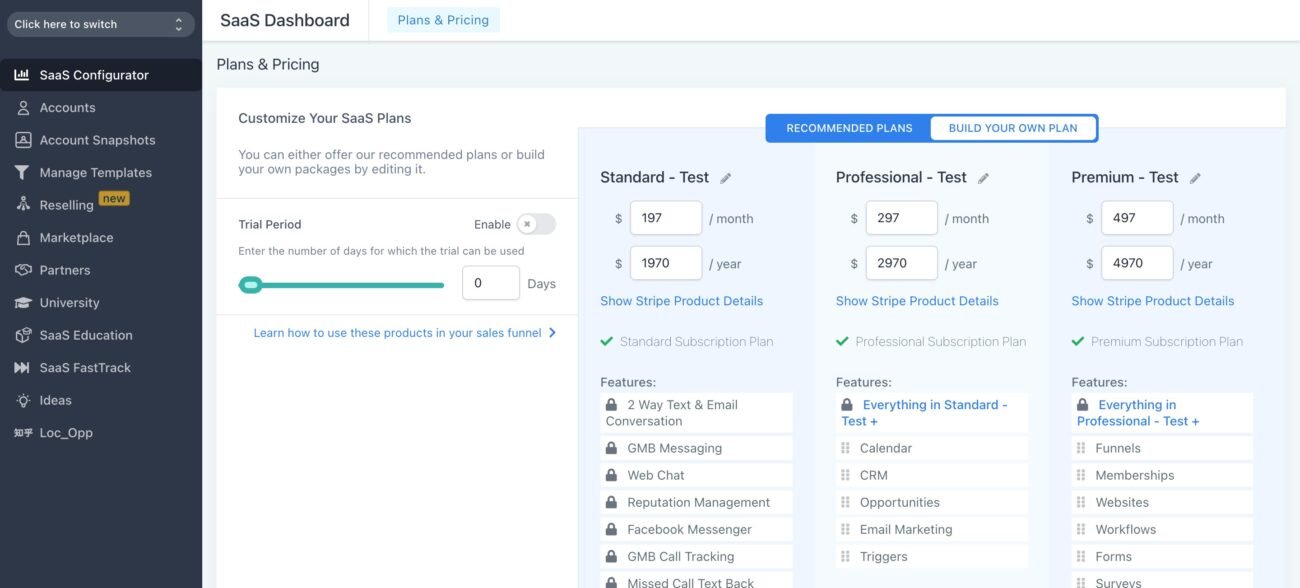
Go to SaaS Configurator → Add Plan
Choose your billing source (Agency or sub-account).
Add plan name, description, category (like Starter, Premium, etc.)
Set monthly and annual pricing (e.g. $97/month or $970/year)
Define:
Contact limit (e.g. 1,000)
User seats (e.g. 2)
Included features (CRM, workflows, reputation, AI, etc.)
Optional: Add-ons like WhatsApp, Yext, and Call Tracking
Attach your snapshot for auto-onboarding
Choose credit system (e.g. $10/month in usage credits)
Set rebilling markup (e.g. 1.5x usage cost)
📌 Pro Tip: Never edit a live plan. Duplicate and modify it instead.

A snapshot is a complete setup template that includes:
Funnels
Emails and SMS campaigns
Pipelines
Calendars
Tags, forms, and automations
Each time a client signs up, this snapshot gets auto-loaded into their account.
Examples:
🏡 Real Estate Snapshot
💇♀️ MedSpa Automation Flow
📅 Booking and Nurture Series for Coaches

GoHighLevel lets you resell:
| Feature | GHL Cost | You Can Charge (1.5x) |
|---|---|---|
| Outbound Call | $0.014/min | $0.021 |
| Inbound Call | $0.0085/min | $0.013 |
| SMS | $0.007/message | $0.0105 |
| Email (per 1,000) | $0.67 | $1.00 |
| AI Credits (1,000 tokens) | Varies | Add markup |
Clients will be billed when they exceed usage credits—automatically.
Use Workflows to automate:
Welcome email with login instructions
Add staff to Slack or Notion
Book a strategy call
Add contact to your internal CRM
Send renewal reminders and payment notices
💡 You can even create a client dashboard with links to training, help desk, and support.
Create a dedicated sub-account just for SaaS subscribers. Then:
Go to Payments → Products
Click Create Product → Use as SaaS
Add plan name, description, pricing, trial, usage caps, etc.
Build a checkout funnel inside that sub-account
This keeps your SaaS business clean, organized, and easier to scale.
Clients need a place to sign up. Build this inside GoHighLevel:
Add a 2-step checkout page
Include monthly vs annual toggle
List all plan features
Embed trust badges, testimonials, and FAQs
Link checkout to your SaaS product
Example URL: yourbrand.com/subscribe
In Agency Settings:
Set wallet charge alerts (e.g. when usage hits $200)
Turn on audit logs to track team actions
Enable beta features for early access to updates
Check usage reports per sub-account monthly
These tools help prevent billing surprises and optimize growth.
SaaS mode in GoHighLevel allows you to offer the platform as a service to other businesses under your own branding. You can create custom pricing plans, manage sub-accounts, and offer various features like CRM, marketing automation, and more.
To enable SaaS mode, you need to have an Agency-level account in GoHighLevel. Additionally, you’ll need a Stripe account for handling payments and billing for your clients.
Yes, you can fully customize the pricing plans in SaaS mode. You can set your prices, choose which features are included in each plan, and define any usage limits, such as the number of contacts or emails allowed.
You can integrate Stripe by navigating to the SaaS Mode settings in your Agency dashboard. From there, you’ll find an option to connect your Stripe account, which will handle all payment processing for your SaaS clients.
Yes, GoHighLevel allows you to white-label the platform, meaning you can use your own branding, including your logo, colors, and custom domain (e.g., dashboard.yourbrand.com) for the SaaS offering.
You can create sub-accounts manually via the Agency Dashboard or automate the process using onboarding forms that automatically create sub-accounts when filled out by new clients.
You can offer a wide range of features, including CRM, email and SMS marketing, sales funnels, websites, membership sites, booking calendars, and more. You can choose which features to include in each of your pricing plans.
As the SaaS provider, you’ll be responsible for supporting your clients. You can set up a helpdesk, use GoHighLevel’s chat features, or integrate with a third-party support system to assist your clients.
There is no hard limit on the number of sub-accounts you can create. However, your hosting and infrastructure should be capable of handling the load. GoHighLevel’s pricing tiers may also include different levels of resources and features.
GoHighLevel SaaS Mode is your launchpad to recurring income, scalable services, and a true software business. With the right setup, you can serve hundreds of clients without burnout—offering powerful tools and automation under your brand.
✅ Get your domain, snapshot, Stripe, and first plan set up today
✅ Build a simple sales funnel and test it live
✅ Start enrolling clients on autopilot

Design smarter. Move faster. Stop switching tabs. If you’ve ever designed something in Canva, downloaded it, uploaded it into your

The Smart Way to Re-Engage Leads Without Manual Work Leads don’t always ghost you on purpose. Sometimes they get busy.

AI automation is evolving fast. If you’ve ever wished you could fully control AI tasks inside your CRM without relying

Build Powerful Workflows Just by Speaking Imagine creating an entire workflow without touching your keyboard. No typing. No complicated setup.
If you’re using Conversation AI to handle customer interactions, you’re already ahead of the game. But what if you could
If you’ve ever wished your workflows could think before sending a message, you’re going to love what’s new in HighLevel.

Pick a design that fits your brand.

Integrate it seamlessly.

Tailor it to your business needs.

Start generating leads and sales.
No account yet?
Create an AccountWe use cookies to improve your experience on our site. By using our site, you consent to cookies.
Websites store cookies to enhance functionality and personalise your experience. You can manage your preferences, but blocking some cookies may impact site performance and services.
Essential cookies enable basic functions and are necessary for the proper function of the website.
These cookies are needed for adding comments on this website.
Google reCAPTCHA helps protect websites from spam and abuse by verifying user interactions through challenges.
These cookies are used for managing login functionality on this website.
Stripe is a payment processing platform that enables businesses to accept online payments securely and efficiently.
Service URL: stripe.com (opens in a new window)
Statistics cookies collect information anonymously. This information helps us understand how visitors use our website.
Google Analytics is a powerful tool that tracks and analyzes website traffic for informed marketing decisions.
Service URL: policies.google.com (opens in a new window)
Clarity is a web analytics service that tracks and reports website traffic.
Service URL: clarity.microsoft.com (opens in a new window)
SourceBuster is used by WooCommerce for order attribution based on user source.
You can find more information in our Privacy Policy and .



