



Rebilling, Reselling, and Wallets in GoHighLevel
If you’re running your agency on GoHighLevel, you’ve probably seen little deductions labeled “wallet” or heard about features like rebilling
Contents
If you’re running your agency on GoHighLevel, you’ve probably seen little deductions labeled “wallet” or heard about features like rebilling and reselling—but what do they really mean? More importantly, how can they help you stop absorbing client costs and start creating recurring revenue?
In this easy-to-follow guide, we’ll break it all down in plain English. Whether you’re just getting started or exploring SaaS mode, you’ll learn how to take control of your billing, offer more to clients, and even profit from everyday usage.
Key Takeaways
- Wallets are prepaid balances used to pay for services like SMS, email, or phone calls.
- Rebilling lets you pass usage costs back to your clients—with or without markup.
- Reselling allows you to charge clients monthly for premium add-ons like WhatsApp or AI tools.
- These features are exclusive to certain GoHighLevel plans ($297 or $497 plans).
- You need a Stripe account to enable client billing and collect payments.
What Is the GoHighLevel Wallet and Why You Need It
Think of the wallet as a prepaid account that gets used every time you or your client sends an SMS, email, or places a call through HighLevel. Instead of getting hundreds of micro-charges on your card, HighLevel deducts these costs from the wallet balance.
How It Works
You preload money into your wallet (e.g., $100).
Every SMS, call, or email deducts a small amount from the wallet.
When the balance drops below a threshold (like $25), it auto-recharges from your agency card.
Why It’s Important
Without the wallet system, each action would trigger a separate credit card transaction—leading to chaos, fees, and tracking headaches. Wallets simplify everything.
Example:
Outbound SMS: $0.0079 per segment
Inbound SMS: $0.0079 per segment
Outbound call: $0.0180 per minute
Inbound call: $0.0085 per minute
➡️ Set wallet auto-recharge settings under: Agency Settings > Billing
GoHighLevel Wallet Pricing
| Service | Price |
|---|---|
| SMS (In/Out) | $0.0079 per segment |
| Call Outbound | $0.0180 per minute |
| Call Inbound | $0.0085–$0.0220 per minute |
| MMS Outbound | $0.0200 per segment |
| MMS Inbound | $0.0100–$0.0200 per segment |
| Local Number | $1.15 per month |
| Toll-Free Number | $2.15 per month |
Rebilling Explained with and Without Markup
Rebilling gives you control over who pays for usage—your agency or your clients. It comes in two forms:
Rebilling Without Markup (Cost Recovery)
This lets you recover 100% of what GoHighLevel charges you.
-
Requirement: You must be on the $297/month plan or higher.
-
How it works:
-
A client sends an SMS.
-
HighLevel deducts cost from your agency wallet.
-
Your system immediately charges the client’s wallet the same amount.
-
🎯 You break even but stop absorbing usage costs.
Rebilling With Markup (Profit Mode)
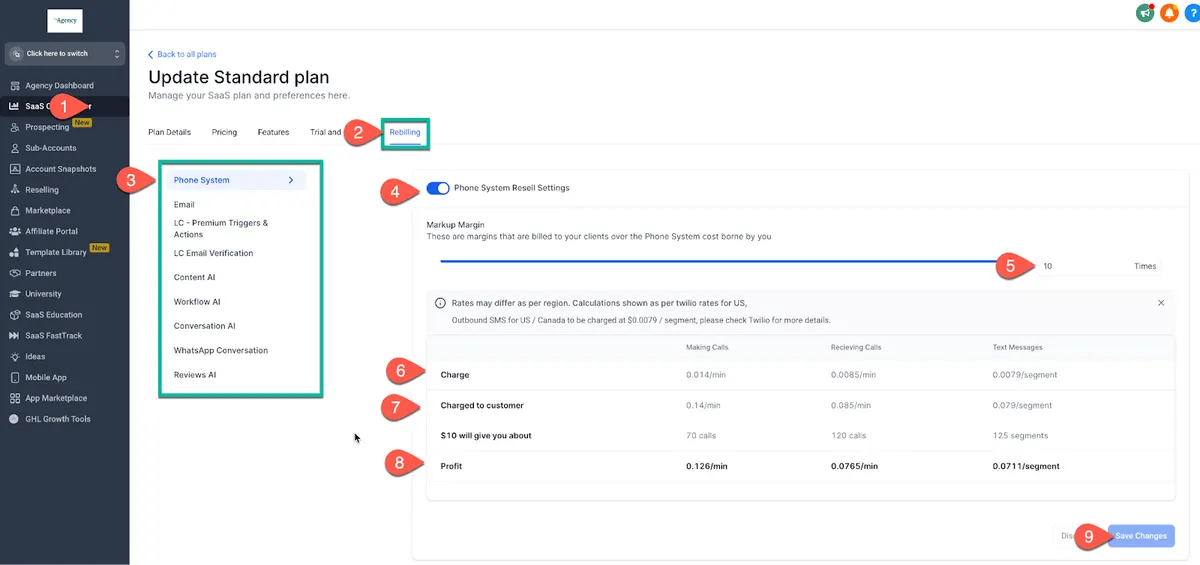
Now we’re talking! This setup lets you add a profit margin to each service your client uses.
Requirement: Must be on the $497/month SaaS plan.
How it works:
A client sends a message.
HighLevel charges your wallet $0.0079.
You charge your client $0.02 or more.
You keep the difference.
💡 Set markup using a slider in SaaS Configurator.
Example Breakdown:
| Service | Cost to You | Client Charge | Your Profit |
|---|---|---|---|
| SMS (1 segment) | $0.0079 | $0.02 | $0.0121 per SMS |
| Email (1 sent) | $0.001 | $0.005 | $0.004 per email |
| 1-Minute Call | $0.0180 | $0.04 | $0.022 per call |
Reselling Premium Services for Extra Revenue
Reselling is for flat-rate services like WhatsApp, Yext, and AI tools. You can either eat the cost (great for bonuses) or mark it up and earn monthly income.
How to Resell a Service Like WhatsApp
- Go to the sub-account and enable the service (e.g., WhatsApp).
- Set the pricing in your SaaS Configurator.
- Once the client adds their card, they’ll be charged monthly.
Example:
WhatsApp Cost to You: $10/month
Your Price to Client: $29.99/month
You Make: $19.99/month profit per client
You can also choose to bundle it in at no extra charge to stand out from competitors.
WhatsApp Reselling Example
| ervice | You Pay | You Charge | Profit |
|---|---|---|---|
| WhatsApp Add-on | $10/month | $29.99/month | $19.99/month |
✔️ You can choose to bundle services or upsell separately
✔️ Best shown during onboarding, sales calls, or via email campaigns
Step-by-Step Setup for Rebilling and Reselling
Step 1: Connect Your Stripe Account
Go to
Agency View > Settings > Payments.Click “Connect to Stripe”.
Step 2: Switch Sub-Accounts to SaaS Mode
Go to the sub-account > Click the three dots > “Switch to SaaS”.
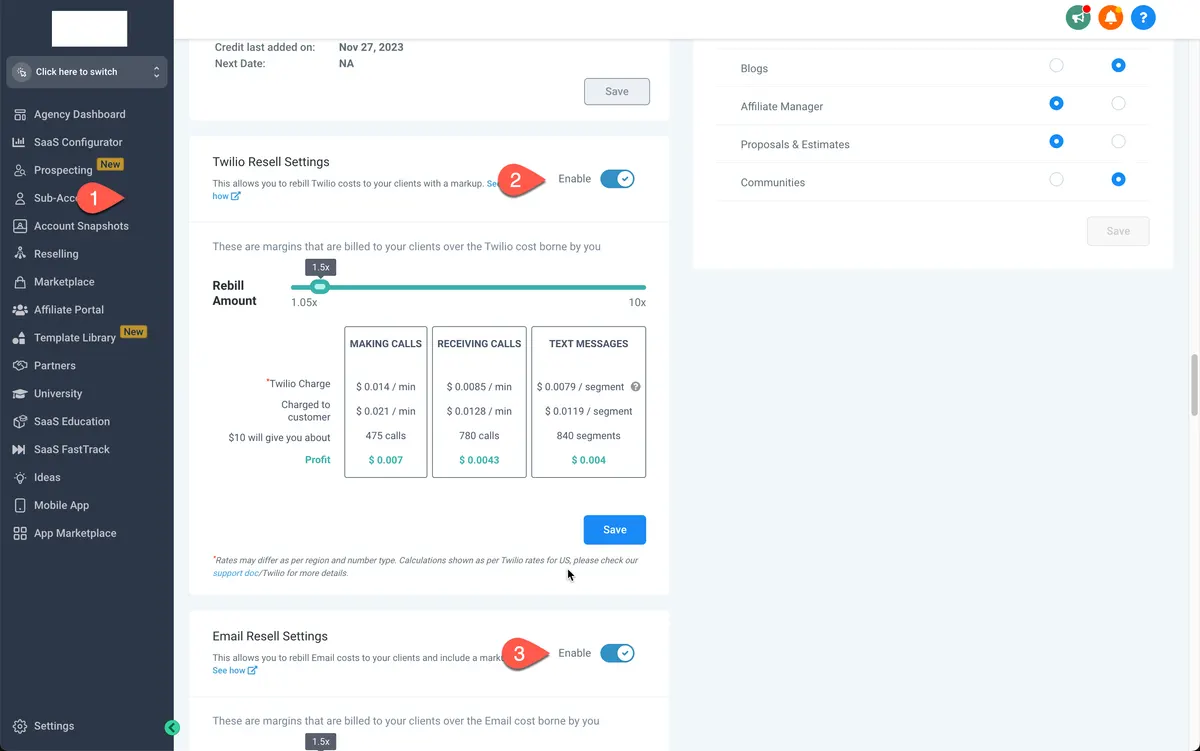
Step 3: Configure Rebilling Settings
Go to “Manage Client” view.
Enable wallet rebilling.
Set your markup slider.
Step 4: Customize Service Pricing
Under SaaS Configurator, define pricing for:
SMS, Email, Calls
AI Tools
WhatsApp, Yext, and more
Advanced Tips
🔹 Bundle services into your packages for added value (e.g., “Pro Plan includes WhatsApp + AI”)
🔹 Use email automation to inform clients when usage bills are processed
🔹 Monitor wallet usage regularly to avoid service pauses
🔹 Offer clients usage reports as part of their subscription for transparency
Conclusion
GoHighLevel’s wallet, rebilling, and reselling features aren’t just backend billing tools—they’re real revenue opportunities. By mastering how these work, you stop absorbing client costs, keep your cash flow clean, and even open the door to monthly profits just from what your clients already use.
Whether you’re just trying to break even or want to scale your agency with smart automation and pricing—this is where it starts.
👉 Ready to get started? Dive into the SaaS Mode Setup Guide and set yourself up for success today.
Quick answers
Frequently asked questions
Do I need a Stripe account to rebill?
Yes. Stripe is required to collect payments from clients.
Will HighLevel ever charge my clients directly?
No. HighLevel only charges your agency wallet. You control client billing via Stripe.
Can I rebill AI services too?
Yes! AI usage can also be rebilled with markup if you’re on the $497 plan.
What happens if my wallet hits zero?
If your wallet runs out and can’t reload (e.g., failed card), services may pause to avoid unapproved overages.
Where can I see usage and costs?
Go to Agency Settings > Billing to view wallet transactions and history.
Where this leaves you
Skip the build. Import a working GoHighLevel account instead.
Everything above is buildable by hand, and most people never finish. A snapshot is the same setup already made: funnels, pipelines, calendars, the prebuilt website and the automations, written for one industry and wired together before it reaches you.
- Delivered within 24 hours by email
- Install on unlimited sub-accounts you manage
- 20 hours of setup help across 15 days
Keep reading
All articles

Benefits of White Label SaaS in 2025
The way agencies grow in 2025 looks very different from just a few years ago. Instead of selling only services,
September 1, 20255 min read


How to Set Up GoHighLevel SaaS Mode: The 2026 Walkthrough
SaaS Mode turns GoHighLevel into software you sell. Setting up plans, rebilling, automated provisioning and the wallet, plus the mistakes that cost margin.
May 30, 20247 min read


GoHighLevel for Agencies: The Setup That Scales Past Ten Clients
How to structure a GoHighLevel agency account: template sub-accounts, snapshots, naming conventions, onboarding and the operational decisions that break at scale.
December 5, 20236 min read