🎈Winter Savings Special Sale 🎁
00
DAYS
00
HRS
00
MINS
00
SECS


Every missed call is a potential missed opportunity. Whether you run a local service business, a real estate agency, a clinic, or a sales-driven organization, phone calls often signal high intent. The problem is simple — you can’t always answer every call.
GoHighLevel’s Missed Call WhatsApp Back feature was built to solve this exact problem. Instead of letting missed calls go cold, the platform automatically follows up with callers on WhatsApp, turning silence into conversation and missed opportunities into active leads.
This feature is fast, built-in, easy to enable, and designed to work without the complexity of workflows or manual follow-ups.
Missed calls happen more often than businesses realize. During peak hours, after business hours, or when teams are short-staffed, calls go unanswered—and customers don’t usually wait.
Most callers:
In competitive markets, speed matters. A fast acknowledgment builds trust, while silence pushes prospects away. This is where WhatsApp follow-ups outperform traditional callbacks or SMS messages.
Missed Call WhatsApp Back is a native GoHighLevel feature that automatically sends a WhatsApp message to a caller immediately after a call is missed.
Instead of requiring workflows, triggers, or third-party tools, this feature works directly within GoHighLevel’s phone system. Once enabled, it ensures every missed call receives a friendly, professional WhatsApp message without delay.
The goal is simple — let customers know their call mattered and invite them to continue the conversation in a channel they already use daily.

While SMS has been the traditional approach for missed call text backs, WhatsApp offers several advantages:
In many regions, WhatsApp messages are read within minutes. By shifting missed call follow-ups to WhatsApp, businesses dramatically increase the chances of reconnecting with callers.
As soon as a call is missed, GoHighLevel automatically sends a WhatsApp message to the caller. There is no waiting period and no manual action required.
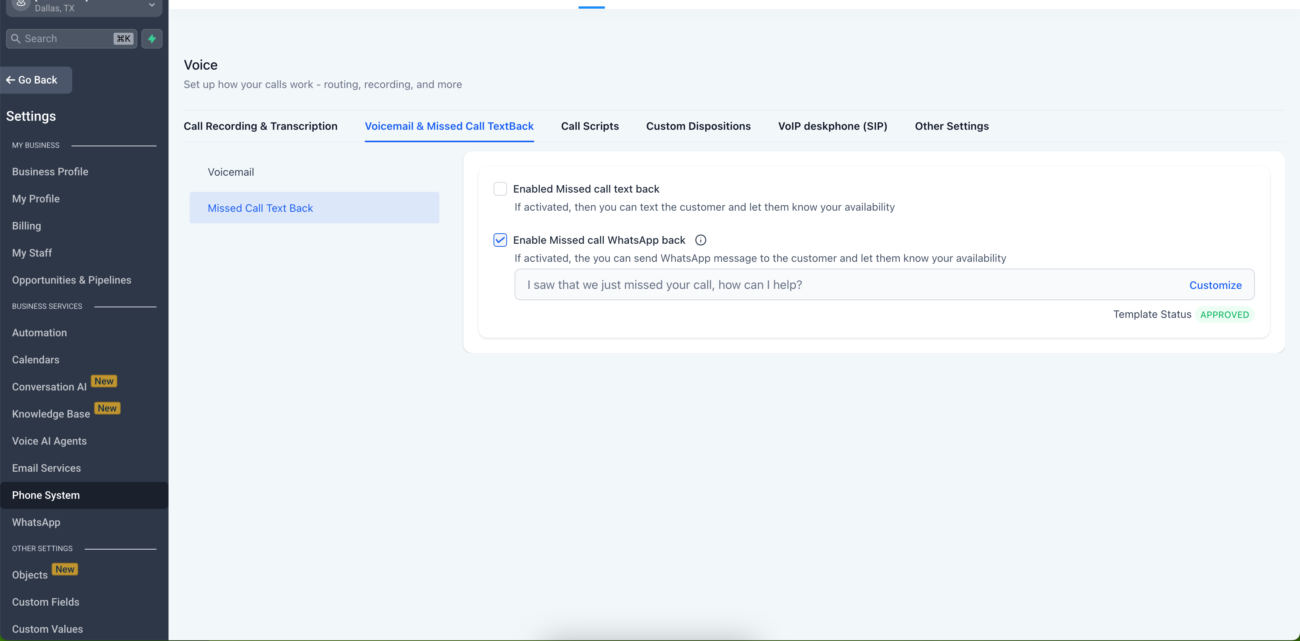
The feature can be enabled directly from:
A simple toggle activates WhatsApp follow-ups, making it accessible even for non-technical users.
GoHighLevel includes a ready-to-use, WhatsApp-approved template:
“Hi this is {{location.name}}, I saw that we just missed your call. How can I help?”
Because the template is already approved, businesses can start using the feature immediately without waiting for WhatsApp template approval.
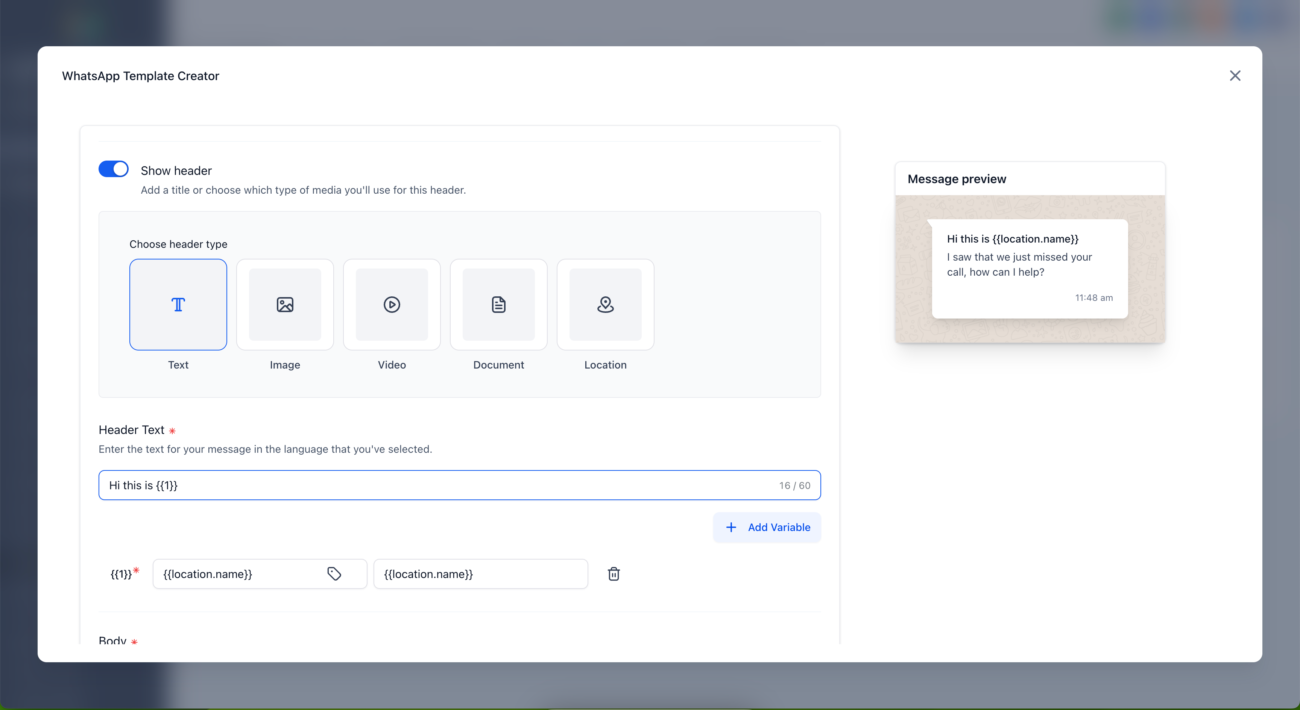
Businesses can customize the message to match their brand tone and use case. Supported variables include:
Customization is handled directly inside the Missed Call WhatsApp Back settings, not from the WhatsApp templates section.
Messages are always sent from your default connected WhatsApp number. This creates a consistent, trusted experience for customers and avoids confusion.
This feature does not replace or interfere with existing workflows. If you already have automations running for missed calls, they will continue to function normally.
Enabling the feature takes only a few minutes:
Once saved, the feature is live instantly.
Clinics often miss calls during busy hours or lunch breaks. With Missed Call WhatsApp Back, patients instantly receive a message inviting them to book appointments, reducing lost bookings.
Agents frequently miss calls while attending showings. WhatsApp follow-ups keep prospects engaged and prevent them from contacting competing agents.
Plumbers, electricians, HVAC providers, and cleaners benefit from instant WhatsApp responses when calls are missed on job sites or after hours.
After-hours calls are common. A WhatsApp message with business hours or a booking link turns missed calls into scheduled services.
Missed Call WhatsApp Back improves conversions by:
A short WhatsApp message reassures the caller that help is available, increasing the likelihood they will respond instead of moving on.
No. It works alongside workflows and does not disable existing automations.
Yes. You can fully customize the message using supported personalization variables.
No. The default template is already approved and ready to use.
Yes. The message is sent instantly, even outside business hours.
GoHighLevel’s Missed Call WhatsApp Back is a smart, practical feature designed for real businesses facing real problems. It eliminates missed opportunities, improves response times, and aligns perfectly with modern customer communication habits.
If your business relies on phone calls to generate leads, this feature ensures that no missed call ever goes unanswered again — even when your team can’t pick up the phone.

If you’ve ever struggled with A2P 10DLC registration, you know how confusing and rejection-prone the process can be. One small

Build Powerful Workflows Just by Speaking Imagine building a complete automation without typing a single word. No clicking through triggers.

Design smarter. Move faster. Stop switching tabs. If you’ve ever designed something in Canva, downloaded it, uploaded it into your

The Smart Way to Re-Engage Leads Without Manual Work Leads don’t always ghost you on purpose. Sometimes they get busy.

AI automation is evolving fast. If you’ve ever wished you could fully control AI tasks inside your CRM without relying

Build Powerful Workflows Just by Speaking Imagine creating an entire workflow without touching your keyboard. No typing. No complicated setup.

Pick a design that fits your brand.

Integrate it seamlessly.

Tailor it to your business needs.

Start generating leads and sales.
No account yet?
Create an AccountWe use cookies to improve your experience on our site. By using our site, you consent to cookies.
Websites store cookies to enhance functionality and personalise your experience. You can manage your preferences, but blocking some cookies may impact site performance and services.
Essential cookies enable basic functions and are necessary for the proper function of the website.
These cookies are needed for adding comments on this website.
Google reCAPTCHA helps protect websites from spam and abuse by verifying user interactions through challenges.
These cookies are used for managing login functionality on this website.
Stripe is a payment processing platform that enables businesses to accept online payments securely and efficiently.
Service URL: stripe.com (opens in a new window)
Statistics cookies collect information anonymously. This information helps us understand how visitors use our website.
Google Analytics is a powerful tool that tracks and analyzes website traffic for informed marketing decisions.
Service URL: policies.google.com (opens in a new window)
Clarity is a web analytics service that tracks and reports website traffic.
Service URL: clarity.microsoft.com (opens in a new window)
SourceBuster is used by WooCommerce for order attribution based on user source.
You can find more information in our Privacy Policy and .



