🎈Winter Savings Special Sale 🎁
00
DAYS
00
HRS
00
MINS
00
SECS


Discover optional tips for managing invoices in GoHighLevel. Learn how to customize, automate, and streamline your invoicing process to save time and improve accuracy.
Why Does It Matter to Your Business?
How to Use Optional Tips on Invoices from HighLevel
Key Steps to Optimize Invoices in HighLevel
Understanding HighLevel’s Invoicing Features
Customizing Invoice Templates
Setting Up Automated Recurring Invoices
Adding Payment Links for Easy Collection
Tracking and Following Up on Unpaid Invoices
Using Analytics to Improve Invoicing
Invoices are more than just payment requests—they’re an extension of your brand and a critical part of your business operations. Here’s why optimizing your invoices in HighLevel is vital:
By optimizing yourHighLevel Invoices process, you can build trust, improve client relationships, and keep your finances organized with minimal effort.
Using optional tips on invoices in HighLevel can transform how you handle billing. Follow these steps to maximize their potential:
Explore the Invoicing Features
Personalize Your Invoices
Automate Where Possible
Incorporate Payment Options
Review Analytics Regularly
By leveraging these tips, you can streamline invoicing, minimize errors, and create a smoother experience for your clients.
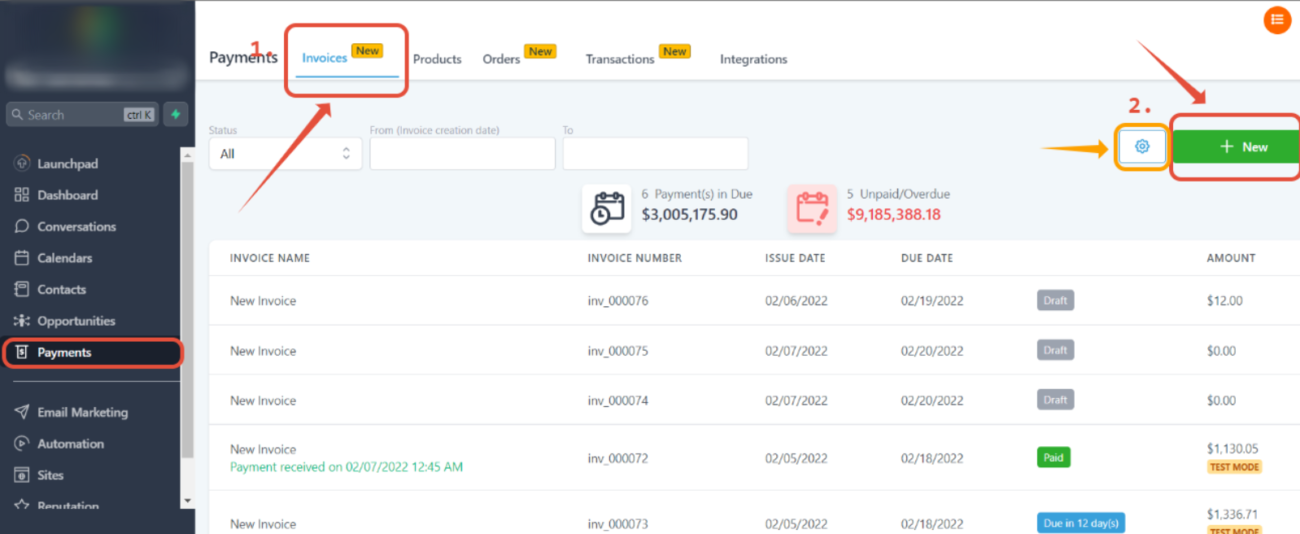
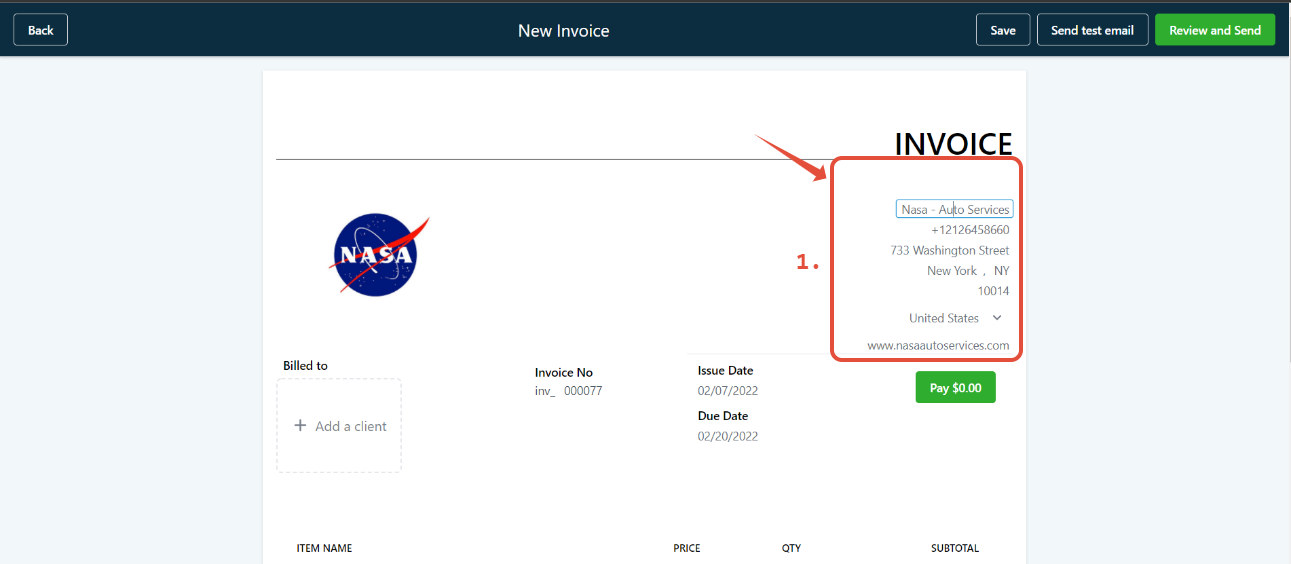
Modify “From” Information: Click on the text under the “from info” section to make changes directly. Simply type in the updated information.
Change the Image: Select the current image to access the media library, where you can upload a new image or choose one from the available options.
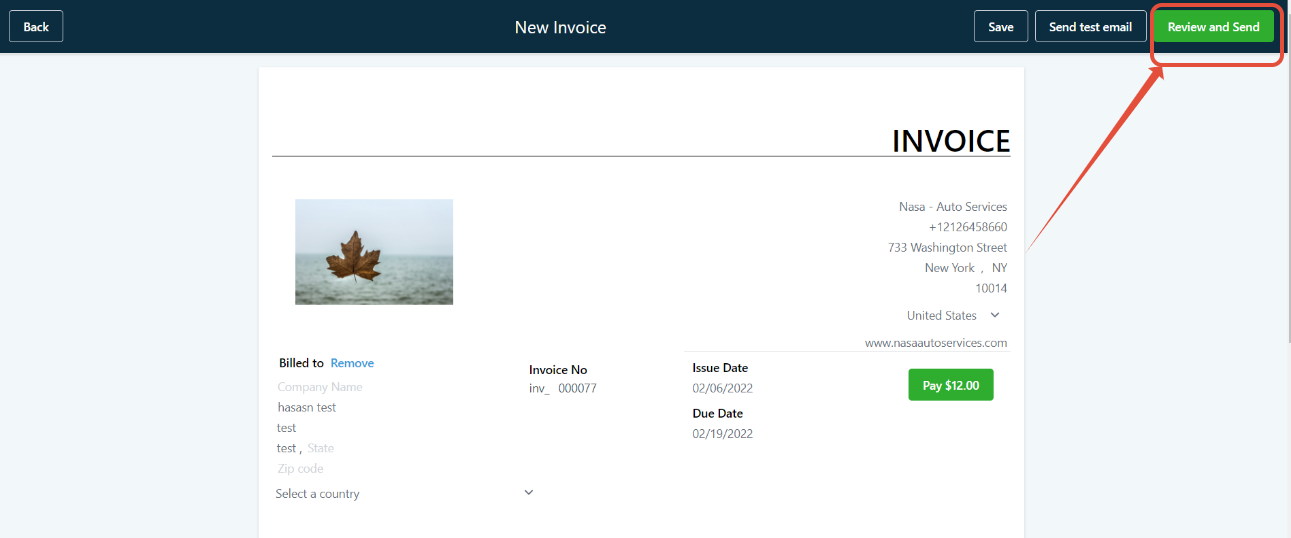
Add or Update Client Details: Input the client’s information and adjust fields such as the Invoice Number, Issue Date, and Due Date.
Add Items: Use the “Add Item” button to include products from your products tab.
Edit Item Details: After adding products, adjust the price and quantity as needed for each item.
Access Tax Settings: Click on the “Tax Settings” option in your invoice interface.
Add a Tax: Select “Add Tax” and fill in the required fields:
Yes, HighLevel allows you to personalize your invoices with branding, custom fields, and more to match your business identity.
Recurring invoices can be configured through the settings under the “Recurring Payments” section. Select frequency and automate billing cycles.
Yes, HighLevel supports integrations with popular payment processors like Stripe and PayPal, making it easy to manage transactions.
Absolutely! HighLevel lets you automate follow-up reminders for overdue invoices to improve payment collection.
Yes, HighLevel provides analytics to track payments, overdue invoices, and overall financial performance to help optimize your invoicing process.
Effective invoicing is crucial for maintaining cash flow and building client trust. With HighLevel, you can simplify your invoicing process by customizing templates, automating recurring payments, and using analytics to track performance. Implement these tips to streamline your invoicing system and focus more on growing your business.

If you’ve ever struggled with A2P 10DLC registration, you know how confusing and rejection-prone the process can be. One small

Build Powerful Workflows Just by Speaking Imagine building a complete automation without typing a single word. No clicking through triggers.

Design smarter. Move faster. Stop switching tabs. If you’ve ever designed something in Canva, downloaded it, uploaded it into your

The Smart Way to Re-Engage Leads Without Manual Work Leads don’t always ghost you on purpose. Sometimes they get busy.

AI automation is evolving fast. If you’ve ever wished you could fully control AI tasks inside your CRM without relying

Build Powerful Workflows Just by Speaking Imagine creating an entire workflow without touching your keyboard. No typing. No complicated setup.

Pick a design that fits your brand.

Integrate it seamlessly.

Tailor it to your business needs.

Start generating leads and sales.
No account yet?
Create an AccountWe use cookies to improve your experience on our site. By using our site, you consent to cookies.
Websites store cookies to enhance functionality and personalise your experience. You can manage your preferences, but blocking some cookies may impact site performance and services.
Essential cookies enable basic functions and are necessary for the proper function of the website.
These cookies are needed for adding comments on this website.
Google reCAPTCHA helps protect websites from spam and abuse by verifying user interactions through challenges.
These cookies are used for managing login functionality on this website.
Stripe is a payment processing platform that enables businesses to accept online payments securely and efficiently.
Service URL: stripe.com (opens in a new window)
Statistics cookies collect information anonymously. This information helps us understand how visitors use our website.
Google Analytics is a powerful tool that tracks and analyzes website traffic for informed marketing decisions.
Service URL: policies.google.com (opens in a new window)
Clarity is a web analytics service that tracks and reports website traffic.
Service URL: clarity.microsoft.com (opens in a new window)
SourceBuster is used by WooCommerce for order attribution based on user source.
You can find more information in our Privacy Policy and .



