🎈Winter Savings Special Sale 🎁
00
DAYS
00
HRS
00
MINS
00
SECS


AI just got a lot more powerful inside GoHighLevel. With the latest update, the Workflow AI Builder is now available across all sub-accounts — giving businesses, marketers, and agencies access to smarter, more personalized, and fully automated workflows powered by ChatGPT.
If you’ve ever wanted to build intelligent automations that feel human, respond dynamically, and adapt in real-time—this is your golden ticket.
✅ Workflow AI is now accessible in every sub-account (not just agency-level)
🤖 Integrates directly with ChatGPT for intelligent decision-making
🔁 Supports conditional logic, branching, and context-based automation
🧠 Great for scaling support, sales, and operational workflows
💰 Available for use with AI usage-based pricing or the unlimited AI Employee plan
Workflow AI is an automation action inside GoHighLevel’s powerful workflow builder that allows you to:
Unlike typical automations that follow a rigid “if this, then that” format, Workflow AI lets you use natural language prompts to control what happens next — and now you can do that in any sub-account.
Before this update, Workflow AI was limited in accessibility and often required toggling between agency and sub-accounts.
Now that it’s live in all sub-accounts:
✅ Every client or brand under your agency umbrella can leverage AI
✅ Teams can create smarter onboarding, follow-ups, and lead nurturing flows
✅ Agencies can re-bill AI usage to generate recurring revenue
✅ There’s no need for custom integrations or jumping between tools
This makes GoHighLevel an even stronger all-in-one platform for marketing, operations, and client success.
Here’s how businesses are already using Workflow AI across their sub-accounts:
Automatically write personalized follow-up emails based on form submissions, appointment bookings, or sales calls.
Prompt Example:
“Write a friendly follow-up email to {{contact.name}} thanking them for booking a {{appointment.service_name}} on {{appointment.start_time}}. Mention the benefits of this service and include next steps.”
Ask a lead for more details, and based on their response, score or route them accordingly.
Prompt Example:
“Read the following user message: ‘{{last.message}}’. Determine if the user is interested in booking an appointment. Return YES or NO.”
Use AI to interpret responses like “I’m not ready” or “Call me back later” and move them to the right nurturing sequence.
Summarize long notes or call transcripts and add them to the CRM record.
Prompt Example:
“Summarize the following notes in 2-3 sentences: ‘{{notes}}’. Focus on what the lead is interested in and any objections they raised.”
Build conditional SMS flows where AI understands the response and decides what message to send next.
Let’s walk through exactly how to use this new feature:
Go to Automation → Workflows → + Create Workflow (or open an existing one)
Examples:
Click the “+” to add a new action
Choose: AI Prompt
Use clear, specific instructions. Examples:
Include merge fields to personalize.
After the AI prompt, use “If/Else” to route contacts based on keywords in the AI’s output (e.g., “interested,” “cancel,” “book”).
Test using internal contact records
Once ready, click Publish and set your workflow live!
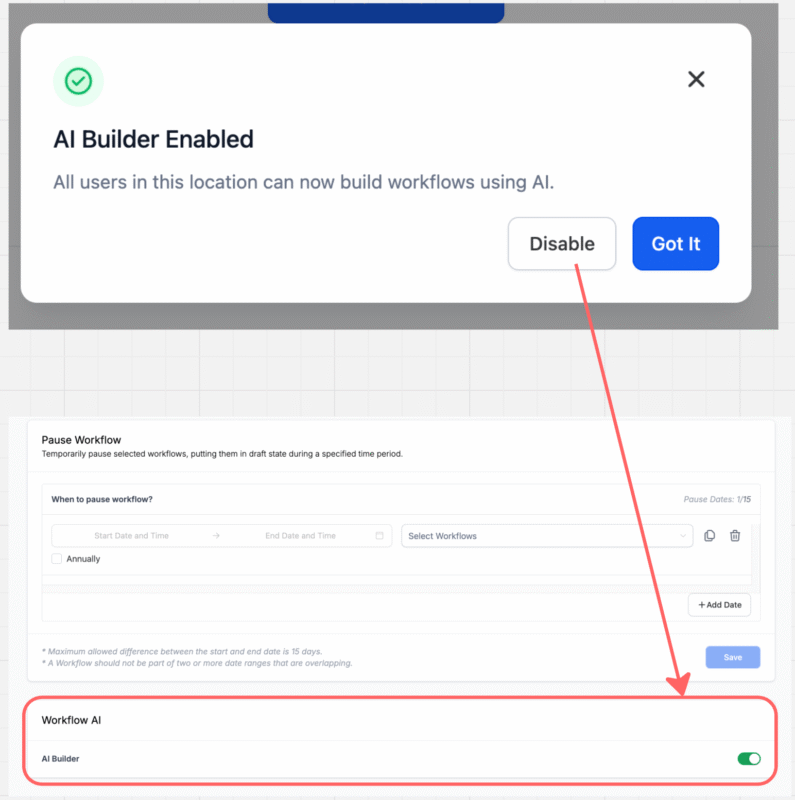
GoHighLevel has introduced a seamless way to activate and manage Workflow AI Builder across all your sub-accounts. Here’s how it works:
Enabling AI Builder at the agency level now automatically activates it across all sub-accounts instantly.
There’s no need to manually enable it in each location—once it’s turned on at the agency level, it becomes available platform-wide.
Want more control? No problem.
You can disable AI Builder for specific sub-accounts at any time:
Go to: Automations → Global Workflow Settings → Disable AI Builder
This gives agencies the flexibility to restrict AI usage in selected locations based on client needs or preferences.
To ensure visibility:
This ensures you stay informed and in control at every level.
Workflow AI is usage-based or included in HighLevel’s AI Unlimited plan. Here’s how it breaks down:
| Plan Type | Workflow AI Pricing |
|---|---|
| Pay-per-use (default) | ~$0.02 per message or action (varies by size) |
| Unlimited AI Plan ($97/mo) | ✅ Unlimited access |
| SaaS Pro Plan ($497/mo) | ✅ Includes AI + ✅ Rebilling Options |
If you’re on the SaaS Pro plan, you can rebill clients for AI usage at a markup and earn back your investment.
Prompt writing is where the magic happens. Here’s how to make your AI smarter:
Example of a great prompt:
“Act like a friendly sales rep. Write a 2-sentence response thanking {{contact.first_name}} for their interest in our service {{custom_field.service_type}}, and suggest they book a time here: {{calendar.booking_link}}.”
Here are next-level ways to combine Workflow AI:
Use AI to interpret how “hot” a lead is based on their responses. Tag accordingly.
Feed the AI product info or FAQs using custom prompts, and it can respond intelligently inside your workflow.
Trigger upsell offers based on purchase behavior, then have AI write the email or SMS dynamically.
✅ Save hours per week on manual message writing
✅ Build scalable, intelligent client onboarding systems
✅ Increase conversions with personalized, timely replies
✅ Offer smarter automations as a white-label service
✅ Create new revenue streams through AI usage rebilling
Whether you’re building for your own brand or your clients, Workflow AI is like hiring a 24/7 assistant who never sleeps, never forgets, and always replies with the perfect message.
Yes, but you pay-per-use unless you upgrade to the $97 AI Unlimited Plan or the $497 SaaS Pro Plan.
Yes! This update makes the feature fully available across sub-accounts.
No, not unless you include them in the prompt. If you want context, paste or pull previous messages into your prompt.
Absolutely. You can use the AI output to send via either channel — or both.
Yes, if you’re on the SaaS Pro plan. Set your pricing and let GoHighLevel handle the rest.
GoHighLevel just made a massive leap toward the future of automation — and you’re invited.
By giving every sub-account access to Workflow AI, the platform empowers you to create smarter, more personalized, and scalable automations that act like humans and think like strategists.
The only question now is: What will you automate first?
Start building your first AI-powered workflow today. The future is already here—and it’s conversational.

If you’ve ever struggled with A2P 10DLC registration, you know how confusing and rejection-prone the process can be. One small

Build Powerful Workflows Just by Speaking Imagine building a complete automation without typing a single word. No clicking through triggers.

Design smarter. Move faster. Stop switching tabs. If you’ve ever designed something in Canva, downloaded it, uploaded it into your

The Smart Way to Re-Engage Leads Without Manual Work Leads don’t always ghost you on purpose. Sometimes they get busy.

AI automation is evolving fast. If you’ve ever wished you could fully control AI tasks inside your CRM without relying

Build Powerful Workflows Just by Speaking Imagine creating an entire workflow without touching your keyboard. No typing. No complicated setup.

Pick a design that fits your brand.

Integrate it seamlessly.

Tailor it to your business needs.

Start generating leads and sales.
No account yet?
Create an AccountWe use cookies to improve your experience on our site. By using our site, you consent to cookies.
Websites store cookies to enhance functionality and personalise your experience. You can manage your preferences, but blocking some cookies may impact site performance and services.
Essential cookies enable basic functions and are necessary for the proper function of the website.
These cookies are needed for adding comments on this website.
Google reCAPTCHA helps protect websites from spam and abuse by verifying user interactions through challenges.
These cookies are used for managing login functionality on this website.
Stripe is a payment processing platform that enables businesses to accept online payments securely and efficiently.
Service URL: stripe.com (opens in a new window)
Statistics cookies collect information anonymously. This information helps us understand how visitors use our website.
Google Analytics is a powerful tool that tracks and analyzes website traffic for informed marketing decisions.
Service URL: policies.google.com (opens in a new window)
Clarity is a web analytics service that tracks and reports website traffic.
Service URL: clarity.microsoft.com (opens in a new window)
SourceBuster is used by WooCommerce for order attribution based on user source.
You can find more information in our Privacy Policy and .



