🎈Winter Savings Special Sale 🎁
00
DAYS
00
HRS
00
MINS
00
SECS


Communication today happens everywhere. Customers message through Facebook, reply on Instagram, chat via SMS, leave WhatsApp messages, and increasingly rely on AI-powered voice interactions. Businesses now must be ready to respond instantly — no matter which platform the customer chooses.
That’s why GoHighLevel’s latest upgrade is a big step forward. The All-in-One Chat Widget now supports Facebook, Instagram, and Voice AI, making it easier than ever to manage multichannel conversations in one unified place.
This update brings together the world’s most popular social channels and next-gen Voice AI inside a single, clean interface directly on your website.
Let’s break it down.
GoHighLevel’s chat widget is designed to simplify communication by giving customers a single point of contact. Previously, it supported Live Chat, SMS, and Email. With this update, it now integrates even more powerful channels.
Supported Channels Now Include
This upgrade means businesses no longer need multiple plugins, separate bubbles, or individual social chat tools on their website.
Everything is unified inside one widget.
Customers today don’t stick to one communication platform. They switch between apps depending on convenience, habits, and urgency. This makes multichannel communication essential — not optional.
Here’s how this update helps businesses stay ahead.
Visitors can now pick the communication method they feel most comfortable with whether that’s a DM, a Messenger chat, or a voice-powered AI conversation.
All conversations land in one unified inbox inside GoHighLevel.
No switching apps.
No separate logins.
No missed leads.
When customers are given options, they convert more often. Offering Facebook, Instagram, WhatsApp, and AI chat creates instant engagement.
Voice AI can handle booking, FAQs, or lead qualification even when your team is unavailable.
GoHighLevel made the setup simple and intuitive. Here’s how to enable the new channels.
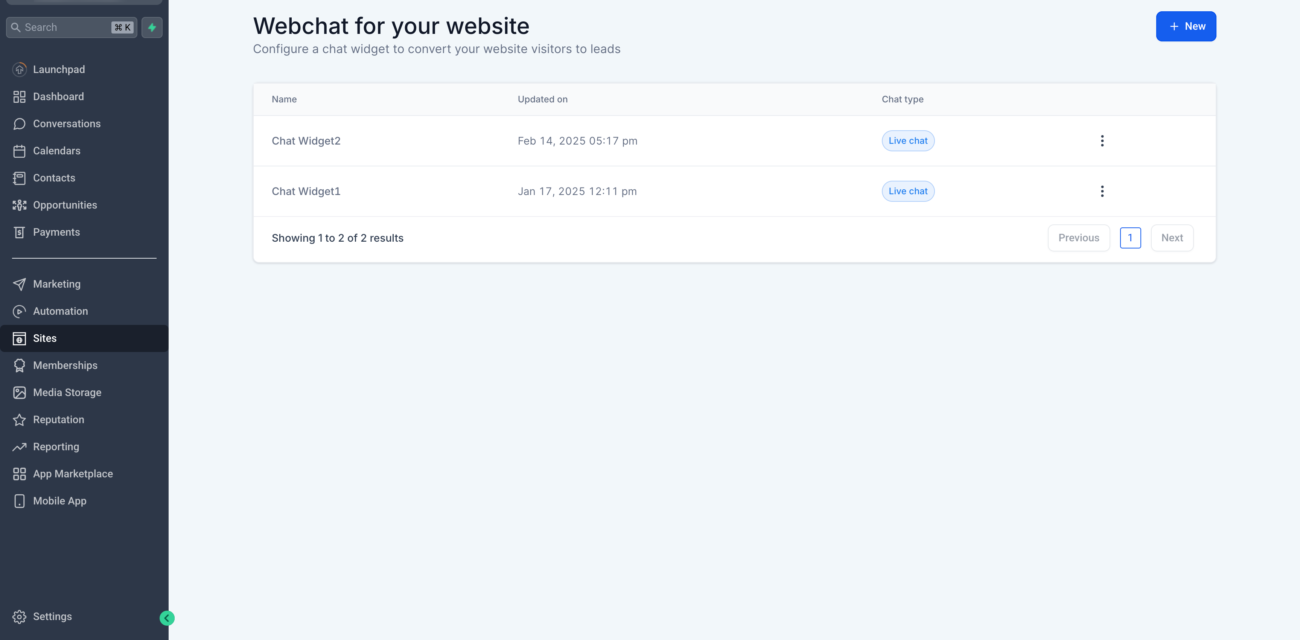
You can:
This is where the new multi-select option appears.
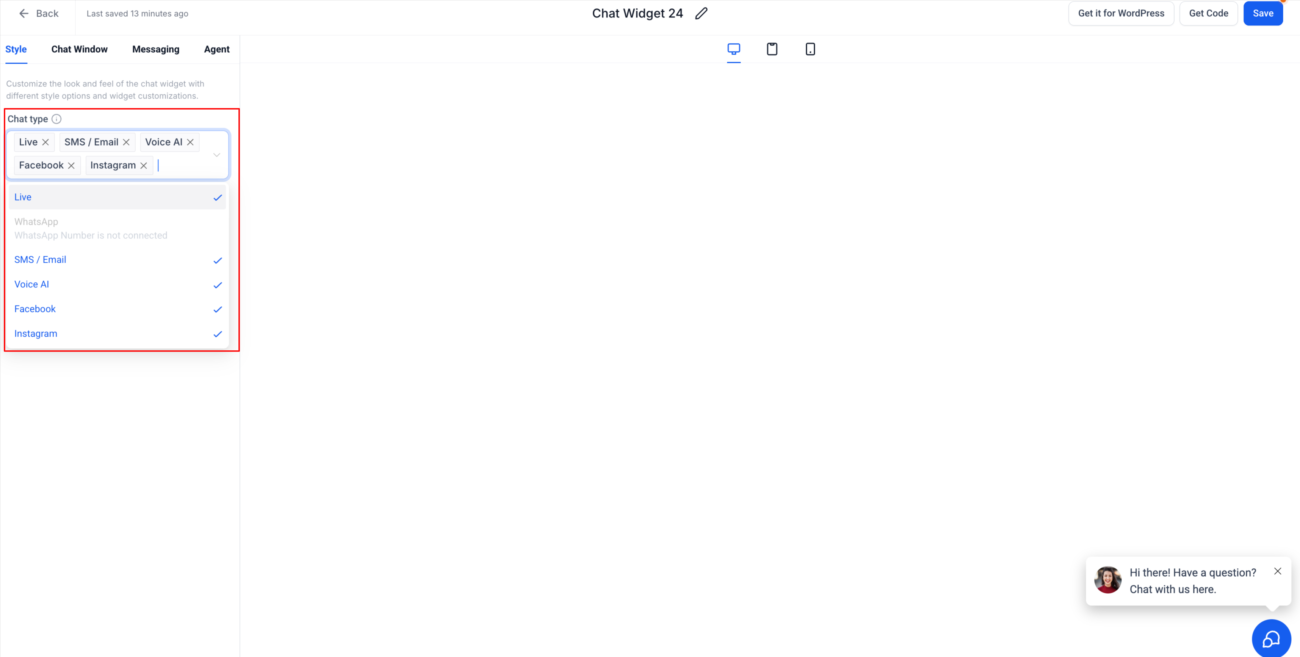
You will now see a dropdown with all available channels:
Check any combination.
For example:
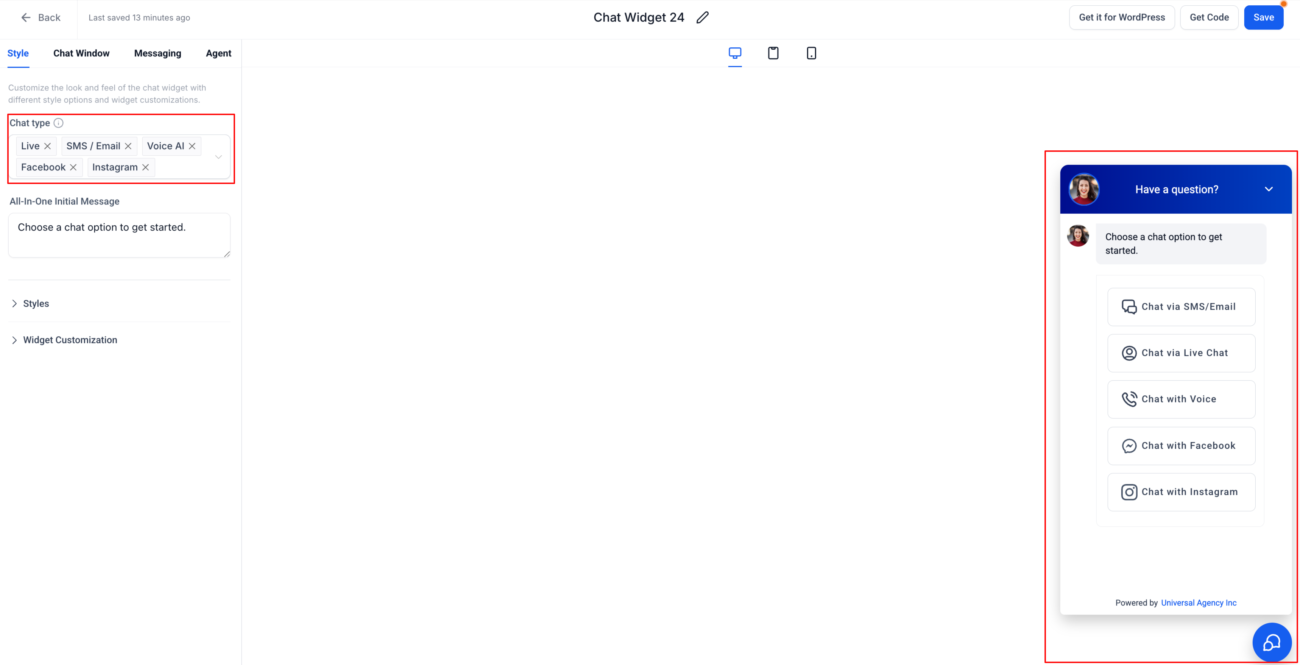
As soon as you select a channel, the widget preview updates in real time.
This helps you design the perfect customer experience before installation.
The new update supports dozens of use cases across multiple industries.
Customers usually DM salon pages on Instagram to ask about prices, timings, and availability.
A salon can now configure its widget to show:
This gives clients immediate access to the channels they already use daily.
Real estate leads often come from Facebook ads.
With this feature, agents can show:
This captures high-intent leads quickly and directs them into GoHighLevel for pipeline management.
Plumbers, electricians, and repair services need fast responses.
They can use:
Voice AI can initiate calls, book appointments, or answer FAQs instantly.
Online stores usually receive messages across many social platforms.
A store can select:
This setup encourages more pre-purchase conversations and boosts sales.
Customers see one widget instead of multiple floating buttons.
All messages come into GoHighLevel’s inbox.
Different customers prefer different channels — now you offer them all.
The widget design remains uniform across channels.
Voice AI enhances workflow with smart automation and conversational handling.
This lets you fully customize the widget based on your business needs.
| Plan Name | Monthly Price | Includes Chat Widget? | Includes Facebook & Instagram? | Includes Voice AI? | Best For |
|---|---|---|---|---|---|
| Starter Plan | $97/mo | ✔ Yes | ✔ Yes | ✖ No | Small businesses starting with automation |
| Pro Plan | $297/mo | ✔ Yes | ✔ Yes | ✔ Yes (limited) | Growing businesses needing multi-channel messaging |
| SaaS Mode Plan | $497/mo | ✔ Yes | ✔ Yes | ✔ Yes (full AI workflows + customization) | Agencies reselling or scaling AI-powered services |
Important notes:
The addition of Facebook, Instagram, and Voice AI to the All-in-One Chat Widget marks a major milestone for GoHighLevel users. Businesses now have the ability to engage customers across all major communication platforms—from social media to SMS to AI-powered voice responses — all inside a single unified widget.
This upgrade simplifies workflows, improves customer satisfaction, and increases lead generation opportunities. By giving customers multiple ways to communicate and centralizing everything inside GoHighLevel, businesses can deliver faster, smarter, and more personalized interactions.
If you want stronger engagement, more conversations, and a future-ready communication system, this update is one you should enable immediately.

If you’ve ever struggled with A2P 10DLC registration, you know how confusing and rejection-prone the process can be. One small

Build Powerful Workflows Just by Speaking Imagine building a complete automation without typing a single word. No clicking through triggers.

Design smarter. Move faster. Stop switching tabs. If you’ve ever designed something in Canva, downloaded it, uploaded it into your

The Smart Way to Re-Engage Leads Without Manual Work Leads don’t always ghost you on purpose. Sometimes they get busy.

AI automation is evolving fast. If you’ve ever wished you could fully control AI tasks inside your CRM without relying

Build Powerful Workflows Just by Speaking Imagine creating an entire workflow without touching your keyboard. No typing. No complicated setup.

Pick a design that fits your brand.

Integrate it seamlessly.

Tailor it to your business needs.

Start generating leads and sales.
No account yet?
Create an AccountWe use cookies to improve your experience on our site. By using our site, you consent to cookies.
Websites store cookies to enhance functionality and personalise your experience. You can manage your preferences, but blocking some cookies may impact site performance and services.
Essential cookies enable basic functions and are necessary for the proper function of the website.
These cookies are needed for adding comments on this website.
Google reCAPTCHA helps protect websites from spam and abuse by verifying user interactions through challenges.
These cookies are used for managing login functionality on this website.
Stripe is a payment processing platform that enables businesses to accept online payments securely and efficiently.
Service URL: stripe.com (opens in a new window)
Statistics cookies collect information anonymously. This information helps us understand how visitors use our website.
Google Analytics is a powerful tool that tracks and analyzes website traffic for informed marketing decisions.
Service URL: policies.google.com (opens in a new window)
Clarity is a web analytics service that tracks and reports website traffic.
Service URL: clarity.microsoft.com (opens in a new window)
SourceBuster is used by WooCommerce for order attribution based on user source.
You can find more information in our Privacy Policy and .




