



Module 01 · Login page designs
A GoHighLevel login page design that makes the first impression for you
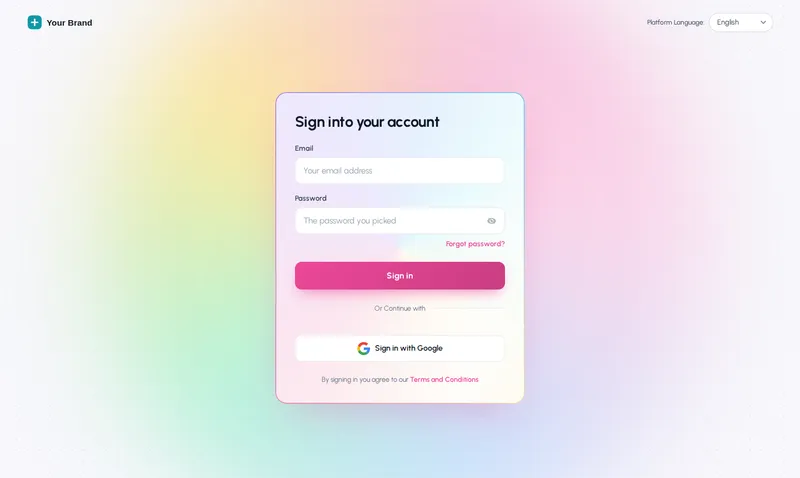
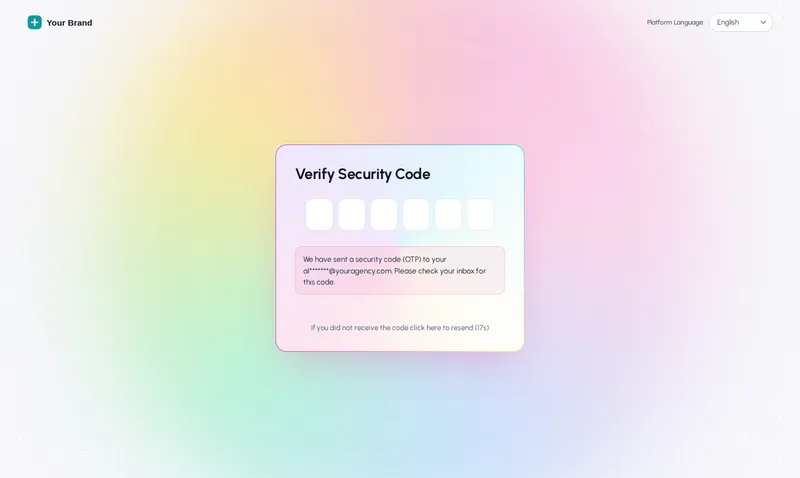
The login page is the first screen every client sees and the last one most agencies style. Pick one of 16 animated designs and it covers sign-in, two-factor and password reset, delivered as a single CSS line.
One-time payment, lifetime accessLogin within minutes, at most 24 hours
 Two-factor
Try it live
All 16 designs on a copy of the real login page
Click a design to see it on a copy of the GoHighLevel login markup, then switch to the two-factor and reset screens. The phone view shows how each one adapts.
Loading the live preview
Holographic The same CSS that ships to GoHighLevel, on a copy of the real login markup. Switch to the two-factor and reset screens, and try the phone view.
The 16 login designs, by name
- Aurora
- Split hero
- Cinematic
- Editorial
- Midnight stars
- Neon grid
- Prism ring
- Gradient mesh
- Ocean waves
- Minimal glow
- Frosted photo
- Photo wall
- Sunrise hills
- Orbit
- Light beams
- Holographic
The first screen your clients see is a plain white form
White-label settings put your logo above GoHighLevel's sign-in box and stop there. The box, the background and the reset screens stay stock, on the one page every client sees every day.
Stock login page
- A white form on a grey page with a logo above it
- Two-factor and reset screens in GoHighLevel’s default look
- Nothing that says which agency the client is signing in to
With a login design
- An animated design in your colours behind the form
- The same design on two-factor and password reset
- Your headline, photo and rotating quotes where there is room
What you control on the login page
16 animated designs
Aurora, Split hero, Cinematic, Editorial, Midnight stars, Neon grid and more, each built for the real GoHighLevel login markup.
Every screen covered
Sign-in, two-factor code and password reset share one design.
Rotating quotes
Photo-panel designs can rotate your quotes or testimonials, one line each.
Logo styles
Plain, on a light chip, on a dark chip or on a card, so it reads on any background.
Built for phones
Layouts adapt on small screens and drop the photo only when there is no room for it.
Your colours and words
The design follows your brand colour; change the headline, button, photo and accent.
The process
From design to live login page
Step 1
Choose a design
Open the Login tab and pick one of the 16 designs. The preview shows it on sign-in, the two-factor screen and password reset.
Step 2
Add your touches
Logo style, headline, rotating quotes, background photo and colours. The preview updates as you type.
Step 3
One CSS import, once
Paste the @import line into Agency Settings > Company > White Label > Custom CSS. Every later change to the login page goes live on its own.
Which package
All login page designs come with Top Starter and every package above it
The login page is part of the look, so every package includes all of the designs.
- Top Starter $217includes this
- Top Pro $517includes this
- Top Elite $1,047includes this
The rest of the customizer
- 01Themes, UI kits and dark mode27 themes, 11 UI kits and dark mode for every screen Top Starter and up
- 02Dashboard designs18 dashboard designs, 6 of them built around a photo Top Pro and up
- 03Sidebar, top bar and menusSidebar, right dock or top bar in 8 styles, 8 mega menu styles Top Starter and up
- 04Popups43 templates in 7 formats, inside GoHighLevel and on websites Top Elite and up
- 05Notifications and social proof94 social proof and widget templates across 32 types Top Elite and up
- 06Pipeline board designs12 opportunities board designs with stage colours by position Top Pro and up
- 07Contact actions barQuick tags and workflow buttons on every contact page Top Pro and up
- 08Floating widgets51 floating contact and chat widget templates Top Elite and up
- 09Calculators134 calculator templates across 14 types Top Elite and up
Can you customise the GoHighLevel login page?
Yes. GoHighLevel does not run custom scripts on the login page, but it does load your Custom CSS there. The customizer delivers each of its 16 login designs as one CSS import, which is how the sign-in screen gets a full design rather than just a logo.
Which screens does the login design cover?
Sign-in, the two-factor code screen and password reset all share the design, so someone resetting a password never drops back to the stock white form. Switch between them in the preview above.
Are the login designs animated?
Yes, each of the 16 designs moves: glows, light beams, stars, orbits, a holographic foil border and more. The animation is gentle and plays behind the form, never over the fields.
Can I use my own photo and quotes?
Designs with a photo panel take your own background image, and can rotate your quotes or testimonials, one line each, with the author underneath.
Does the login design work on phones?
Yes. The designs adapt on small screens, and keep the photo and quotes only where there is room. Try the phone view in the preview.
Do I need a separate install for the login page?
Yes, one extra line: the CSS import in Agency Settings > Company > White Label > Custom CSS. It sits next to the script line from the main install and is pasted once.
Which package includes the login designs?
All of them, in every package. Top Starter ($217 one time) already includes all 16 designs.
Will my clients’ sub-account logins change too?
Everyone who signs in on your white-label domain sees the design, because it is set at agency level on the shared login page.
Finish your GoHighLevel the way you finished the snapshot
One-time payment, lifetime access. Your login is emailed within minutes, at most 24 hours, and you install it with one line of code.