



Module 07 · Pipeline board designs
GoHighLevel pipeline design that shows where deals pile up
On the stock opportunities board, New Lead and Won look the same. Pipeline designs colour each stage by its position, restyle columns and deal cards, and keep dragging exact: 12 board designs, light and dark.
One-time payment, lifetime accessLogin within minutes, at most 24 hours
Try it live
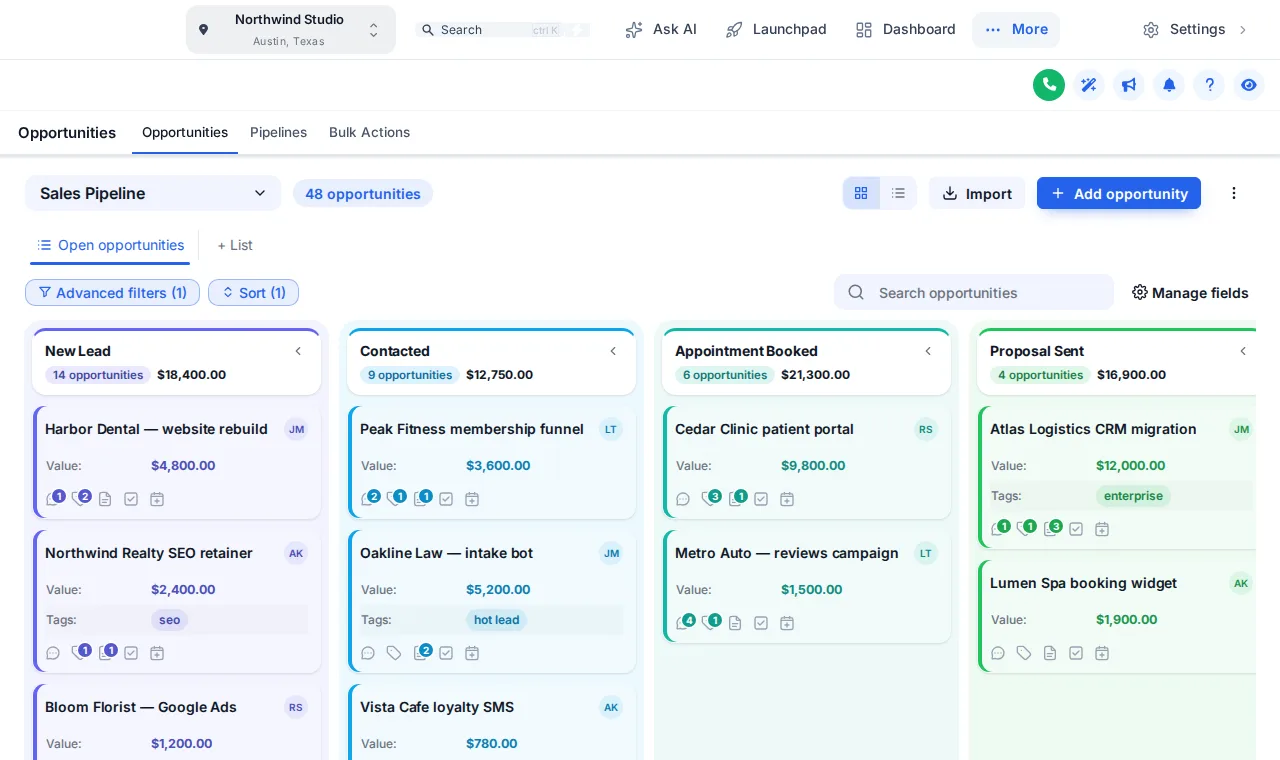
All 12 board designs on a sample pipeline
Click a design and the sample opportunities board restyles itself. Scroll the board sideways to see every stage take its colour from its position, then swap the sidebar theme.
Loading the live preview
Colour Ribbon A copy of the GoHighLevel opportunities board with a sample pipeline. Scroll the board sideways: colours follow each column’s position, not its name.
Every stage looks the same, so every deal does too
A grey board makes it hard to see where deals are stuck. Colour by position and a little structure turn the board into something a sales team can read from across the room.
Stock GoHighLevel
- Grey columns and white cards in every stage
- Values in the same weight as everything else
- A board that looks like every other agency’s
With the customizer
- A colour per stage, in order, in every pipeline
- Deal values in bold, in the stage colour
- One of 12 designs, from Clean Light, Frosted Glass, Midnight Neon to dark boards
What the pipeline designer changes
Stage colours by position
First stage, first colour; they repeat after the last. Works for any pipeline in any sub-account.
Stage columns
Headers as cards, plain, tinted, filled or underlined, with deal counts as text or a badge.
Deal cards
Background, border, radius, shadow and hover, a stage stripe or dot, and three densities.
Dragging still works
Cards never shift on hover, so drag and drop stays exact.
Values that stand out
Deal values in bold and in the stage colour, with your own colours for names and labels.
Toolbar and list view
Pipeline picker, filters, search and buttons restyled, with the list view to match.
In short
Pipeline designs, in facts
- Board designs
- 12: Clean Light, Frosted Glass, Midnight Neon, Neo Brutal, Candy Pastel, Gradient Headers, Compact Pro, Colour Ribbon, Obsidian Gold, Ocean Pro, Emerald Calm, Brand Match
- Colour rule
- By stage position, repeating after the last stage
- Changes data?
- No. Stages, deals and automations are untouched
- Package
- Top Pro and up, from $517 one time
The process
Restyle the board in three steps
Step 1
Pick a board design
Open the Opportunities tab in the theme editor, switch the restyle on and click a template.
Step 2
Set the colours
Keep the template’s stage colours, build them from your brand colour or pick each one yourself.
Step 3
Save
Every sub-account’s board picks up the design on its next page load. No pipeline settings change.
Which package
Pipeline board designs come with Top Pro and every package above it
- Top Starter $217does not include this
- Top Pro $517includes this
- Top Elite $1,047includes this
The rest of the customizer
- 01Login page designs16 animated designs for sign-in, two-factor and password reset Top Starter and up
- 02Themes, UI kits and dark mode27 themes, 11 UI kits and dark mode for every screen Top Starter and up
- 03Dashboard designs18 dashboard designs, 6 of them built around a photo Top Pro and up
- 04Sidebar, top bar and menusSidebar, right dock or top bar in 8 styles, 8 mega menu styles Top Starter and up
- 05Popups43 templates in 7 formats, inside GoHighLevel and on websites Top Elite and up
- 06Notifications and social proof94 social proof and widget templates across 32 types Top Elite and up
- 07Contact actions barQuick tags and workflow buttons on every contact page Top Pro and up
- 08Floating widgets51 floating contact and chat widget templates Top Elite and up
- 09Calculators134 calculator templates across 14 types Top Elite and up
Can you change how the GoHighLevel pipeline looks?
Yes. The pipeline designer restyles the opportunities board: stage columns, column headers, deal cards, values, the toolbar and the list view. There are 12 designs to start from, light and dark.
How are stage colours decided?
By position. The first stage takes the first colour, the second the next, and they repeat after the last. Nothing is tied to stage names, so every pipeline in every sub-account picks up the design, whatever its stages are called.
Does it change my pipeline stages or deals?
No. Stages, deals, values and automations stay exactly as they are in GoHighLevel. The designer only changes how the board looks.
Does dragging deals still work?
Yes. Cards never move on hover, so dragging a deal to another stage is as exact as in stock GoHighLevel.
Will it work with the pipelines in my snapshot?
Yes. Snapshot pipelines import as ordinary GoHighLevel pipelines, so the designer colours them by position like any other. A four-stage and a nine-stage pipeline both get a sensible palette.
Is there a dark board?
Yes. Light boards sit on solid, gradient or mesh backgrounds, and dark boards use light text on dark columns and cards. Try Midnight or Obsidian in the preview.
Which package includes pipeline designs?
Top Pro ($517 one time) and Top Elite.
What about the list view?
The list view of opportunities is restyled to match the board, along with the pipeline picker, filters, search and buttons above it.
Finish your GoHighLevel the way you finished the snapshot
One-time payment, lifetime access. Your login is emailed within minutes, at most 24 hours, and you install it with one line of code.