



Module 04 · Sidebar, top bar and menus
A GHL custom menu in your order, with your names
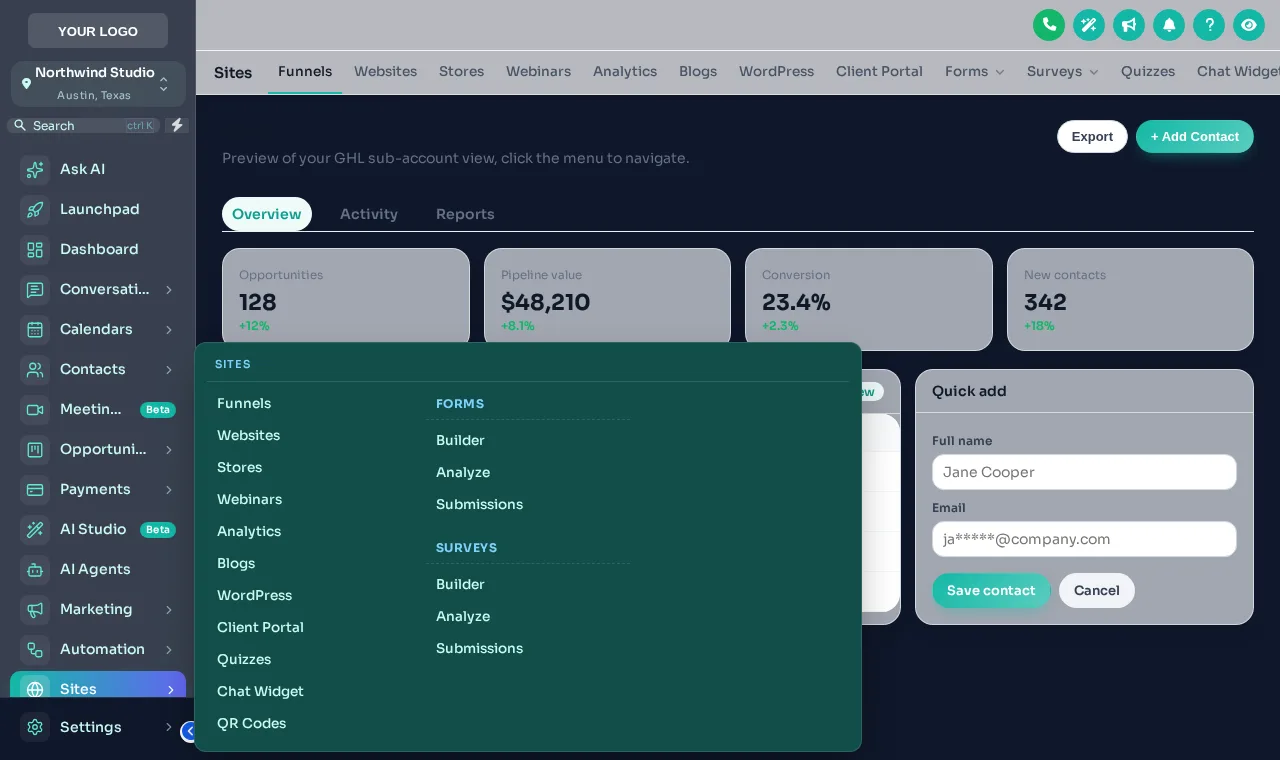
The stock GoHighLevel menu shows every client thirty items in HighLevel's order. A GHL custom menu shows them the five they use, named the way your agency talks, as a sidebar, a right dock or a top bar.
One-time payment, lifetime accessLogin within minutes, at most 24 hours
Thirty menu items, and your client needs five
Every item in the stock menu is a chance for a client to open the wrong thing and email you about it. A menu built around how they work means fewer questions and a product that feels designed for them.
Stock GoHighLevel
- Every client sees every item, in HighLevel’s order
- GoHighLevel’s names, not the ones your onboarding uses
- Sub-pages hidden behind clicks people forget
- No quick route to the three pages used all day
With the customizer
- Only the items a client needs, grouped under your headings
- Your names and icons, matching your training videos
- Mega menus that show every sub-page at once
- A floating quick menu with the daily pages one click away
Try it live
Switch layouts and use the menu inside the preview
Choose a layout, then a top bar style, a sub-menu style and a header. With a mega style chosen, hover Sites inside the frame to open it. 8 mega styles and 8 header styles, all from the editor's own lists.
Loading the live preview
Left sidebar Pick a layout, then use the menu inside the frame. Payments and Sites open their own sub-menus; with a mega style chosen, hover Sites.
Everything the menu module can do
Rename, reorder, hide
Drag items into order, give them your own names and icons, hide what a client does not need and group the rest under headings.
Sidebar, right dock or top bar
Keep the menu on the left, dock it right, or turn it into a top bar in 8 styles.
Mega menus
8 styles for sections with sub-pages: Columns, Split, Cascade, Tiles, Tabs and more.
Floating quick menu
3 layouts and 8 designs. Draggable, and it remembers where it was left.
Your own links
Help docs, booking pages, courses, anything, opening in the app or in a new tab.
Header and start page
8 header styles, hidden header buttons and the page a sub-account opens on after sign-in.
Menus that match the snapshot you installed
- 01
A roofing or HVAC office
Put Opportunities, Calendars and Conversations at the top, rename Opportunities to Jobs, and hide the marketing tools the office never opens.
The roofing snapshot - 02
A mortgage team
A top bar with Pipeline, Contacts and Calendar, plus a custom link to the rate sheet, keeps loan officers focused.
The mortgage snapshot - 03
An agency with training videos
Rename items to match the names used in your onboarding videos, so clients never have to translate between the two.
How our snapshots are delivered - 04
A multi-location business
A floating quick menu with the five daily pages helps staff who switch locations several times a day.
Browse all snapshots
The process
Build the menu in three steps
Step 1
Arrange the menu
Drag items into order, rename them, choose icons, hide what a client does not need and add your own links.
Step 2
Pick a layout
Left sidebar, right dock or a top bar in 8 styles, a header style, and list or mega sub-menus.
Step 3
Save
Agency and sub-account views update on their next page load. Change it again whenever you like.
Which package
Custom menus and layouts come with Top Starter and every package above it
Top Starter includes the layouts, order, names and links. Mega menus and the floating quick menu need Top Pro or Top Elite.
- Top Starter $217includes this
- Top Pro $517includes this
- Top Elite $1,047includes this
The rest of the customizer
- 01Login page designs16 animated designs for sign-in, two-factor and password reset Top Starter and up
- 02Themes, UI kits and dark mode27 themes, 11 UI kits and dark mode for every screen Top Starter and up
- 03Dashboard designs18 dashboard designs, 6 of them built around a photo Top Pro and up
- 04Popups43 templates in 7 formats, inside GoHighLevel and on websites Top Elite and up
- 05Notifications and social proof94 social proof and widget templates across 32 types Top Elite and up
- 06Pipeline board designs12 opportunities board designs with stage colours by position Top Pro and up
- 07Contact actions barQuick tags and workflow buttons on every contact page Top Pro and up
- 08Floating widgets51 floating contact and chat widget templates Top Elite and up
- 09Calculators134 calculator templates across 14 types Top Elite and up
Can you customise the GoHighLevel sidebar menu?
Yes. With the customizer you can drag menu items into a new order, rename them, change their icons, hide items, group them under headings and add your own links, separately for the agency view and the sub-account view.
Can GoHighLevel have a top navigation bar instead of a sidebar?
Yes. The customizer turns the sidebar into a top bar in 8 styles (Solid, Floating, Glass, Brand gradient, Underline, Segmented, Centered, Slim), or docks the sidebar on the right. A merged mode folds the header into the top bar to save height.
What are mega menus?
Sections with sub-pages, such as Payments or Sites, can open as a mega menu instead of a list. There are 8 mega styles, from columns and tiles to tabs and a full-width panel.
What is the floating quick menu?
A small menu that floats over every page with the pages people use most: a bubble with a grid, a dock bar or a side rail, in 8 designs. People can drag it where they like and it remembers the spot.
Which package do I need for menus?
Top Starter covers the layout: sidebar, right dock or top bar, with your order and names. Mega menus and the floating quick menu come with Top Pro ($517) and Top Elite.
Will hiding a menu item stop a client from reaching that page?
Hiding an item tidies the menu; it is not a permission setting. Use GoHighLevel’s own user roles and permissions to control access, and the customizer to control what the menu shows.
Can I add links to my help docs or booking page?
Yes. Custom links can point at your help centre, a booking page, a course or anything else, opening inside the app or in a new tab.
Does the header change too?
Yes. There are 8 header styles, you can hide header buttons you do not want clients to press, and you can choose which page a sub-account opens on after sign-in.
Finish your GoHighLevel the way you finished the snapshot
One-time payment, lifetime access. Your login is emailed within minutes, at most 24 hours, and you install it with one line of code.